
Talon
-
Posts
697 -
Joined
-
Last visited
-
Days Won
30
Content Type
Profiles
Forums
Events
Everything posted by Talon
-
*Official Benchmark Thread* - Post it here or it didn't happen :D
Talon replied to Mr. Fox's topic in Desktop Hardware
@Mr. Fox @electrosoft New Asus BIOS out with "Pure" ME and updated Microcodes to 122. I'm not jumping in just yet, will wait and see any reports. I like the way my rig is running now TBH. https://rog.asus.com/motherboards/rog-maximus/rog-maximus-z890-apex/helpdesk_bios/ -
*Official Benchmark Thread* - Post it here or it didn't happen :D
Talon replied to Mr. Fox's topic in Desktop Hardware
Pretty epic bundle they got there. -
*Official Benchmark Thread* - Post it here or it didn't happen :D
Talon replied to Mr. Fox's topic in Desktop Hardware
Just saw you grabbed that SP98! I honestly debated grabbing it too. But this SP97 is so good already, I have no complaints with it. I'm able to game at 5.8Ghz P and 5.3Ghz E on this beast. @electrosoft 5.85Ghz P passed gaming for the short bit I tested, but got angry in geekbench of all things. This was all with no manual core voltage tuning though, just auto scaling. Percentage wise for gaming, over my SP89, it's about 5% faster in some tests for gaming. Nothing amazing, but what you'd expect from the clock speed bumps. -
*Official Benchmark Thread* - Post it here or it didn't happen :D
Talon replied to Mr. Fox's topic in Desktop Hardware
SP97 with just Noctua AIO. Was around 300w and 70c for a single run. Crazy good silicon. -
*Official Benchmark Thread* - Post it here or it didn't happen :D
Talon replied to Mr. Fox's topic in Desktop Hardware
Highest SP I’ve had with 270K is 89. it’s a solid 89 with balanced P/E cores and it does 5.7Ghz rock solid. It also have excellent thermals and core temp distribution. If this SP97 can’t do 5.7Ghz P I’ll be very disappointed. 5.8ghz would be pretty sick. There are just so many moving parts on Arrow Lake that it makes binning difficult but fun. @Mr. Fox Id love to see what scores your newly delidded 270K can put down in the new Geekbench 7. Get the chiller running and push it! lol. -
*Official Benchmark Thread* - Post it here or it didn't happen :D
Talon replied to Mr. Fox's topic in Desktop Hardware
I did but I'll probably end up regretting it lol. All of the 270K I've used have all been good samples, small differences really and this one might end up being worse than my current chip, hard to say. It looks fairly balanced, maybe I'll get lucky and it's a 5.8Ghz P on stock IHS with AIO but who knows. Maybe it won't scale with voltage like I said. -
*Official Benchmark Thread* - Post it here or it didn't happen :D
Talon replied to Mr. Fox's topic in Desktop Hardware
Saw that too. The IMC has me saying nah lol. Besides my current chip has been flawless at 5.7Ghz P, maybe that chip could do 5.8? Maybe. The thing about SP, is that the number doesn't always tell the full story. Sometimes chips just fail to scale with the voltage headroom they should have left. -
*Official Benchmark Thread* - Post it here or it didn't happen :D
Talon replied to Mr. Fox's topic in Desktop Hardware
Whew!! Good stuff, let me know how it fares for you if you don't mind! I was seeing around 10-13c Hotspot Delta, with a spike to 17-18c in transients but they were rare. -
*Official Benchmark Thread* - Post it here or it didn't happen :D
Talon replied to Mr. Fox's topic in Desktop Hardware
The checkmark is required to make it work, will update that in a new simple guide. Sorry that needs to be added and clarified. -
*Official Benchmark Thread* - Post it here or it didn't happen :D
Talon replied to Mr. Fox's topic in Desktop Hardware
For some reason your HotSpot.dll is only 6kb and mine is 7kb (actual size is 6.5kb). Something might be wrong there. https://drive.google.com/file/d/1tFywxgBq7HzfNxhAV3MqSKXizgKnEhUP/view?usp=drive_link That is a direct copy of my .dll that is working. Try this. -
*Official Benchmark Thread* - Post it here or it didn't happen :D
Talon replied to Mr. Fox's topic in Desktop Hardware
Did you do this to your GPU profile? [Settings] LowLevelMonitoring=0 Otherwise it will fail to launch. Edit: Also to answer your earlier question, just the normal latest Beta 3 MSI Afterburner works with this. I've tested it on both my RTX 5090 D and RTX 5070 Prime systems. Another user on OCN.net reported it working too. Sorry the instructions are just way to complicated and non-sensical. I will go back and have the robot make a clean and simple PDF. Way too much fluff. -
*Official Benchmark Thread* - Post it here or it didn't happen :D
Talon replied to Mr. Fox's topic in Desktop Hardware
Hmmm. The .dll isn't even shown? Let me go back and look at what the robot typed in the guide. -
*Official Benchmark Thread* - Post it here or it didn't happen :D
Talon replied to Mr. Fox's topic in Desktop Hardware
Did you import the sensor? Under monitoring tab, go to "Active Hardware Monitoring Graphs" -- the ... at the right of that. Checkmark on the BlackwellHotspot.dll and hit Ok then Apply. You will then have both GPU 1 Hotspot Temperature and GPU 1 Hotspot Delta at the bottom of the monitoring tab. Might need to restart Afterburner to get to populate after you enable the .dll Apologies for not being more clear. I'll update the guide. Also this is how the RTCore.cfg file should look.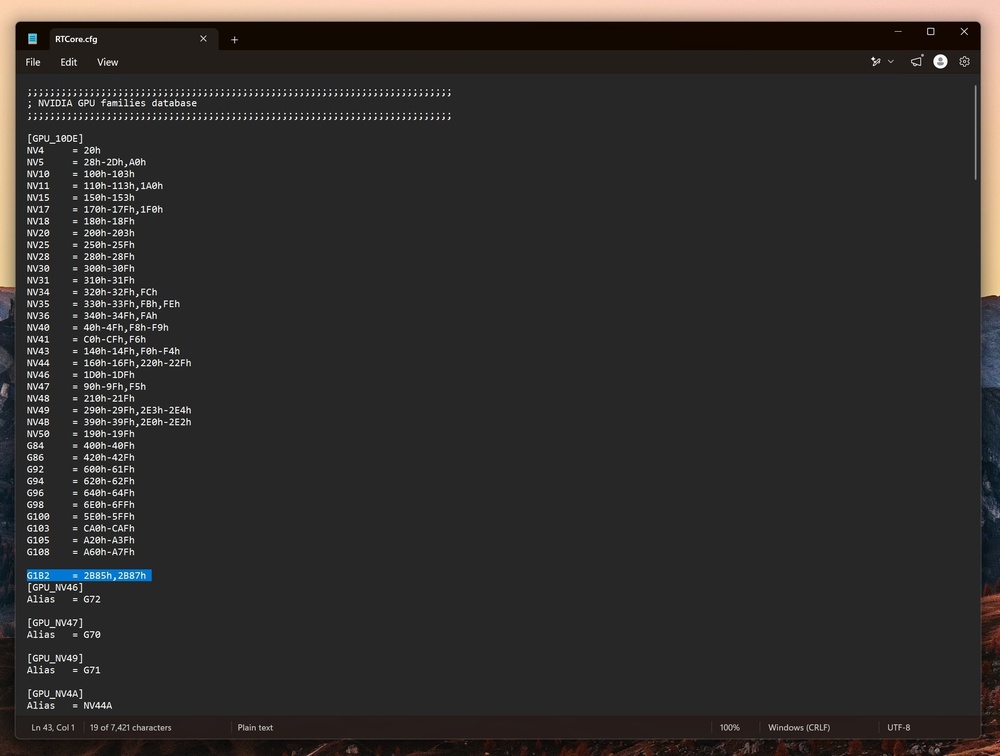
-
*Official Benchmark Thread* - Post it here or it didn't happen :D
Talon replied to Mr. Fox's topic in Desktop Hardware
BlackwellHotspot_v1.2.dll.txt Use this new version of the .dll I've added Hotspot Delta which is the delta between the coldest and hottest sensor. So now you'll get not only the hottest hotspot, but the delta between the 6 sensors. Edit: Make sure to download it as all files, and save it as BlackwellHotspot.dll -
*Official Benchmark Thread* - Post it here or it didn't happen :D
Talon replied to Mr. Fox's topic in Desktop Hardware
Morning project done, did this with ChatGPT in a couple of hours. Remove the .txt from the hotspot.dll @Mr. Fox @Papusan @electrosoft BlackwellHotspot.dll.txtBlackwellHotspot_MSI_Afterburner_Guide_v3_1.pdf -
*Official Benchmark Thread* - Post it here or it didn't happen :D
Talon replied to Mr. Fox's topic in Desktop Hardware
And they say AI and LLM are useless. I used my robot and got this added in less than 30 minutes. -
*Official Benchmark Thread* - Post it here or it didn't happen :D
Talon replied to Mr. Fox's topic in Desktop Hardware
Wow, nice result! That seems to be a very cherry 270K+ LOL. I might need to borrow your .cmo file lol. -
*Official Benchmark Thread* - Post it here or it didn't happen :D
Talon replied to Mr. Fox's topic in Desktop Hardware
I think I'm pretty similar. I'll have to check when I'm home again. I still run 8667 CL38 on my 270K. -
*Official Benchmark Thread* - Post it here or it didn't happen :D
Talon replied to Mr. Fox's topic in Desktop Hardware
That's more like it! Once you lop it's head off, I think you'll be able to break 50K which is wild. I saw someone post a 270K+ with 52K CB23 over at OCN today. Nova Lake is going to go hard with it being Intel's second gen dielet approach. They've learned quite a bit about it after the Arrow Lake fumble. Intel engineer said yesterday on Reddit that the E cores are reportedly as fast as RPL/ARL P cores. -
*Official Benchmark Thread* - Post it here or it didn't happen :D
Talon replied to Mr. Fox's topic in Desktop Hardware
Im on the latest version, but I’ve heard people say it has internal limiters or something and you can’t downgrade. Something does seem to be limiting you. I know you could probably score higher by undervolting (very small undervolt with offsets) on P/E cores but it might introduce instability long term. When I get home I’ll check my score tomorrow. On the road till then unfortunately. -
*Official Benchmark Thread* - Post it here or it didn't happen :D
Talon replied to Mr. Fox's topic in Desktop Hardware
My guess is power limit unlimited? Try E cores at 5.0. -
*Official Benchmark Thread* - Post it here or it didn't happen :D
Talon replied to Mr. Fox's topic in Desktop Hardware
Tbh at said, I ran upwards of almost 1.6v auto into my DLVR on a 285K for 6 months without issue lol. -
*Official Benchmark Thread* - Post it here or it didn't happen :D
Talon replied to Mr. Fox's topic in Desktop Hardware
Actual VRM Core Input Voltage 1.385V Manual Mode - CPU Core Voltage Override otherwise DLVR voltage is like 1.58v at those clocks and is wasted heat. -
*Official Benchmark Thread* - Post it here or it didn't happen :D
Talon replied to Mr. Fox's topic in Desktop Hardware
What is your DLVR input voltage? Or are you bypassing that entirely? with those clocks you should be above 47-48K. Try using 1.4v input. -
*Official Benchmark Thread* - Post it here or it didn't happen :D
Talon replied to Mr. Fox's topic in Desktop Hardware
I’ve seen some doing 5.9ghz on direct die. Seems to unleash the chips a bit.