Hiew
-
Posts
128 -
Joined
-
Last visited
-
Days Won
5
2 Followers


Hiew's Achievements






-
*Official Benchmark Thread* - Post it here or it didn't happen :D
Hiew replied to Mr. Fox's topic in Desktop Hardware
Posts like this make my day. I was never part of the NBR crowd myself, but when Reciever asked me to help NBR find a new home, I was happy to jump in. I’m honored you guys have kept NBT as your home all these years. Thanks for the kind words! -
Maintenance complete. Let me know if anything needs some extra care 🙂
-
- 7
-

-

-
- maintenance
- forum maintenance
- (and 1 more)
-
The hosting provider has stated that it was a rare occurrence and will not happen again. That remains to be seen. Up until this point I haven't noticed any downtime at all, and they claim a 100% uptime SLA. Any amount of downtime is unacceptable for me, therefore if this happens again we're going to have to jump ship.
- 1 reply
-
- 8
-
-
My firm recently purchased two GE76 12UGS-033CA adding to their apparent love of MSI laptops. Our current inventory of MSI Raiders: 1x GE75 Raider 10SFS 3x GE76 Raider 11UG 2x GP66 Raider 11UH 2x GE76 Raider 12UGS Now while this isn't my first choice for an office setting with the main workload being CAD/renders, our team seems to like them. I haven't had any time to mess around with these yet, but some of them will be due for a maintenance appointment with me.
-
Posting Images to the forum - Feedback Thread!
Hiew replied to Reciever's topic in Internal Announcement Discussion
I'm at a loss here since I don't seem to understand and want to fix the issue for you. The small images do not appear bigger to me and do not scale up. They're the same pixel density and dimensions as the copy I have on my computer. I have two monitors: one 1440p and one 1080p scaling is at 100%. Please try changing your windows scaling to 100% as this may resolve the odd behaviour you're seeing? I figure its either that or the maximum displayed image inline which is 1000x750. If you click on the image it will show the full size if it fits on your screen, then click on it again and it will display without scaling down.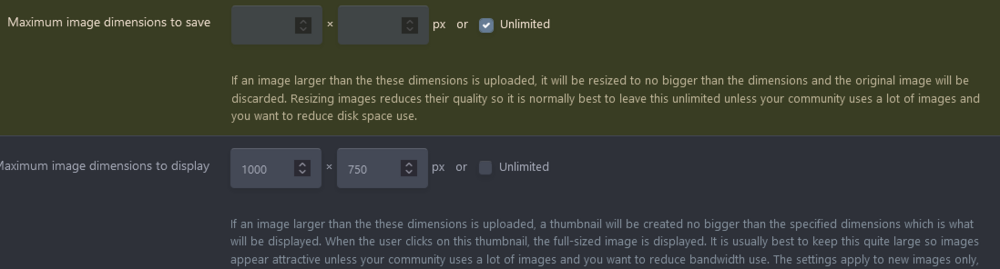

-
Posting Images to the forum - Feedback Thread!
Hiew replied to Reciever's topic in Internal Announcement Discussion
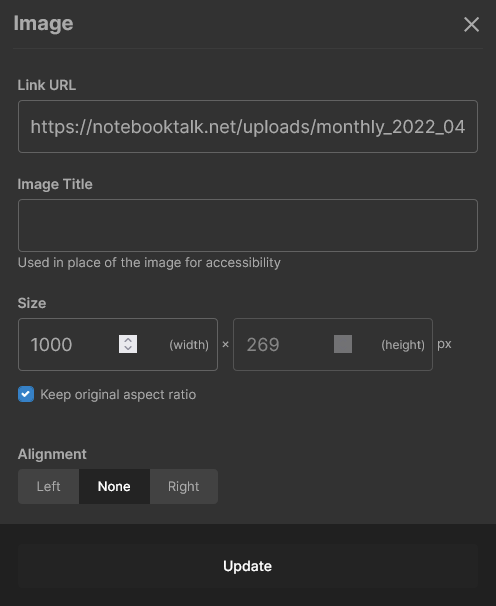
Interesting, that's some odd behaviour to me. As far as I can tell, the forum software will only change the size of large images. When composing your posts, you may double-click on the image to resize it. Tree picture below is 4928 x 3264 2.8 mb I can take the same uploaded photo and resize it in post

-
Posting Images to the forum - Feedback Thread!
Hiew replied to Reciever's topic in Internal Announcement Discussion
They're actually legible now with minor compression artifacts when you zoom in. I can remove compression all-together, but that can generally speaking be a poor decision for web content. I'm looking at adding a module that would allow a media gallery and downloads as well. Still not sure about those yet. -
introduction Image quality and member storage limits
Hiew posted a topic in Internal News / Announcements
I hear image quality settings have been quite a pain for many when uploaded, this was due to large dimension images being resized to 1200 x 1200 while keeping the same image dimension ratios. This primarily affected full desktop screenshots with text being blurry, unreadable, and quite frankly disgusting...which is not acceptable for something I admin! 😉 To remedy this, I've changed the image dimensions to unlimited as a trial period for all members while I monitor the impact on the server. I don't expect this to be much of an issue at our current size, however high quality image files may need to be limited in the future. Maybe something like 16:9 ratio (1920x1080) instead of 1:1 as before. All members have a storage limit of 50mb total for the time being, I'm working on setting up donations to allow for much larger storage limits amongst other things. I've also removed the "maximum storage per submission" setting which previously constrained users to something like 5mb per post. Please feel free to create a topic under https://notebooktalk.net/forum/114-internal-announcement-discussion/ if needed! -
introduction NotebookTalk.net transfer & other things
Hiew replied to Hiew's topic in Internal News / Announcements
The transfer from efgxt.net to NotebookTalk.net has concluded. ALL links and bookmarks that previously had efgxt.net will correctly redirect to notebooktalk.net. If there are any issues please let one of the admins know. -
introduction NotebookTalk.net transfer & other things
Hiew replied to Hiew's topic in Internal News / Announcements
NotebookTalk.net finally resolves to the new server. I'm going to lock the forums tomorrow at around 18:00 MDT. I'll give a notice 1 hour prior. -
Everyone, its time to decide our brand!
Hiew replied to Reciever's topic in Internal Announcement Discussion
The ball is rolling now, there was a problem preventing the DNS to propagate to the new server. -
As I'm sure many of you have noticed notebooktalk.net wasn't directed to the new server. I'm currently working on this and should be resolved as soon as the new server gets propagated. With this in mind I'll have to shut down the forum (efgxt.net), transfer the database to the new server, enable notebooktalk.net as the new main domain, and redirect efgxt.net to notebooktalk.net. I'm planning on doing this once DNS is fully propagated (usually 24-72 hrs from this post) and I will give a 12-24 hour announcement on efgxt.net before this happens. This will most likely going to go through on Saturday the 26th after 8 MDT. This also leads me to say sorry about the lack of communication on my part, though@Recieverhas been filling in some of the gaps. I've been quite busy with work, I've taken on a new role with a ton on my plate. I've finally caught up with work and will be making more changes and improvements once the website is fully transitioned to the new domain.
-
Everyone, its time to decide our brand!
Hiew replied to Reciever's topic in Internal Announcement Discussion
https://www.whatsmydns.net/#NS/notebooktalk.net For some reason they're propagating at a snails pace. It's been a good four days now. -
Yeah this is definitely not intended behaviour and is extremely annoying. I'll have some time tomorrow to go over these issues and will follow up! edit: This may also be due to the cache needing to be rebuilt for older posts.
-
I can't get over the myriad of problems and regressions I've noticed and @Aaron44126 outlined in the OP. The first Thing I had to do was install ElevenClock