JadeRover
-
Posts
183 -
Joined
-
Last visited
-
Days Won
2
Content Type
Profiles
Forums
Events
Everything posted by JadeRover
-
Yes that's what I understood, to do this you had someone do it ? Because I looked into doing this myself for my zbook 17 g5 but having a good 4K120Hz signal requires some individually shielded cables that are like 0.3mm wide cable + conductive shield. It would be extremely complicated to do by hand. I lack the skill. Unless you solder unshielded cables but then the signal integrity won't be as good. Id' imagine
-
Hello, probably a bit old now, but how did you route the eDP cable to the display ? I saw that the display you used has it's connector on the right looking from the back, where as zbook 17 g5/g6 4K displays have the cable on the left looking friom the back. Wasn't the original cable too short ? Did you have to make a custom one to extend all the way to the new 4K display connector ? Thanks.
-

HP Elitebook 8570W - is it still good ? Hardware modifications
JadeRover replied to GuitarG's topic in Custom Builds
And yes I get your idea, since the motherboard outputs eDP signals (4 lanes of eDP) but it terminates in an unusable connector. The only solution is to DIY / get made a custom cable that connects to the eDP connector on the motherboard and then directly to the eDP display, bypassing the DC board that would create an unusable signal. 4 lanes of eDP is on part with modern laptops, you can connect 4K dislays or 1080p >120Hz displays as well. Worth looking into as the only custom part needed is a custom eDP cable, the LCD can be an off the shelf 40 pin eDP display. -
HP Elitebook 8570W - is it still good ? Hardware modifications
JadeRover replied to GuitarG's topic in Custom Builds
Yes, dell m6600 and dell m6700 DC models have that DC conveter board that transforms the incoming eDP to 50 pin LVDS + 10 pin power cable used by the DC LCD. The HP zbook 17 g1, g2 and 15 g1 that have the DC screen option also use such converter boards. Keep in mind that for all the models stated the converter board looks something like this : So if you get the DC cables for your model you see that it connects to your board in a non standard eDP format = can't use that cable to connect to a standard eDP panel conenctor. Also the zbook 17 g1 and g2 all have this converted board as they all have LVDS displays and the motherboard outputs eDP. Not sure why HP chose this approach, probably because eDP lcds were rare in 2013-2014. so zbook 17 g1/g2 with 900p to 1080p screes have this board if you want a sure way to get your hands on one. -
Dreamcolor Display from HP ZBook 17 G2 into 8760w?
JadeRover replied to loopster's topic in Components & Upgrades
That's odd, so the laptop refuses to boot in your scenario ? But it does in the same scenario + VGA ? You are running dGPU mode or Hybrid graphics ? -
Dreamcolor Display from HP ZBook 17 G2 into 8760w?
JadeRover replied to loopster's topic in Components & Upgrades
That is the correct, Zbook 17 g1 uses a mux switch between dGPU and iGPU that goes to the eDP connector on the motherboard. Then that eDP signal is converted to LVDS and fed to the panel, they probably did this as 17.3 inch eDP panels were rare in 2013, they used off the shelf LVDS ones instead. HOWEVER, iGPU has only 2 lanes of eDP (you can see that on the schematic) and the dGPU has the full 4. When you have a DC screen it needs 4 lanes of eDP, all other stock screens require only 2. So with a stock screen BIOS will give you option for Hybrid graphics enable/disable. When DC screen is plugged in, BIOS sees this and immediately disables hybrid graphic option and forces display through dGPU = no display if you don't have a dGPU installer or the dGPU you installed has no eDP OR it has DP (display port) but wit no backligh control pins = Black screen. HP RTX3000 does have eDP on the correct port, DP_D so this card should work on the zbook 17 g1. I will test this soon as I have HP RTX3000 andzbook 17 g2. Also here is an even cheaper RTX3000 (close to France in Europe) : Nvidia Quadro RTX3000 6 Go GDDR6 N19E-Q1-KD-A1 (HP ZBOOK 17 G6) | eBay 90 euros -
Nice !! Looks complicated to get all that wiring down. I was thinking of doing smething similar on my soon to be zbook 17 g1. However I was going to use an arduino connected internally to one of the not in use USB ports for the fingerprint reader. That way I can code a PC to arduino interfacing app that can cantrol the fan speeds internally from the laptop without having to use external switches. This does reqire coding skill tho and I lack some of that.
- 7 replies
-
- 1
-

-
- 8740w overclock
- 8740w cooling
- (and 1 more)
-
Dreamcolor Display from HP ZBook 17 G2 into 8760w?
JadeRover replied to loopster's topic in Components & Upgrades
Uhhh, that not an acual picture right ? We were talking about the pinout of the MXM connector that links up the GPUs display outputs on 4 different channels : A, B, C and D Usually eDP from the GPU is located on channel D called DP_D But for it to work the laptop must wire the eDP port to DP_D of the GPU ! The confusion is that some zbooks : Zbook 15 g1 + g2 + g3 and zbook 17 g3 have it wired to DP_C meaning no output on the internal screen -
Dreamcolor Display from HP ZBook 17 G2 into 8760w?
JadeRover replied to loopster's topic in Components & Upgrades
I will soon get a G1/G2 not sure, blindly bought it for 40 euros, seller had no info at all. On g1 schematic it has eDP on DP_D One day when I have time I while write a complete guide on zbook 15/17 that have MXM slot (g1 -> g6) -
Dreamcolor Display from HP ZBook 17 G2 into 8760w?
JadeRover replied to loopster's topic in Components & Upgrades
Actually the pinout of 8760w motherboard eDP connector is not compatible with zbook eDP Motherboard connector. 8760w has eDP and LVDS on the same connector wheras Zbook had only eDP on the connector. pluggin zbook display cable on 8760w will short out LVDS and cause no boot at best and motherboard damage at worst. Therefore you can only salvage the display from the Zbook 17 g2. You will need to source the DreamColor cables + board made specifically for the 8760w. -
Dreamcolor Display from HP ZBook 17 G2 into 8760w?
JadeRover replied to loopster's topic in Components & Upgrades
The display is the same : LP173WF3-SLB3 also same as the ones ending in SBL1/SBL2/SBL4. They use an eDP cable going to a converter that converts the 40 pin eDP int 50 pin LVDS that then breaks out into 2 cables that plug into the display. Motherboard eDP connector -> (eDP cable) -> eDP to LVDS converter board -> (2x lcd cables) -> LCD 50 + 10 pin LVDS input What is sure to work is get a non working dreamcolor motherboard cable + board + LCD cable from 8760w and use the lcd you salvaged from the zbook. -
Dell Precision M6700 RTX Ampère and Ada Lovelace issues
JadeRover replied to SuperMG's topic in Custom Builds
The issue sounds like thermal constraints since power fluctuates, if it was a steady 100w on the m6700 you would now that you are power limited by the MXM slot. I'm guessing CPU is around 20-40% utilization so that isn't a bottleneck, same for PCIe speeds, both should be at 16x3.0 -
Dell Precision M6700 RTX Ampère and Ada Lovelace issues
JadeRover replied to SuperMG's topic in Custom Builds
You can replace it for cheap with a regular cr2032 battery and some tape, see here : -
Dell Precision M6700 RTX Ampère and Ada Lovelace issues
JadeRover replied to SuperMG's topic in Custom Builds
I don't think this is the case here. The laptop turns on and doesn't post unless a certain configuration is used. The laptop fails to detect/work with the video card and doesn't turn on because of that, this isn't a power related problem, more of a vbios / UEFI / Bios setting that comes into play. -
When you list DVD, you mean external right ?
-
[6820hq Skylake] Precision 7720 extreme mods
JadeRover replied to JadeRover's topic in Components & Upgrades
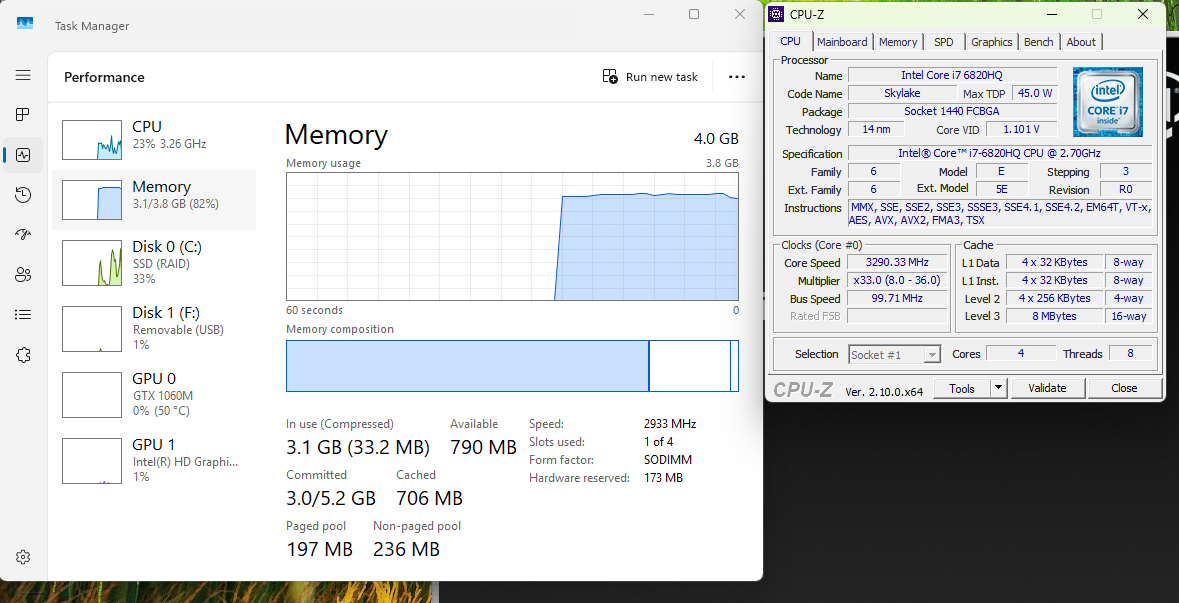
I got one stick of 4G 3200Mhz to run at 2933Mhz. I tested it and it is stable, after changing max ram frequency variable to 2933Mhz thanks to SREP_UMAF USB, the laptop refuses to boot once, then it boots okay (happens for each max ram frequency edit I think). Just to be safe, I added +35mv to system agent (integrated memory controller) in throttle stop. From SREP, in pre boot environment, it is also possible to add some voltage to uncore (same as system agent, it will add voltage to the integrated memory controller = more stability). I placed my stick in one of the easy access slots behind the access hatch, unfortunately, as of right now I only have one stick of >2666Mhz DDR4. I will try to make some XMP profiles for my 2666Mhz sticks so they can run at 2933Mhz or so.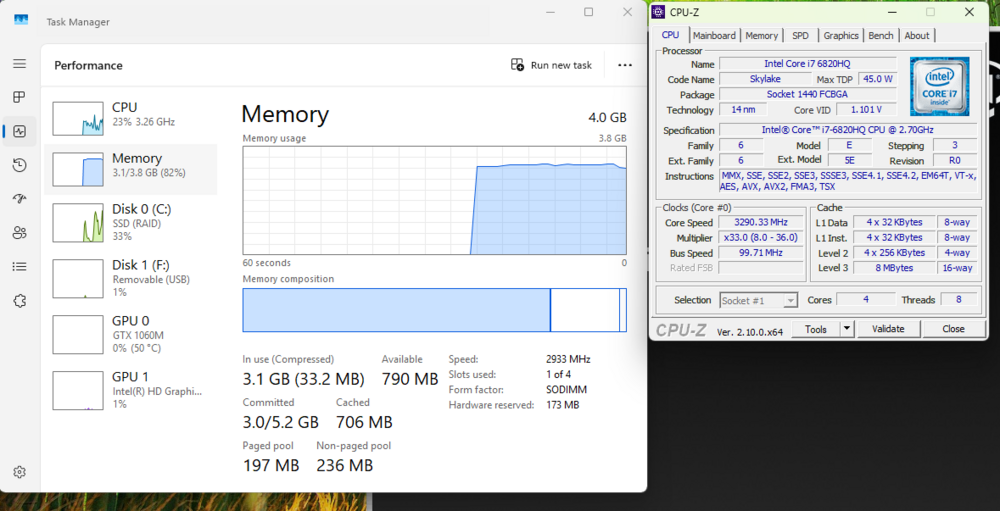
- 6 replies
-
- 1
-

-
- precision 7720
- precision 7710
- (and 1 more)
-
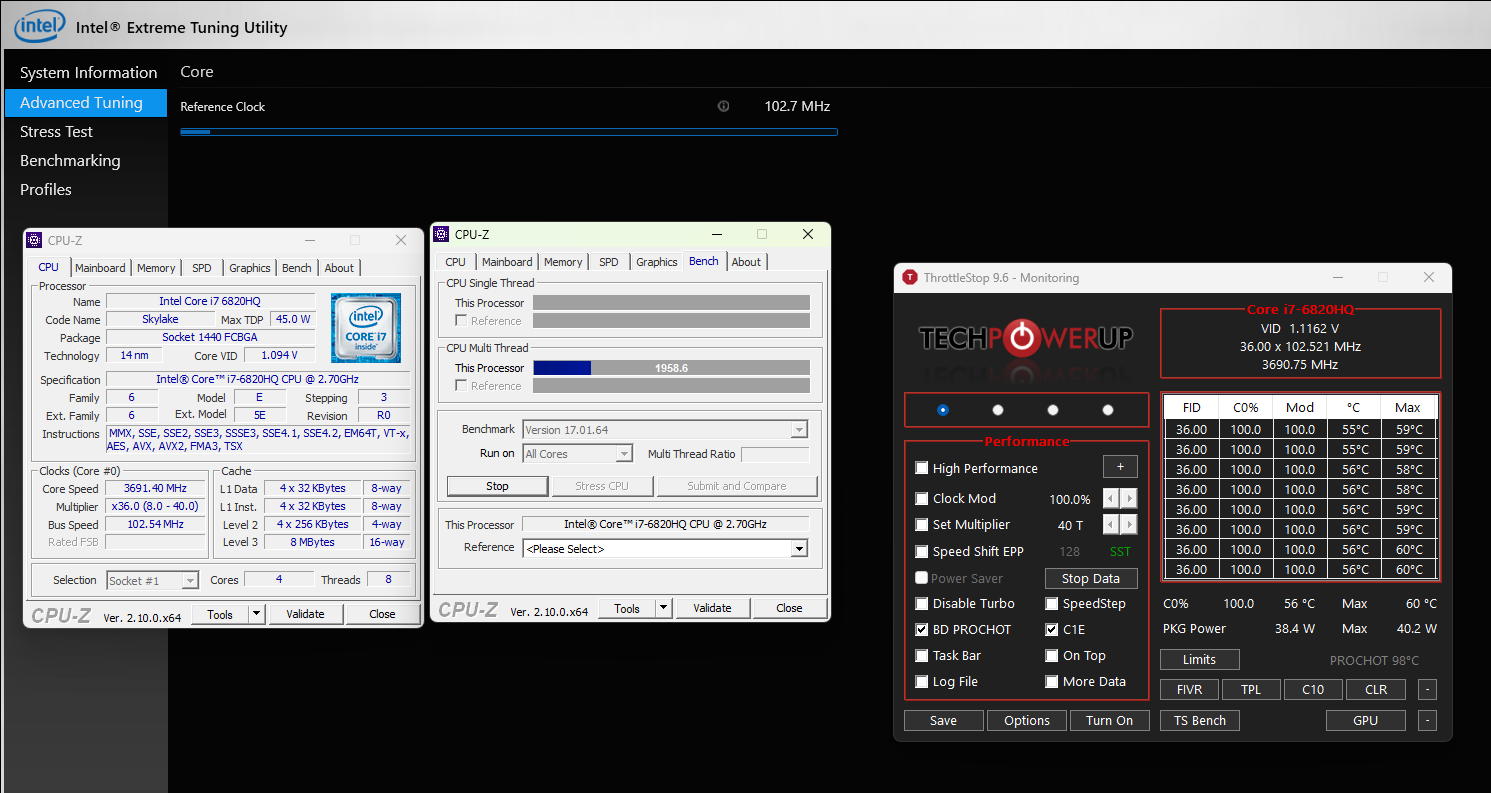
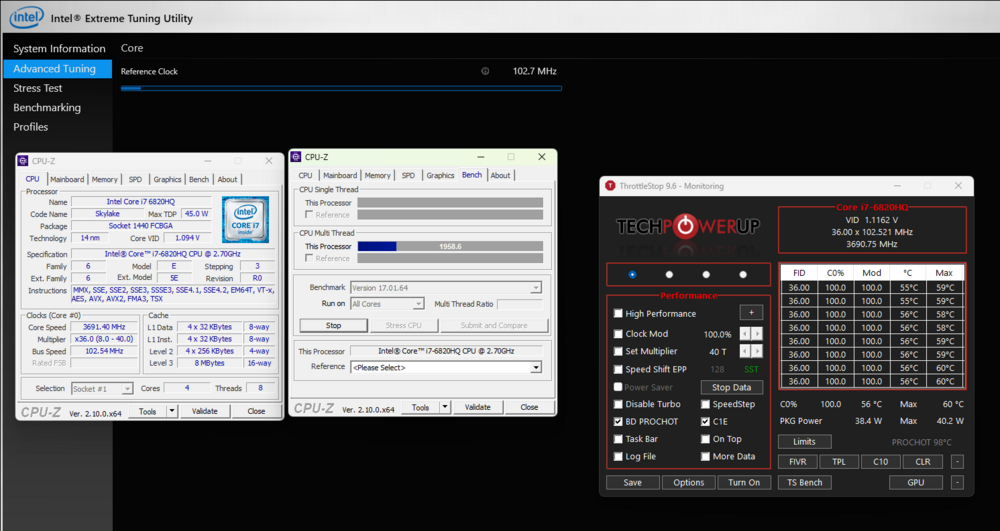
Hi guys, I have some free time on my hands and I just wanted to share some of the mods I'm going to do to my precision 7720. I will write a complete guide once I am satisfied on the overall mods. Currently I have a i7-6820HQ motherboard that I will soon replace with a i7-7920HQ motherboard. In the meantime, I have flashed a modified v1.15 bios (enables undervolting) using the dell bios container method here, using version v1.40 as a base : GitHub - vuquangtrong/Dell-PFS-BIOS-Assembler: A script to combine BIOS entries into executable Dell Firmware Update Utilities I also used this smokeless_UMAF beta tool on a USB found here : Smokeless_UMAF/UMAF_BETA.zip at main · DavidS95/Smokeless_UMAF · GitHub to enable some hidden options in the BIOS : we have access to : - CPU overclocking (up to the limits of your cpu, my 6820hq went from 3.2 Ghz all core -> 3.6Ghz all core) - RAM overclocking - RAM SPD writing (= we can write custom XMP profiles to non XMP ram) - Intel ME region flash allowed (= we can flash custom ME region with overclocking BCLK profile) Here is my 6820hq running with a 102.7 ish MHz BCLK, going over this results in an instant crash due to intel limitation = need to investigate : Resulting in a ~100Mhz boost compare to non OC BCLK. 3.600Ghz -> 3.690Ghz More to come !
- 6 replies
-
- 2
-

-
- precision 7720
- precision 7710
- (and 1 more)
-
Dell Precision 7720 Refurbishment/Upgrade Project
JadeRover replied to Will's topic in Custom Builds
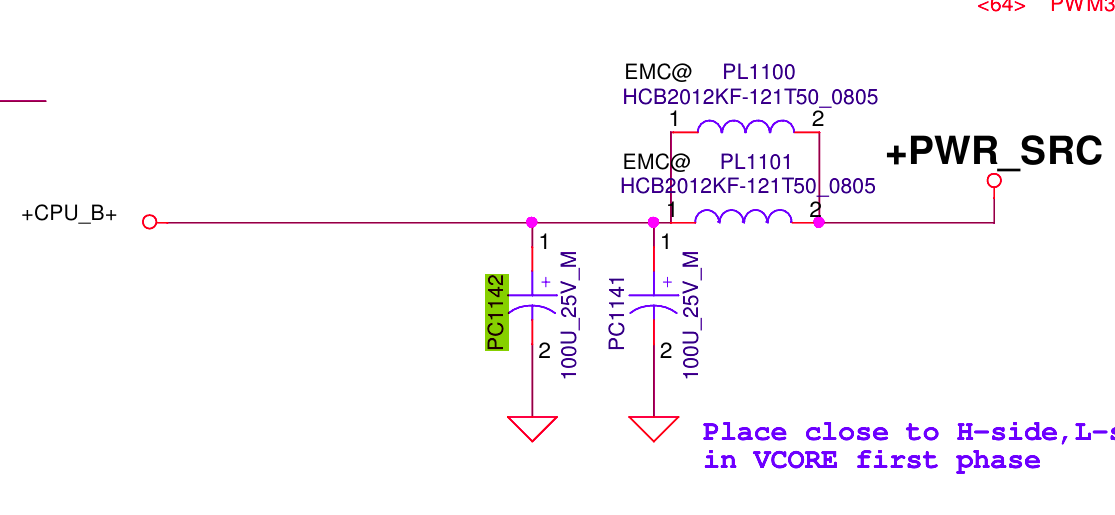
@Will, it indeed appears that you are missing a capacitor (compairing to pictures on the internet). I wouldn't worry about it too much, it's just a decoupling capacitor that is there to make sure that the voltage drop that appears on the VRM input when the cpu suddenly turbos (= current spike), isn't too important. You still have another capacitor in // to the one you are missing : see the schematic : If you want to replace it, you'd want to get a "100 micro Farads 25v SMD capacitor". I recommend salvaging one from a dead/spare motherboard, from another laptop, not worth it to buy a new one just for that. Make sure it is 25v and you will be fine, these are quite big and are can be desoldered without problems, just make sure to not touch the dome with you soldering irong, just desolder at the legs.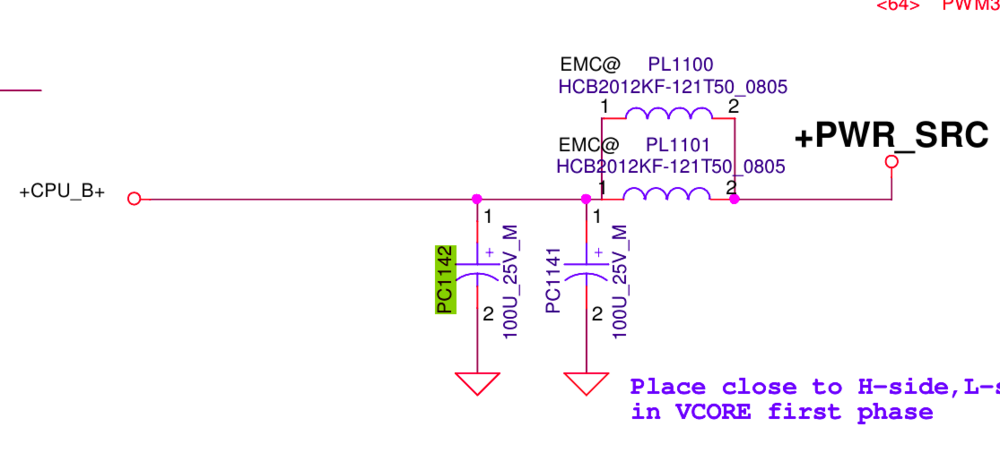
-
Dell Precision 7720 Refurbishment/Upgrade Project
JadeRover replied to Will's topic in Custom Builds
@Annihilator You can try this tool to edit memory profiles from the hidden bios "memory overclocking", you can select 2 XMP profile or even create a custom profile from the menu directly. GitHub - DavidS95/Smokeless_UMAF It should work as in this discussion, this user said it worked on his i5-8300H latitude 5591 Any way this could work on Intel-based models? · DavidS95/Smokeless_UMAF · Discussion #6 · GitHub And I checked, precision 7720 and Latitude 5591 share the exact same hidden memory overclocking menu (looking at the IFR of both laptop's bios dumps). I think what should work best (and for a lesser cost) is buying standard 3200Mhz ram (nothing fancy) and then uses this hidden menu to push the integrated memory controller of the CPU to it's limits by creating custom memory profile @ 2933Mhz and even 3200Mhz if it's possible. more info here, as this tool was used for preecision 7780 -> I'll try myself in a few days when I have access to my 7720 -
Dell Precision 7720 Refurbishment/Upgrade Project
JadeRover replied to Will's topic in Custom Builds
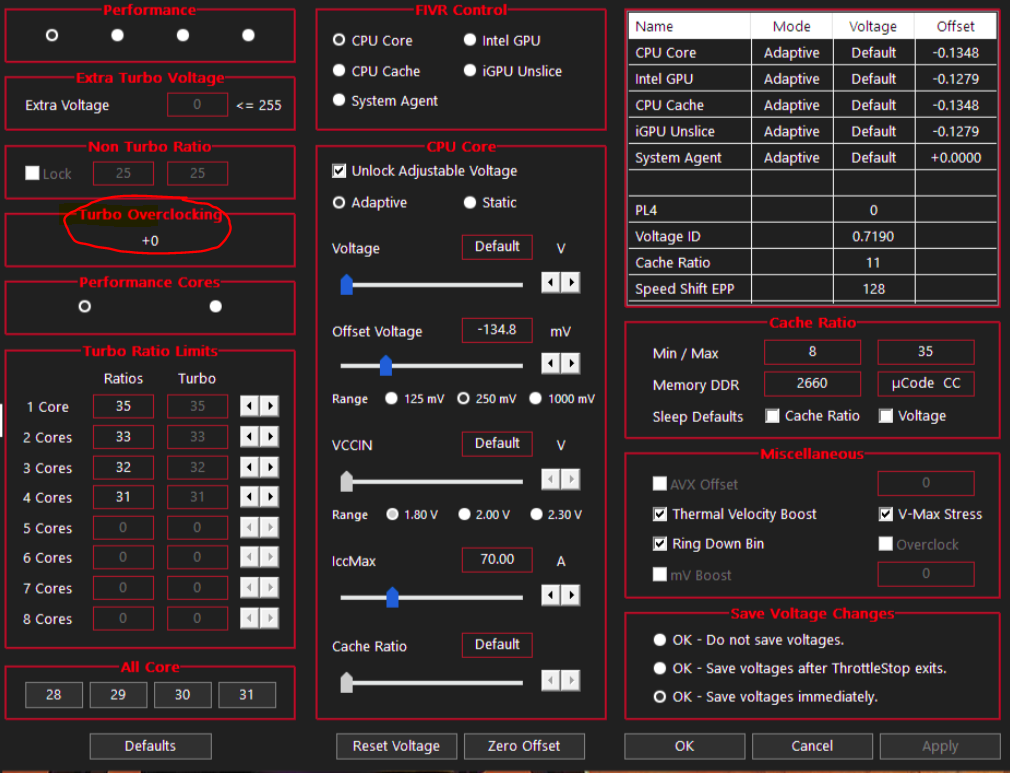
@Will Hello, I've been following your 7720 adventure and I think I will soon start mine, upgrading to a 7920HQ motherboard. Do you have the turbo bins overclock number for the xeon CPU you have ? It can be found here in throttlestop -> FIVR windows I would like to know what the value is for your xeon CPU. I know for a fact that the 7920HQ allows up to +6 turbo bins meaning max 1 core speed of 4.1Ghz -> 4.7Ghz possible. This is quite rare, usually i7s have +4 bins, and for XEONS cpus data is basically unavailable. Thanks ! have a good one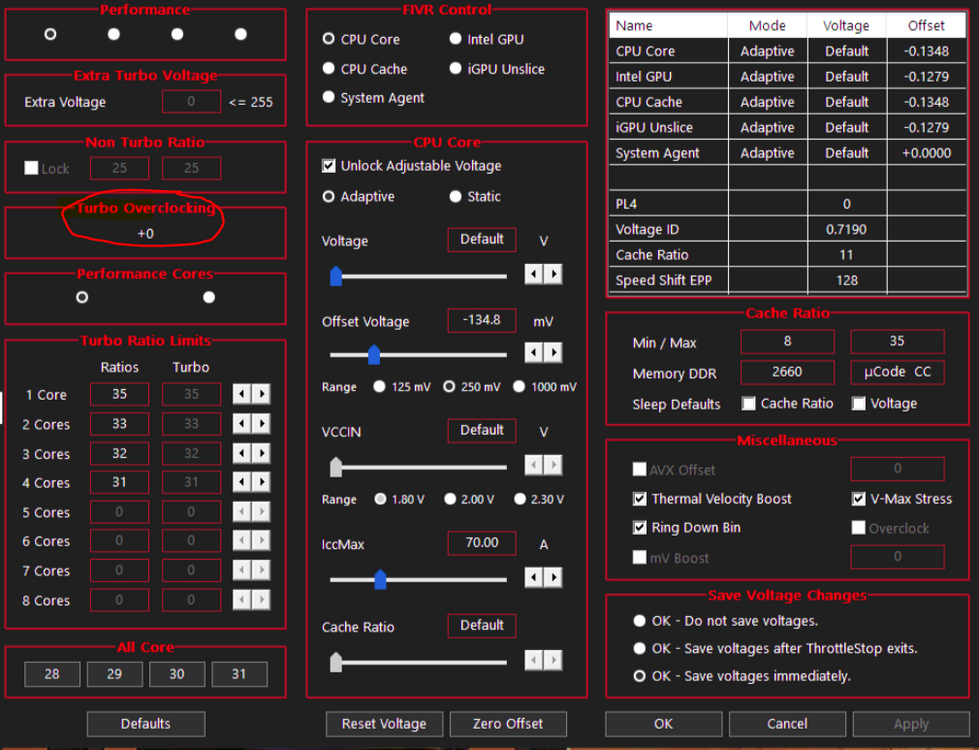
-
Dell Precision 7720 Refurbishment/Upgrade Project
JadeRover replied to Will's topic in Custom Builds
Do you thing it will work to use 3200Mhz ram (I have a few kits) and then via the programs linked here : create an XMP profile for 2933Mhz and possibly 3200mz ? Since the chips on the 3200mhz jedec stick will support up to 3200mhz ? I already used these programs to OC some DDR3L, there are options for DDR4 too. We just need to hope that the 7720 allows writing to ram spd -
Dell Precision 7720 Refurbishment/Upgrade Project
JadeRover replied to Will's topic in Custom Builds
Hello, I would be interested in doing some ram upgrades to my 7720 as well, currently I have a i7-6820hq running 16g of 2666mhz samsung ram (don't know the latency), not sure how dell forces the 6820hq to run with 2666mhz ram as on intel it says 2133mhz max and zbook 17 g3/g4 run it at 2400mhz. I am planning to upgrade to a 7920hq. Do you think this processot can run with higher frequency ram ? 2933mhz, 3200mhz ? An you enable these speeds with nvram edits ? -
M4800 + M2000M GPU FAN is not working.
JadeRover replied to synclear's topic in Pro Max & Precision Mobile Workstation
Hello, sounds like maybe the fan connector got damaged as your fan still works when powering it externally. How did you test it, you plugged 5v on the + and - pins ? Did you remove the fans when upgrading ? -
Yes that's a common issue with optimus laptops, reinstalling the current dispay output drivers (in your case dGPU drivers) should do the trick
-
Precision M6700 owner's thread
JadeRover replied to Aaron44126's topic in Pro Max & Precision Mobile Workstation
Yes, the 50 pin Lvds screen you linked before is 1080p, IPS, 60hz, 10 but color depth, nice display.