JadeRover
-
Posts
172 -
Joined
-
Last visited
-
Days Won
2
Content Type
Profiles
Forums
Events
Everything posted by JadeRover
-

Nvidia-vBIOS-Clock-Power-Tweaker - PASCAL TESTING NEEDED !
JadeRover replied to JadeRover's topic in Components & Upgrades
Hello, this is P106m card vbios ? Manual looking at the clock table, it has only one core value of 1290Mhz and all the others are null (FF). For the memory clock it is 1500Mhz (in afterburner clock dual rank mode). Also the power table is a desktop type with 3 values (not supported by my program). Those I read from your vbios are all at 100w. I can make you a custom vbios to try if you want. I made one quickly, boost to 1910Mhz (I changed all the instances of 1290Mhz to 1910Mhz) and mem up to 2000 Mhz you can give it a try, the checksum was fixed as well. You will probably hit a vrel limit and be around the 1850Mhz mark p106m_vbios_checked.rom -
Nvidia-vBIOS-Clock-Power-Tweaker - PASCAL TESTING NEEDED !
JadeRover replied to JadeRover's topic in Components & Upgrades
I don't have an ETA. This is a side project I have my active life to attend to. DP_B is probably DP++ so it can output either DP or HDMi or even DP+HDMi thanks to a demuxer switch on the laptop (splits the DP++ into one DP and one HDMi). -
Nvidia-vBIOS-Clock-Power-Tweaker - PASCAL TESTING NEEDED !
JadeRover replied to JadeRover's topic in Components & Upgrades
That's right, fixing one byte and then fixing checksum causes error 43. However I know that upddating the GOP driver found inside the vbios doesn't brick the card : GOP Update and Extraction Tool (Turing) - BIOS/UEFI Modding / BIOS Modding/Flashing Tools - Win-Raid Forum I've tested the utility and it changes the 32 bit checksum but not the 8 bit value of the checksum (modulo 256 checksum is the same). -
Nvidia-vBIOS-Clock-Power-Tweaker - PASCAL TESTING NEEDED !
JadeRover replied to JadeRover's topic in Components & Upgrades
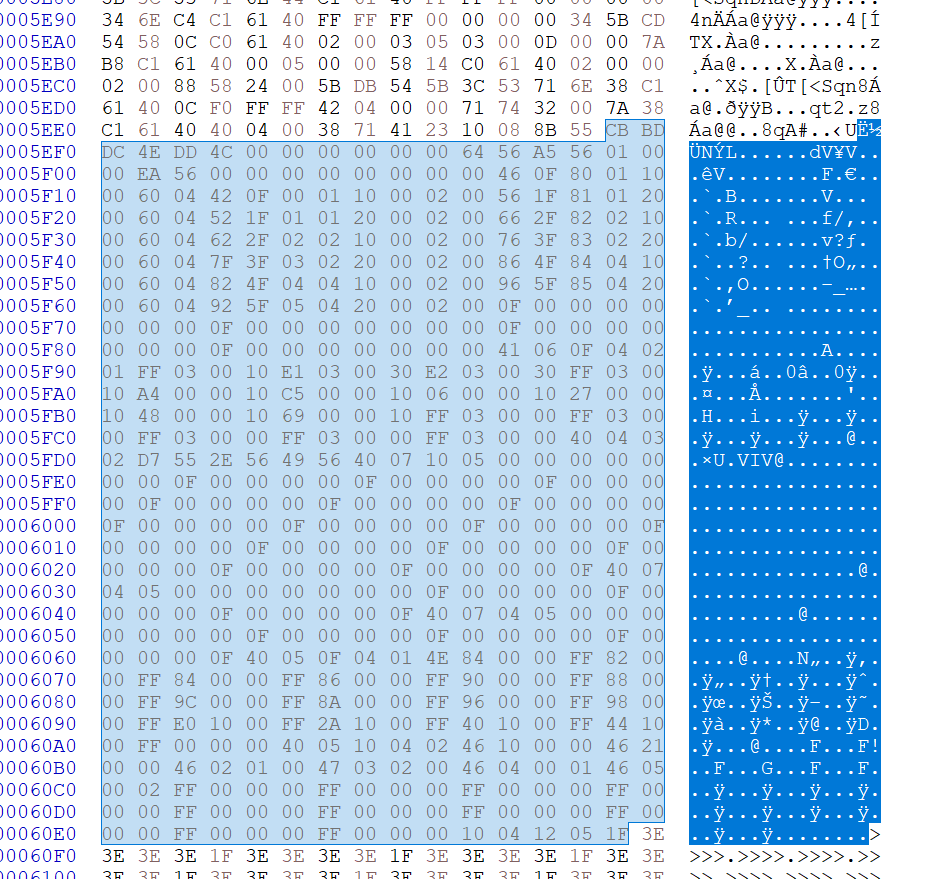
Yes, the display table has tons of info here is a snippet (non parsed data): Highlighted is the entire display table, notice this repeating pattern of 6 lines lines 5F10 and 5F60 starting with header "60". These are the DP_X display entries from A to F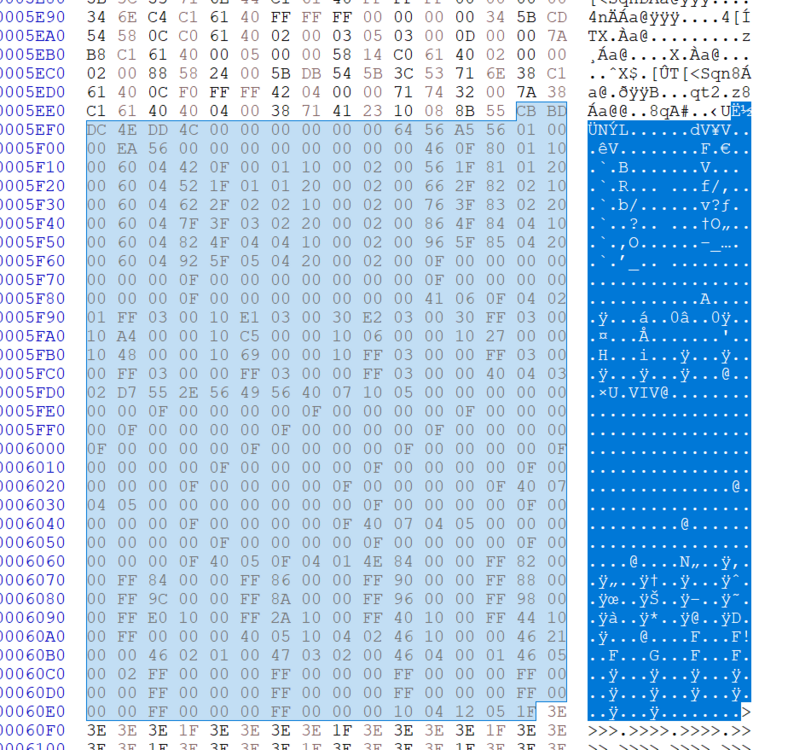
-
Nvidia-vBIOS-Clock-Power-Tweaker - PASCAL TESTING NEEDED !
JadeRover replied to JadeRover's topic in Components & Upgrades
Version 1.0 is released : Release v1.0 | Nvidia-vBIOS-Clock-Power-Tweaker · JadeRover/Nvidia-vBIOS-Clock-Power-Tweaker Editing and saving vbios is possible + checksum is fixed. Therefore I need volunteers with an external flasher to test on pascal cards these modifications ! -
Nvidia-vBIOS-Clock-Power-Tweaker - PASCAL TESTING NEEDED !
JadeRover replied to JadeRover's topic in Components & Upgrades
Hello, yes there is a way to do so. The mac rumor vbios have different output table from stock vbios + documentation exists on the "DCB" table (display table) of nvidia vbios, that's the next step of the program is to read and edit these outputs. Unfortunately when testing with an RTX3000 gpu, my custom vbios did not work, the card would be bricked with error 43. Moreover, changing 2 adjacent bytes in the bios by doing +1 and -1 to the hex value (so that checksum is the same) results in a brick as well for this Turing card = meaning that Turing has more security checks then Pascal and any custom vbios bricks the card (also this was documented on mac rumors). AKA turing custom vbios won't be possible 😞 -
Precision 7510/7520 Owners Thread
JadeRover replied to M4980's topic in Pro Max & Precision Mobile Workstation
Hello, I don't think that 240Hz will work as the 7720/7520 are limited to DP1.2 signal speeds so that would be 190fps max at 1440p (according to wikipedia). What happens is that when you select that refresh rate the screen artifacts and then windows reverts to 60Hz after 15s (since you can't press the accept changes button) I don't think there are 16:9 OLED panels that support >60Hz. 16:10 they do exists, also from the vivobook line but then you would have to make sure it can actually fit in the display cover of the laptop. Go through 15.6inch OLED panels in panelook to find all the model numbers + specs -
Nvidia-vBIOS-Clock-Power-Tweaker - PASCAL TESTING NEEDED !
JadeRover replied to JadeRover's topic in Components & Upgrades
Yes, agreed, that info would be crucial. I had started a draft that would show the display table, all the info relative to "dispkay outputs" is stored in the DCB table : see here https://nvidia.github.io/open-gpu-doc/DCB/DCB-4.x-Specification.html Luckily this table has not been updated for a while so it should be compatible with all the bios from the Pascal-Lovelace era. If you want to help out you can contribute to the github. What we need is algorithms going through all the table entries and parsing the data in a user friendly format showing : DP_X = such interface + i2c controls ? (basically if it supports eDP) + enabled ? -
Nvidia-vBIOS-Clock-Power-Tweaker - PASCAL TESTING NEEDED !
JadeRover replied to JadeRover's topic in Components & Upgrades
Updated the repository -> version 0.3 Now turing cards read properly and the standalone windows exe works. @ssj92 You can now properly read the clock values of your T1000 and RTX5000 -
Nvidia-vBIOS-Clock-Power-Tweaker - PASCAL TESTING NEEDED !
JadeRover replied to JadeRover's topic in Components & Upgrades
Yes that bitmap icon is killing me! It prevented me from exporting to a single exe file 😞 I would get an error -
Hello everyone ! linked is my early version of a pascal to ada lovelace vbios editor. Works for Mobile and Desktop cards UPDATE v1.4 enables you to modify clock values and power values. The program fixes the checksum as well, and it was tested on a P4000m, more pascal testing needed !! Here is the link, the details are explained in the repository https://github.com/JadeRover/Nvidia-vBIOS-Clock-Power-Tweaker Get the latest version V1.4 from the releases : Releases · JadeRover/Nvidia-vBIOS-Clock-Power-Tweaker Pictures of v1.4:
-
Ok, unfortunately this will only get you so far, usually shorted capacitors/mosfets aren't visible with the naked eye. Darker areas on motherboards can be usual heatspots (around CPU VRM, battery charging circuit, etc). These can be false positives. Nothing stands out from the pictures you gave. Unknown chip is the CPU chipset btw. Ok, that's a bummer, a multimeter is a really usefull tool, even for everyday electronics (making sure wires are connected, etc). I would highy recommend getting one, even 10 dollar/euros multimeters are well worth the price in my opinion. Even with not that much knowledge, you can trace short circuits easily with one and know if your GPU is shorted, CPU vrm shorted, chipser shorted, etc... The next step would be to get the laptop to a repair shop, a good shop should have a motherboard diagonistics fee. Make sure they actually diagnose the motherboard properly, most repair shops just plug it in, say it's dead and recommend a motherboard replacement. You can read reviews/check the websites of repair shops and make sure they actually do real motherboard testing.
-
Do you have a multimeter ? If so you can look up guides for "check laptop power rails" and try to find the short. If I had to guess you probably have a main power rail short = would explain the no reaction to power button. What about booting the laptop without a GPU ? Do you have a spare cpu as well for testing ?
-
(Potential) Fix for "pwr" limit of MXM GPU
JadeRover replied to JadeRover's topic in Components & Upgrades
Hi, I think for dual gpu laptops it's worth a shot to tape off that PWR_LEVEL pin and see what happens. What is the performance limit reason in gpu z for the affected gpu? If it's "power" when it shouldn't be (seing 60w instead of the real 90w power limit) then it definitely can be the PWR_LEVEL signal causing this. Keep in mind that this fix doesn't give the gpu infinite power limit, you still have the power limit set in the vbios. This fix prevents the EC of the laptop telling the gpu to throttle it's power. -
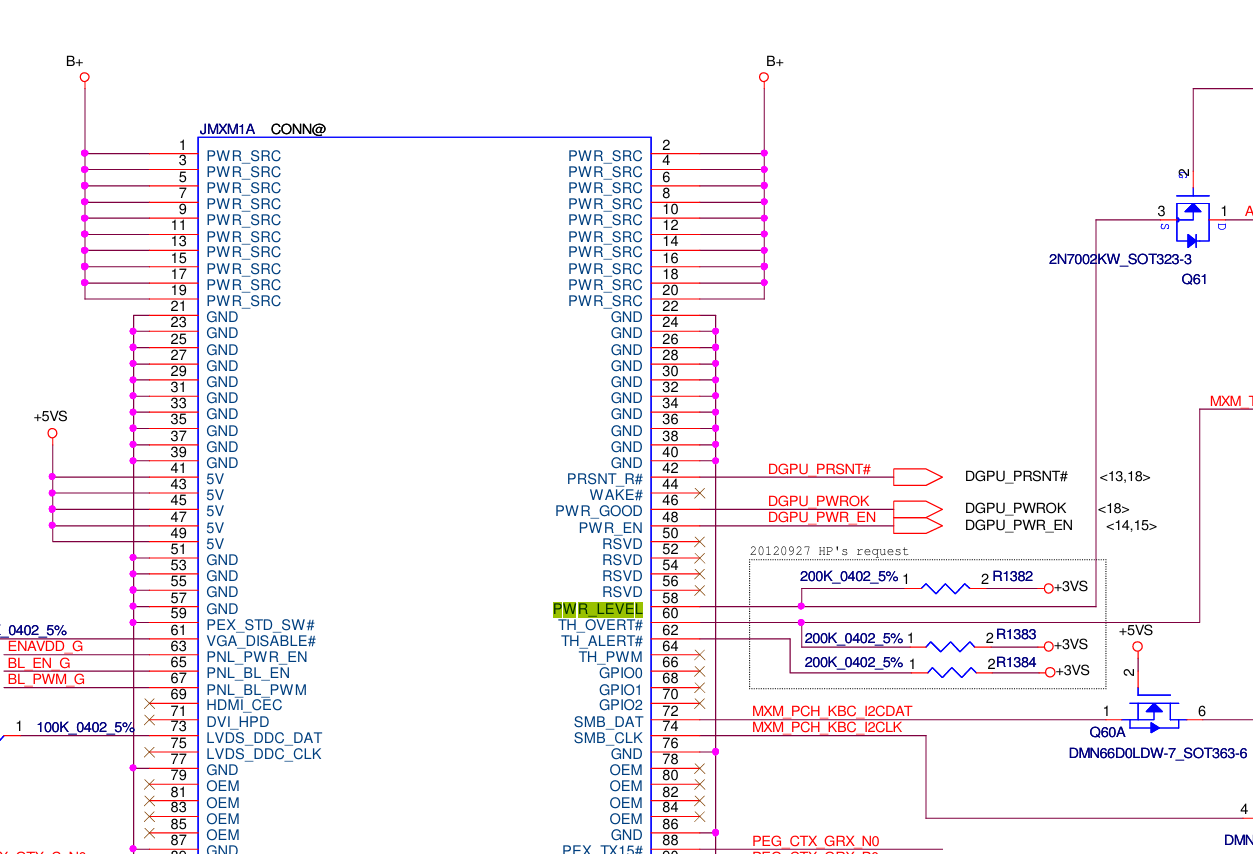
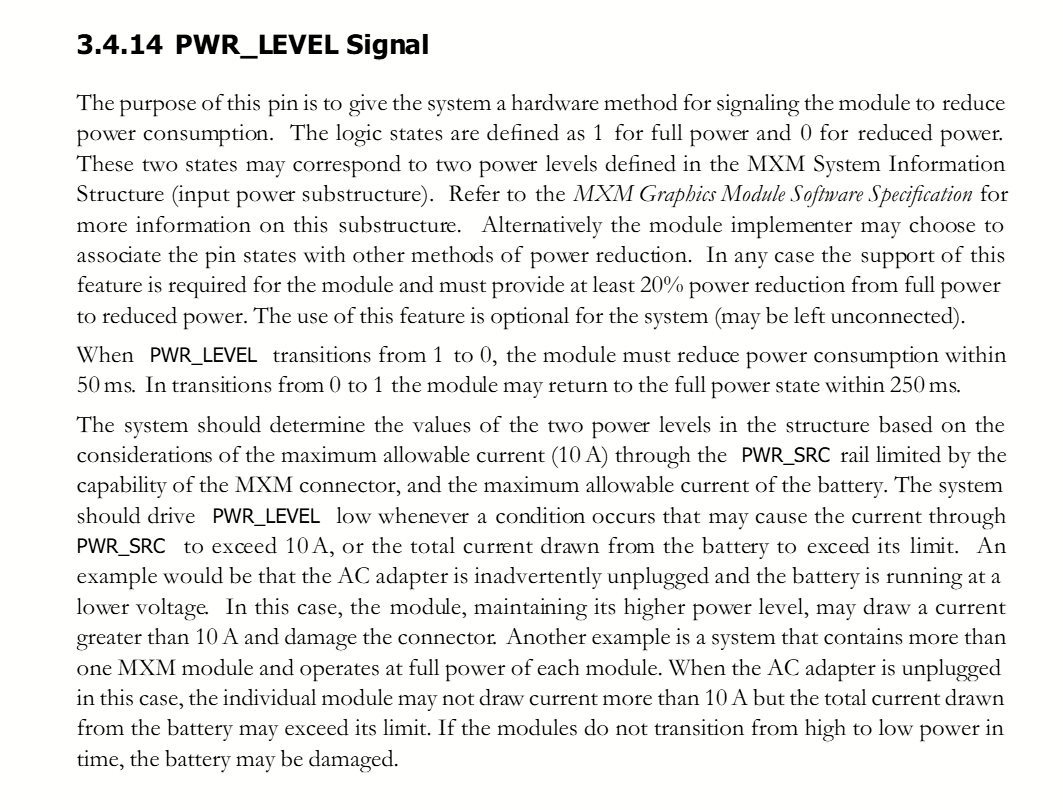
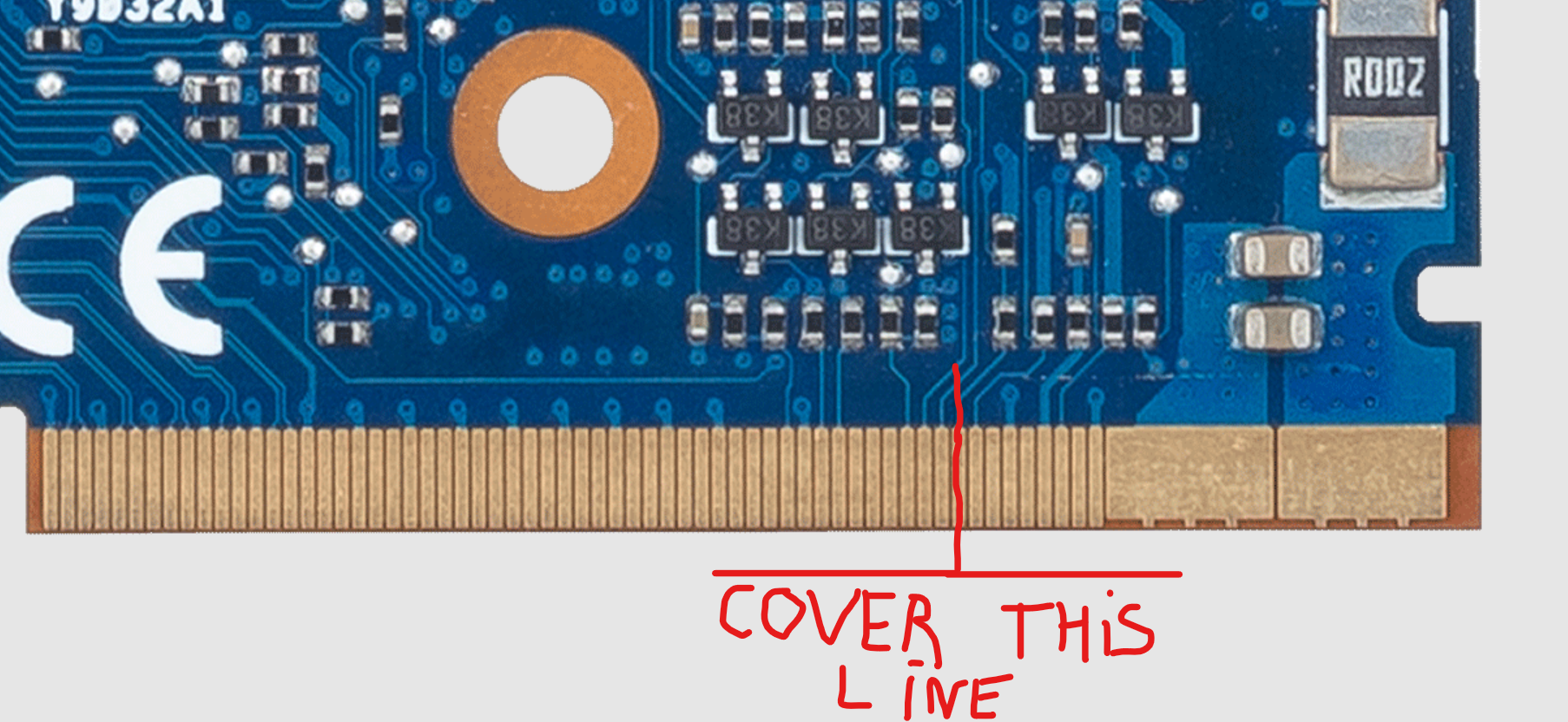
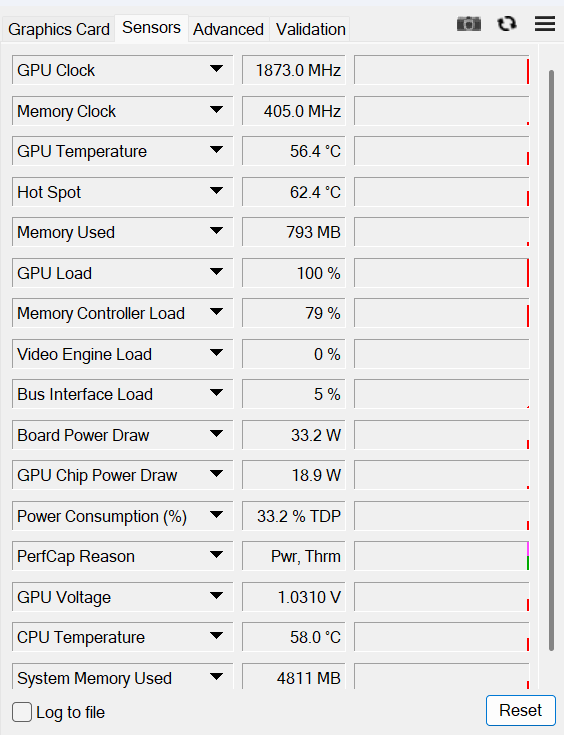
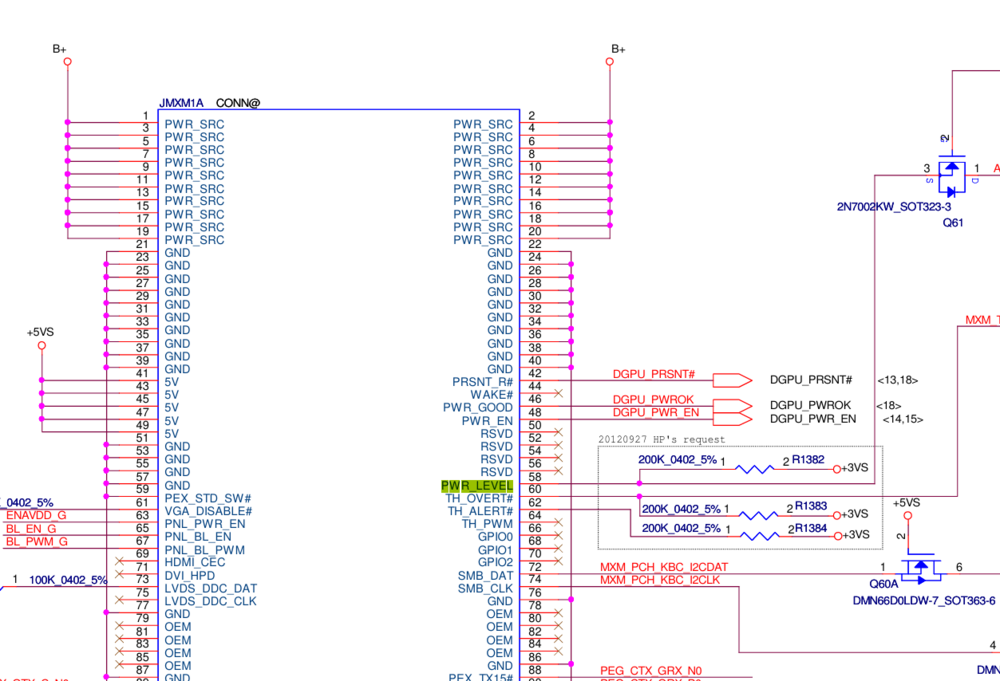
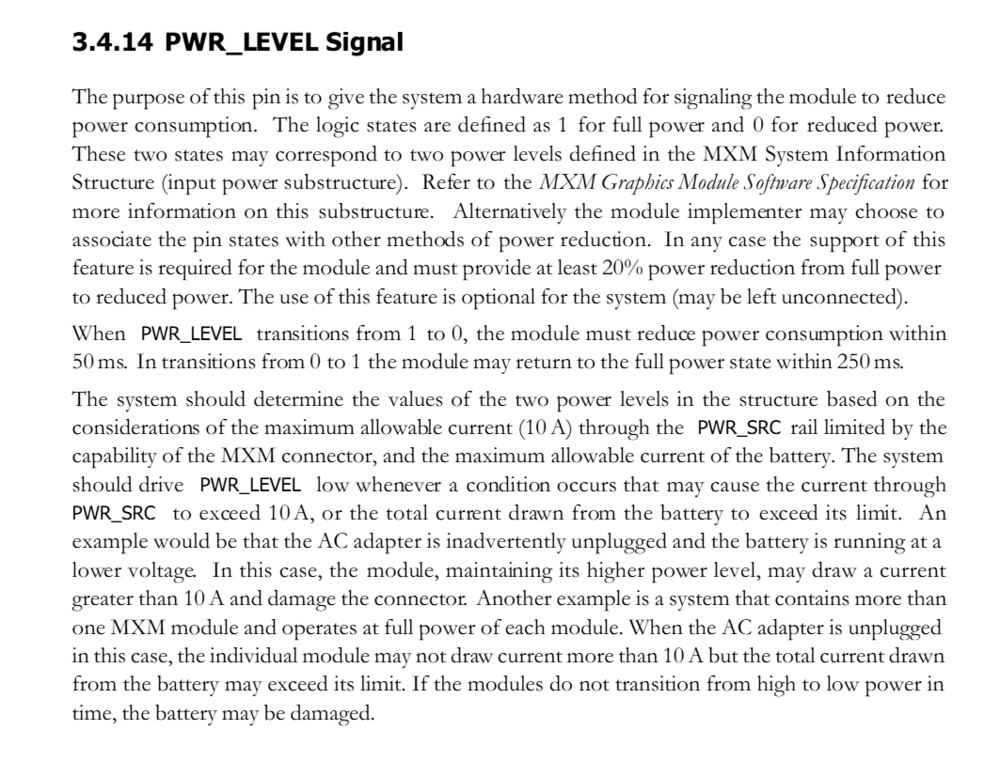
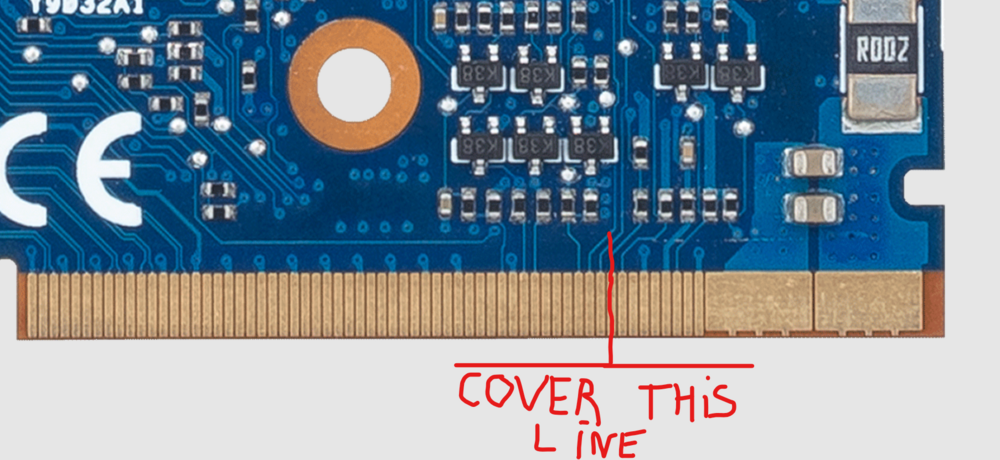
Hello eveyrone, Ok so this problem applies only to MXM gpus that have a "pwr" limit (as well as "thrm" limit sometimes) in GPU-Z when doing a benchmark. This is also known as the "40w power bug" Such example : Notice this is not due to hitting the power limit of the card (33% of TDP). Symptoms of the low power bug is a TDP usage around 50% = 40w if you have a TDP of 80w. I think I found the issue. It has to due with a digital signal that is sent to the GPU, the PWR_LEVEL signal : A previous fix was to block the SMB_DAT or SMB_CLK signal so that the EC chip of the laptop wouldn't be able to communicate with the MXM dGPU. This has the disadvantage of stopping all data communication between EC and MXM dGPU = no more thermal data coming in = EC usually ramps up the GPU fan to maximum. According to MXM 3.1 documentation : This signal is not mendatory and it does apply some kind of power reduction when enabled. Therefore I took a gamble and decided to cover it up and see what happens. My fix is to block off the PWR_LEVEL pin with a bit of tape. - I first put some normal paper scotch tape on my plastic desk (to get it nice and flat during cutting process) - I cut it into a thin strip with a very sharp cutter(width of MXM pin) - I removed it from my plastic desk, then applied it with tweezers. The pin is the 9th counting from the first "thin" pin, on the TOP of the MXM module aka side of the MXM gpu where there is the actual GPU die : It's okay if you cover up the 8-5th pin as well as these are reserved pins (no connection inside a laptop) I did this on my dell precision 7720 with GTX 1060M and this has so far resolved the issue, my card can now boost to 100w thanks to the modded bios. Hope this helps someone !
-
Quadro P4000 Mobile Oc vbios. Working and tested.
JadeRover replied to Ralph's topic in Components & Upgrades
You are right, I think it should work afterall, using nvflashk. But I would really highly recommend a flasher anyway as the first vbios I can make will prob result in bricking the gpu unill fine tuning is done. Also, my program is coming along nicely, I can reliably find the Core clocks and mem clocks of pascal. I can also reliably get the core + mem clocks of Turing and above gpus (tested up to 4060m vbios) . But this is only using the virtual p state table. Meaning I can only edit the values of "boost" you see in gpu z. This is not the actual boost value : rtx3000 can boost to 1820mhz and that clock is not in the v p table. It must be somewhere else. This is not the case for pascal as this second "real boost" clock is in the v p table. They must have done slight changes between pascal and further generations. Because of boost 2 -> boost 3 modes. Mem overclocking is possible though, as well as power limit modification. -
Quadro P4000 Mobile Oc vbios. Working and tested.
JadeRover replied to Ralph's topic in Components & Upgrades
I can probably write the code this week, thing is I would need people to test the vbios with fixed checksum that are made, I only have a GTX1060 (in a dead precision 7720 I gotta fix) + Flashing would only work with an spi programmer, CH341a and such. modifying GPU clock + MEM clock is usefull only for quadro cards that can't overclock in software, all GTX + RTX cards have OC sliders unlocked in MSI afterburner. Power limits modification is usefull for Quadros + GTX cards I guess. -
Quadro P4000 Mobile Oc vbios. Working and tested.
JadeRover replied to Ralph's topic in Components & Upgrades
Here, look in hex for "28 4F 4C" it's the same from pascal -> blackwell The actual TDP values is the "text" are after the (F...(F -> Here it's oS...oS -> in hex it's F8 24 01 -> after little indian 01 24 F8 = 75 000(d) so 75w. (example is p3000 vbios) Def + Max value (not sure of the order though) I could probably write a small tool that can sniff out and find the power + GPU clock + MEM clock for pascal -> blackwell gpus. Shouldn't be that hard, problem is fiwing the checksum after modifications.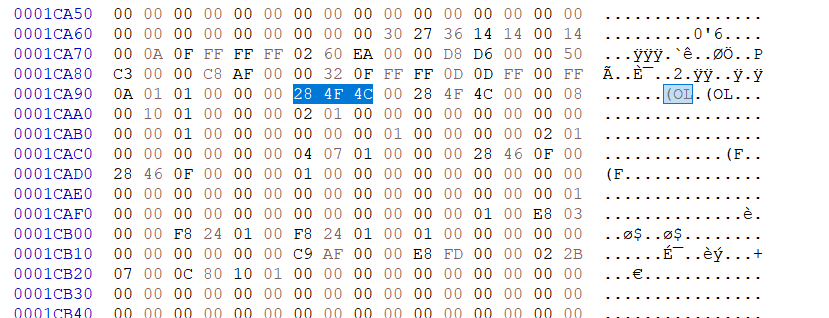
-
Quadro P4000 Mobile Oc vbios. Working and tested.
JadeRover replied to Ralph's topic in Components & Upgrades
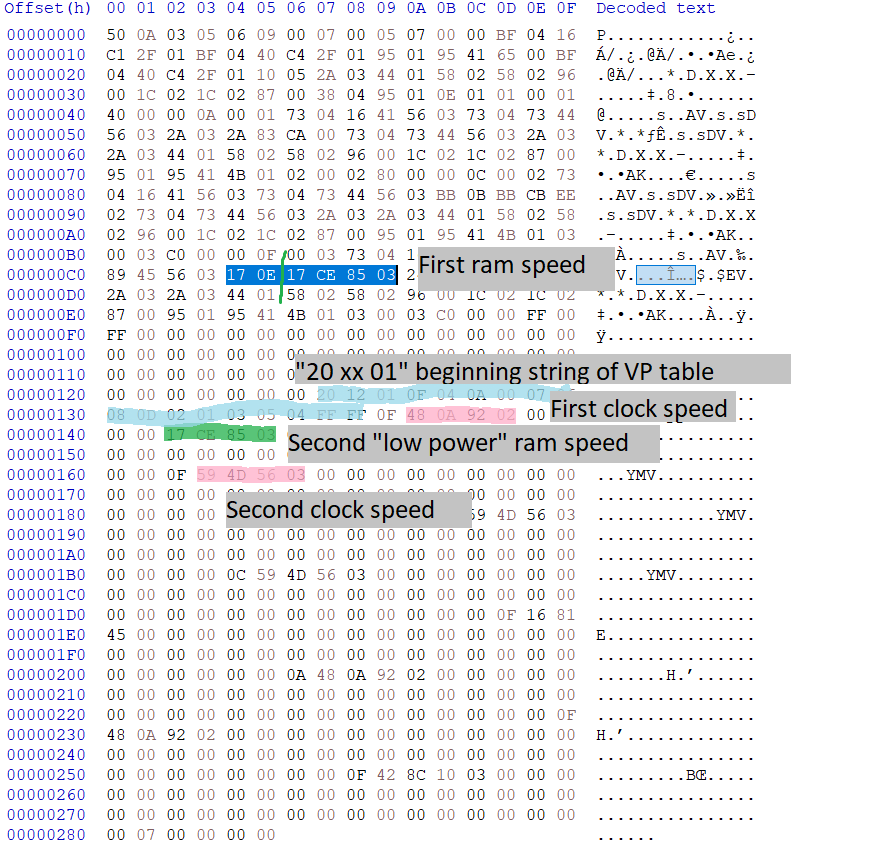
Actually out of curiosity, I went to inspect the "low power" ram frequency string out of a P5200 vbios that has ram speed of 1802Mhz. As you can see here : Despite the different layout : The first ram speed string with DDR value and 2xDDR value is highlighted in dark blue and the second string (that I called "low power" in the post before) is actually set to the same value of : you guessed it : 03 85 CE 17h = 59 100 695d -> devided by 2^15 = 1803 Mhz !! So I guess to overclock ram : users should change the first ram string containing the two DDR speeds as well as this second string that is located between the first P state entry and the second P state entry. This should, in theory, levitate the 1752Mhz memory lock. Testing needs to be done ! I won't have my p3000 for a while unfortunately.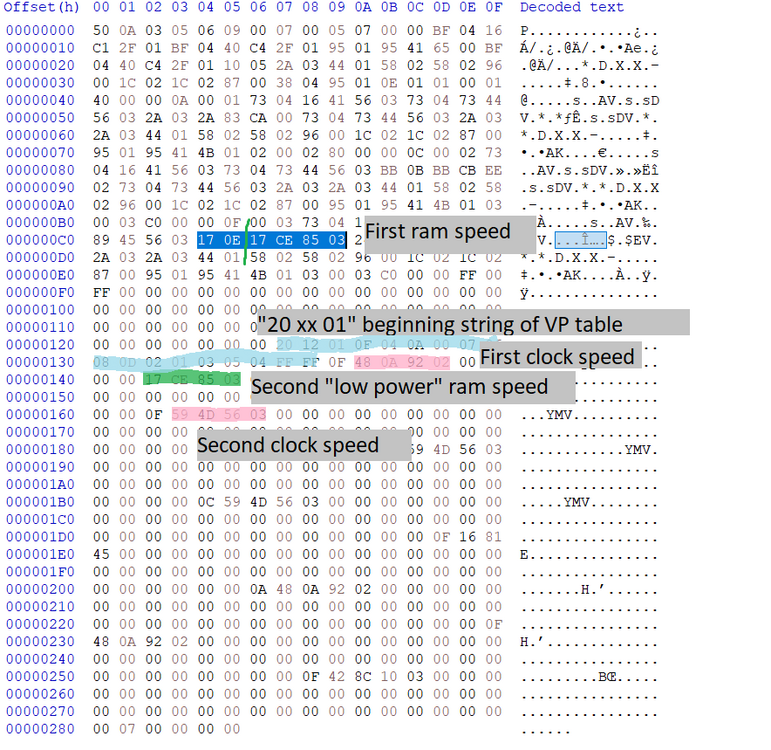
-
Quadro P4000 Mobile Oc vbios. Working and tested.
JadeRover replied to Ralph's topic in Components & Upgrades
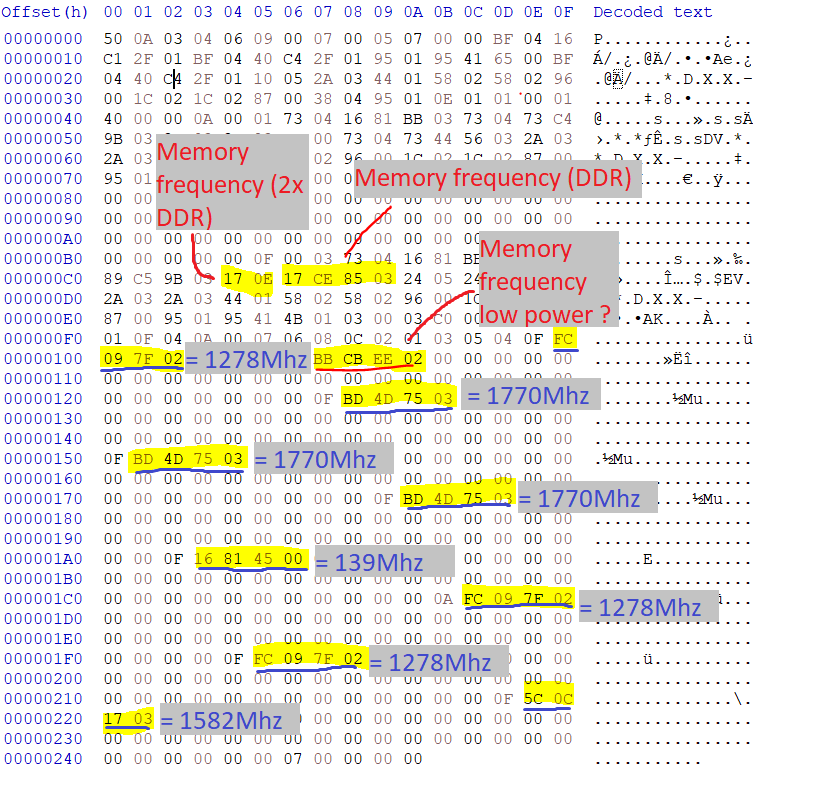
Hello @Ralph. I know it's been about a year since you posted. I have, like you, found where the GPU clocks and memory clocks are stored in the pascal quadro vbios -> the Virtual P state table that can be found thanks to ImHex... I will make a tool to allow users to change clocks in vbios once I have gathered all info needed + done tests on my quadro p3000. Did you find a way to reference the voltage for each clock ? Or is it just when applying a clock value that the card automatically decides what voltage to go to ? This is based on the vbios you posted here. Clock values are pretty close. Highlighted blocks must be read in little indian (17 CE 85 03 = 03 85 CE 17). And at the exception of the memory frequency 2x DDR. All values must be read by dividing the decimal value of the hex block (in little indian) by 2^15 Apparently memory frequency can't go above 1752Mhz on pascal quadro cards.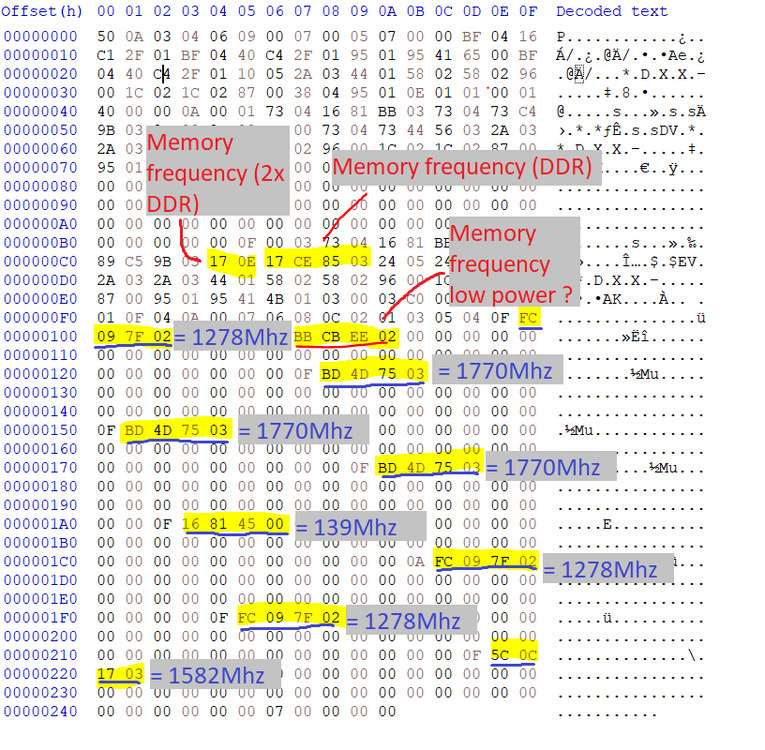
-
Mobile pascal TDP tweaker : how to avoid error 43 [GUIDE]
JadeRover replied to JadeRover's topic in Components & Upgrades
That's unfortunate, I can take a look at your vbios if you want -
OK, no choice unfortunately, you must get a 3k motherboard + 3k cable for a 4k upgrade
-
HP Elitebook 8570W - is it still good ? Hardware modifications
JadeRover replied to GuitarG's topic in Custom Builds
Yes, the m1000m MXM card was shipped in both dell precision 7710/7510 and zbook 15 g3/17 g3. The display outputs through the MXM slot to all the connectors of the laptop are implemented in the vbios. Flashing the bios that you found working would have made this first card work. -
HP Elitebook 8570W - is it still good ? Hardware modifications
JadeRover replied to GuitarG's topic in Custom Builds
@loopster https://notebooktalk.net/topic/225-precision-m6700-owners-thread/page/6/?&_rid=2023#findComment-61191 Here you go, this guide is for the m6700 DC screen. I applied it on my m6700 and the 10 bit mod worked. However I couldn't tell the difference with it on or off, even trying specific 8bit vs 10 bit downloaded videos. Also the DC screen heats up a lot at 100% brightness. Probably the interposer board that is working hard. -
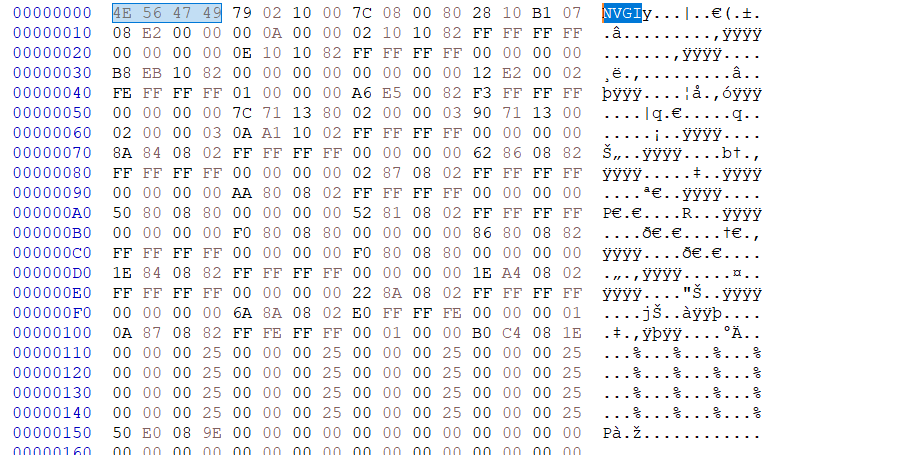
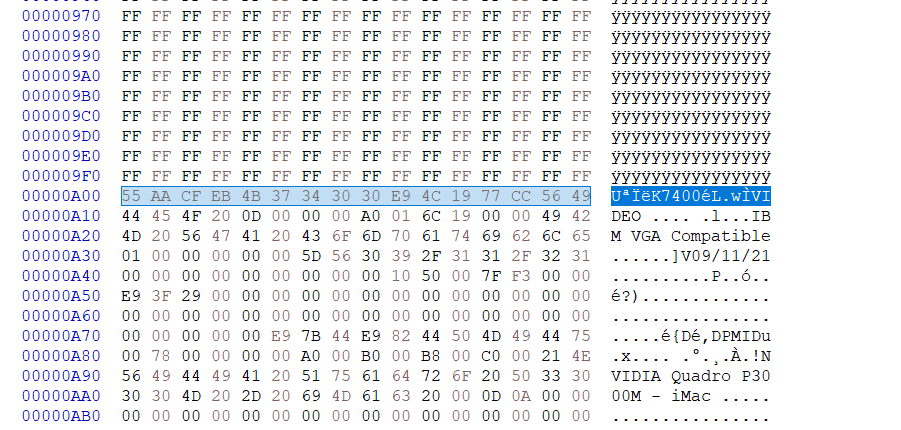
Hello, This guide will explain how you have to actually modify a pascal/turing vbios with pascal mobile tdp tweaker in order to not get error 43 and black screen. latest vesion 1.21 : https://github.com/LaneLyng/MobilePascalTDPTweaker/releases/download/1.2.1.0/Mobile.Pascal.TDP.Tweaker.1.21.zip tools needed : any hex editor -> HxD for example I have embarked on a long vbios modding adventure. End goal : custom display tables in vbioses utility -> Extremely useful for MXM gpus -> looks quite possible thanks to released nvidia documentation but I must invest lots of time in research into this (my time allocation will vary greatly week to week...). Side goal : create a core + memory overclocking utility -> Possible as well, simpler than the display table Anyways, early on I noticed a flaw in the pascal bios tdp tweaker in the way it calculates checksums : it only corrects the checksum to the correct value if your vbios has no header ! If you use a vbios with header the app will calculate a wrong checksum and you will get error 43 or black screen as the security chip on the GPU will refuse to post. Step 1 : Check if your vbios has a header -> Open it in a Hex Editor and see if the starting string is "NVGI" -> if no header, you can mod the base directly in TDP tweaker with no extra steps. example of a vbios with a header : Step 2 : Remove the header and keep it in another file, select all the first lines of the vbios untill you see the string "UxxxK7400". In my case the actual vbios data starts at offset A00 -> Save the modified vbios as "vbios_mod_applicable" Step 3: Open this "vbios_mod_applicable" in mobile TDP tweaker, apply your edits and save the bios, now the checksum is correctly calculated automatically when you save this modified version. Step 4: Open the TDP moded vbios in a Hex Editor and reinsert the header at the very beginning of the vbios. Make sure the file size matches between the OG vbios and the TDP modded one. Step 5: Flash the modded vbios with an external programmer -> nvlashK and OMGflash will not work. You need to have a flasher handy anyway if you are attempting a vbios flash that risks bricking your card. Step 6: Enjoy higher TDP/other changes you applied