

GuitarG
-
Posts
165 -
Joined
-
Last visited
Content Type
Profiles
Forums
Events
Everything posted by GuitarG
-
HP Elitebook 8570W - is it still good ? Hardware modifications
GuitarG replied to GuitarG's topic in Custom Builds
Cheap dirt. AFAIK, about 15-20$. Even those 4K ones. Very! In fact, one guy using here is right on this forum, too. Have you seen ultimate 8770w thread ? Though.. ... now I remember there was reason he uses Radeon MXM 😕 And I hate that word. Compability (between vbios and LCD matrix). And I encountered that problem before, with Clevo. I have a lot of free time on my hands (pun intented, you know, carpal tunnel ^^). Maybe I will think of something. EDIT. Well, during writing I already got first idea. I need zbook 17 g6 original LCD to check. It should be 100% compatible with mine RTX, since it's same platform and even laptop model. And even if it doesn't work, we still make step toward solution. -
HP Elitebook 8570W - is it still good ? Hardware modifications
GuitarG replied to GuitarG's topic in Custom Builds
My idea is to buy eDP 30pin cable for Clevo and use original one from HP (or buy one cheaply to not destroy original one :P). Simply, because then we solder only one side. Muuuuch easier to make it work. And less subject to noise problems. Only real question is will it work with my RTX? As you know I already checked with K1000M and everythings works as intended. But it was so long time ago I don't remember. And I checked videos I made when trying 4k cable, it worked too, but my bad was in using LVDS hp cable. 4K clevo cables would be a lot better (signal needs special treatment - traces length, noise supression, etc). That's why on Chinese forum they said guy modified clevo cable for his 8770w -
Interesing job ! Any benchmarks pre-mod and after ?
-
HP Elitebook 8570W - is it still good ? Hardware modifications
GuitarG replied to GuitarG's topic in Custom Builds
I really would love some better LCD in laptop. My dreamcolor screen at lowest brightness lights up whole room at night 😅 Anybody with DC can confirm same "problem" with minimal brightness ? -
HP Elitebook 8570W - is it still good ? Hardware modifications
GuitarG replied to GuitarG's topic in Custom Builds
Hi there, sorry for such long time to notice, hand is still recovering and in few days I will have other hand "not usable" for some time 😞 So let me help as much I can now, About looking for 5V points, use pins from under DVD slot. To find which one, type "8560w boardview" in search engine, use OpenBoardviewer from github. With such tool you can also understand fan connector pins role. You need only one wire across board, if I remember, connect PWM pin from "slave fan" to PWM pin from "main fan". REMEMBER to solder it BEFORE that little coil. If you solder it AFTER coil (directly to 5 legged IC) you will damage it! 1- 5V 2- PWM 3- GND 4- Tacho 5- Coild for PWM signal Like I wrote, remember to solder in between that coil (5) and pin (2). For DVD port you can even use electronic side cutter. I did so, of course being careful and gently. After plastic "deletion" metal wires left I just desoldered with soldering iron and pinched them with pliers. Good luck Nice one ! Sure! No problem, I even found another DC board, so I have 3 in total - one from Zbook (using it in my laptop) and two from 8560W (one is green, other blue). I will upload them all after I will be able to work! BTW, PC industry situation nowadays makes my inside very sad, I think we will have to get through that Shawkshank Redemption pipe of (...) with what we have.. I had plans to build myself a nice PC, but after PC parts price rising I decided to stay with my trusty old notebook even longer. Untill he will come of age to drink beer with me ^_^ See you all later ! -
That component turns on sata led activity, in simple answer. Regarding project, have fun and good luck! Few months ago I helped my friend to repaste his Precision 7520. He does have mxm slot too, but unfortunately it’s smaller A version. Nice laptops, though!
-
HP Elitebook 8570W - is it still good ? Hardware modifications
GuitarG replied to GuitarG's topic in Custom Builds
Actually you can carefully *delete* that connector with pliers, no need to dissasembly whole laptop. If you would like to use that SATA port then it would be possible to route cables elsewhere -
HP Elitebook 8570W - is it still good ? Hardware modifications
GuitarG replied to GuitarG's topic in Custom Builds
Definitely desolder dvd connector, mxm board will bend overtime and stop working. Especially with heatsink attached. Smartphones have very small board, so it's less prone to bend issue. -
HP Elitebook 8570W - is it still good ? Hardware modifications
GuitarG replied to GuitarG's topic in Custom Builds
1866 and 2133 RAM works out of box, no bios mod needed. Try finding 8560w boardview and using openboard viewer on internet, it would help finding voltages a lot (8560w and 8570w are almost same layouts). From my experience, 980M gained twice performance on modded heatsink. I advise to remove keyboard for better cooling operation till you make one. -
HP Elitebook 8570W - is it still good ? Hardware modifications
GuitarG replied to GuitarG's topic in Custom Builds
Small update, right speaker audio channel started malfunctioning (sometimes dissapearing for moment, sometimes working normally), so I bite bullet and changed audio IC. From 92HD80 to 92HD94, now both speakers sounds better (comparing to 8560w with Windows 7 and SRS) and no more missing audio channel problem. -
HP Elitebook 8570W - is it still good ? Hardware modifications
GuitarG replied to GuitarG's topic in Custom Builds
Haha, sorry, I didn't remember how rough that draft was. My plan is to : 1) make hi res photo of both connectors to show what is connected, show starting orientation and enumerate pins we need 2) make some simple schematic in KiCAD to better show what connect to what (instead of printed sketched paper ^_^) Would that be better to make mod yourselves ? -
HP Elitebook 8570W - is it still good ? Hardware modifications
GuitarG replied to GuitarG's topic in Custom Builds
DP port output checking is essential to find compatible vbios and flashing another (I only bricked my GPU once, so external programmer may be needed). For drivers use NVClean with manually downloaded drivers from nvidia + adding hardware ID in program to check if there would be any code 43 in driver section. No output on internal LCD or code 43 means another vbios to flash. Look for vbios on techpowerup site on unverified uploads, techinferno, etc. As for vendor, HP's firmware for GPUs are least compatible with hp laptops, haha. There is no difference between 8570w and 8770w, electrically and firmware side it is really same thing. And sometimes, it is just damaged GPU -
HP Elitebook 8570W - is it still good ? Hardware modifications
GuitarG replied to GuitarG's topic in Custom Builds
As for cable, one could already make one using my post's info. Unfortunately I don't have energy or health lately to check different vbioses with eDP screen on 8560w (but I'm 90% sure it's vbios that makes LCD compatible with laptop). About chassis and modding another board in, I though about that. What makes this laptop good for me ? It is quality of build, sturdiness. But instead of making "impossible" (making case from scratch or making new motherboard with same dimensions), I would rather make some fusion between clevo P751 cooling system, 3 speaker audio, CPU socket and 8570w magnesium shell, keyboard and touchpad. -
HP Elitebook 8570W - Help to failed MXM upgrade
GuitarG replied to CaptainsWorkspace's topic in Components & Upgrades
You can check screen type by device manager and looking at monitor's hardware ID. DC is AFAIK LGD0220, others are only TN LCD (and very good ones, though). Only DC screen can go above Pascal generation cards. In my experience HP's vBIOSes are last to work with 8570w ^_^ even Dell's are more compatible. CH341 will do a job, but I never used clamps. Soldering flash IC off boards make better results, much less prone to errors (mostly encountered during "verify" phase) due to missmatch. You may need 5V to 3V converter, but have to check what IC GPU uses. So until DC screen confirmed, you may use only those olders M2200. -
HP Elitebook 8570W - Help to failed MXM upgrade
GuitarG replied to CaptainsWorkspace's topic in Components & Upgrades
Hi there! Nice LAN party there ! I definitely would love to play some old LAN games, haha. And that is nice to hear, helping people out was my goal 🙂 I would try out vbios programming on that m2200, begin with that one I recommend checking out P1000 and P2000, I had tried both P5000 and P5200 and those worked with no problems (P5200 would need notebookfan control app from github with 8560w profile set to "auto"). Px200 series need only to buy flash IC and solder it after programming. Not sure about Mxxxx series GPU, but P1000 and others would need DC displays, UEFI only bios mode with Windows installed on GPT style partition. Fastboot turned off helps too. Good luck! -
HP Elitebook 8570W - is it still good ? Hardware modifications
GuitarG replied to GuitarG's topic in Custom Builds
SUCCESS Drivers installed, LCD detected.. now time to find out why it worked ^_^ I will try flashing different vbios now. I changed GPU back to original Quadro 1000M, both FHD AND 4K detected and work! Unfortunately I don't have another 4K display and mine is damaged (backlight works, tries displaying stuff but LCD is damaged itself), but look here: 4K confirmed people !!! 😄 I would buy new one just for testing right now, but I have to watch every penny at the moment :(( -
HP Elitebook 8570W - is it still good ? Hardware modifications
GuitarG replied to GuitarG's topic in Custom Builds
Once again, you helped me here, haha. I remember now when I first tried P5200 GPU I shuffled many versions of it's vbios. I remember that when I tried Lenovo and MSI it had weird display issue. It does really explain now everything. It looked EXACTLY like EDID issues I saw on internet search through specialist forums. Clevo P751zm 4K upgrade didn't worked out maybe because of same problem with vbios. Because I upgraded it with P5000 GPU. And it would be a lot more logical to insert certain compatibility modes/list in vbios rather than mainboard bios. EDIT: And I think now main incompability with MXM cards is ... screen it seems. Lol. First is connection type (edp or lvds output), then rest. With Ampere 4xxx it's additionally 4G Decoding, etc.. So we can at least try to flash different options here, see if any would work. Because no one cracked that nasty Nvidia falcon security/checksum checking... or rather NVidia had striked them down (because $$$). Thanks Astro :) Will try out if I get some free time... because... -
HP Elitebook 8570W - is it still good ? Hardware modifications
GuitarG replied to GuitarG's topic in Custom Builds
Well, it would be hard, because we can program it only physically. And in eDP flash chip is strongly connected to main LCD IC, meaning there is no way to program it without connecting to main IC. On every eDP LCD I have I checked for i2c pads, but no luck. Also I found another case of such problem.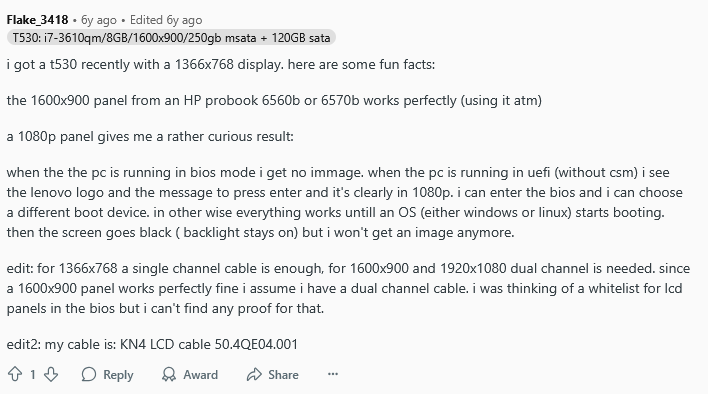
-
HP Elitebook 8570W - is it still good ? Hardware modifications
GuitarG replied to GuitarG's topic in Custom Builds
Well, Dreamcolor is LVDS screen, on DC cable there is pin 11 and 12 connected, those are LVDS EDID cables. They go straight to DC LCD. So at the end of the day, every panel in 8570w is LVDS. EDID hexcode for LVDS and eDP are vastly different, even in length. And they are two totally different technologies. So I think only way could be to find out with coreboot rom. But since it uses a lot of original HP code, it still may not work. Unfortunately. -
HP Elitebook 8570W - is it still good ? Hardware modifications
GuitarG replied to GuitarG's topic in Custom Builds
Yup, there: With crimping plies you could probably make it into JST, I didn't had one so I just soldered one wire. Remember to solder it after coil, not before, or you will fry PWM fan IC. 5V I used from SATA bay port. About modification, there is a little hope left. I think HP may had whitelist of panels that will work in that laptop 😞 and it's in encrypted bios. So I will try one last idea, coreboot 8560w and check then if work. But I don't get my hopes high because even coreboot uses some propertiary manufacturer code for it to even work. And even if it works, then no Windows booting, only Linux. -
Which is the last/best LVDS nonUEFI MXM-A GPU?
GuitarG replied to triturbo's topic in Components & Upgrades
After F40 or F41 bios update no more WLAN whitelist on 8570w. Latest is F71. Only WAN card is whitelisted. Only known (for me) MXM gpu whitelist are in lenovo thinkpads workstations. -
HP Elitebook 8570W - is it still good ? Hardware modifications
GuitarG replied to GuitarG's topic in Custom Builds
Sure ! That was FHD LCD, and thanks! No, only 8560w. 8770w is very rare "pokemon" in my place. And cost waay too much, like 300-400$. With MXM cards, if it fits heatsink, then it is matter of correct vbios, which you need to find out yourself, propably. Or look for info in NBRChive (old forum) --- About eDP Panel! Some good news, some bad. Good is my 4K cable works ! Panel is damaged, though. But I saw backlight working and content (bios logo). Bad news is those cable work only without installed GPU drivers. Also UEFI is a must, otherwise LCD won't even turn on. I experimented on spare HP and I could set up even FHD resolution, but after installing drivers laptop don't even shows internal panel connection. Only external output works. This is problem I had in my Clevo before, I tried to upgrade screen to 4K and it also worked until installing drivers. Seems like I need to troubleshoot another problem. I heard about EDID, now I need to check out how to program them or something.. So we're halfway to success... -
HP Elitebook 8570W - is it still good ? Hardware modifications
GuitarG replied to GuitarG's topic in Custom Builds
What 27 dollars can give you.. now fun begins! -
HP Elitebook 8570W - is it still good ? Hardware modifications
GuitarG replied to GuitarG's topic in Custom Builds
Yes, FHD max. I tried to use 40 pin with 4K, but it didn't light up. It may be soldering error, though. Need to check again with multimeter. Thanks 😄 I need to do mine first, haha. Goal is to make that 4k work. Since I tried it at my workplace, I didn't had time to check everything (like brightness control, etc). I really hope for that spare HP, it would make work much easier (yup, trying my luck at yet another bargain auction). -
HP Elitebook 8570W - is it still good ? Hardware modifications
GuitarG replied to GuitarG's topic in Custom Builds
BINGO




