JadeRover
-
Posts
91 -
Joined
-
Last visited
Content Type
Profiles
Forums
Events
Everything posted by JadeRover
-

My Dell Precision M6800 Website
JadeRover replied to DellBoy's topic in Pro Max & Precision Mobile Workstation
That's a very nice project indeed ! Keeping the interest in these old precision alive, especially info on the rare m6800 covet ! One small thing I noticed while looking through some of your sections, under the CPU and GPU : The m6800 didn't ship with any IPS screens, I think you are referring to eDP screens (that offer upgrades to IPS lcd, instead of TN that is garanted with LVDS). All pascal cards and above don't have support for LVDS, it is possible to run one in the m6800 it's just that optimus must be turned on so that the internal dipslay gets a picture from the iGPU. With an eDP screen, the pascal GPUs can run the display directly, without using optimus. Upgrades to an IPS eDP FHD display is possible required you have an eDP motherboard, m6800 shipped with both eDP and LVDS motherboards.
-
Looking at the CVEs, for the zbook 17 g6 you'll need to go back as far as v01.02 I got all of them from the official HP driver website, here is the page for your g6 (under "see revisions history") : https://support.hp.com/ca-en/drivers/swdetails/hp-zbook-17-g6-mobile-workstation/22892902/swItemId/ob-352280-1 You'll need to download the exe, run it and chose the option to install to usb. Then on the zbook, plug in the USB and boot to the bios and go to : Main -> update system bios -> make sure "lock BIOS version" is unchecked + "unrestricted bios rollback" is selected -> "Update system bios ... using local media" Normally that should do it, I think you'll need to jump slowly down to v01.02. There is no risk of corrupting the bios if you have power plugged in + charged battery Only downsight is that having to go as far back as v01.02 might make some BIOS features that got added later dissapear.
-
Hey all, I have the zbook 17 g5, You can control fans with NotebookFanControl : GitHub - hirschmann/nbfc: NoteBook FanControl and use this profile for Zbook 17 g3 : Current Fan Speed Negative Value · Issue #501 · hirschmann/nbfc You can control GPU and CPU fan independently + create your own fan curve Bought it last year with bios v1.24. I went down to v1.08 going through : v1.24 -> v1.20 -> v1.18 -> v1.14 -> v1.12 -> v1.08 using the plugging in usb method and selecting the "update bios" in the bios setup. It didn't always downgrade, not sure why, but I got there in the end by jumping a few versions at a time. It was a massive pain but now I can undervolt and the 8850H I have has +400mhz OC option that gets enables meaning in theory it can run all core at 4.7ghz (never saw it happen, all core 4.45 ish possible @ 100 watts, -110mv, crashes)
-
Precision 7540 & Precision 7740 owner's thread
JadeRover replied to SvenC's topic in Pro Max & Precision Mobile Workstation
Hi, I have a zbook 17 g5 that has an identical chassis to the g6 version. I'll quickly list pros and cons that matter to me (you can ask me other stuff too): PROS : - Last worstation laptop to have a bluray player, can be swapped out for a HDD, not available on the 15 inch version. - Last worstation laptop to have MXM 3.0 standard connector, not available on the 15 inch version. Meaning upgrade up to MXM 4090 is possible - All metal chassis, feels very solid, rounded edges, 0 flexing. - Screwless maintenance hatch gives access to 2x ram slots, 2x sata/nvme m.2, 1x2.5inch sata drive, dvd player, wifi + wwan. CONS : - Big screen bezels - Other 2 ram slots + 3rd nvme slot is behind the motherboard meaning you need to remove the entire motherboard to access them (dumbest workstation design I know) - okay keyboard, kinda shallow compared to my precision 7720. - ram limited to 2400mhz by BIOS, no option to change it - undervolting only possible with v1.12 bios from 2019, downgrading is a pain. - best cpu option is 9980H (non K) also the 8950HK is possible but it's 6 cores Currently running the 8850H undervolted -140mv, unlocked boost to 4.4ghz 60w power limit, 75°c in games -
Precision M6700 owner's thread
JadeRover replied to Aaron44126's topic in Pro Max & Precision Mobile Workstation
HDMi always uses dGPU, eDP screen or LVDS screen. RGB-MB (Dreamcolor) screen has a direct connection to dGPU if you can get it to work, so this screen is also full performance. eDP 3D lcd cable is the most versatile one as it can connect a 40 pin eDP screen to modern GPUs,+ there is no display port demux between MXM gpu and eDP connector on the motherboard : Meaning that the eDP version is theoretically limited to the one on the MXM side, meaning 4K120hz+ lcd upgrades are possible with this cable.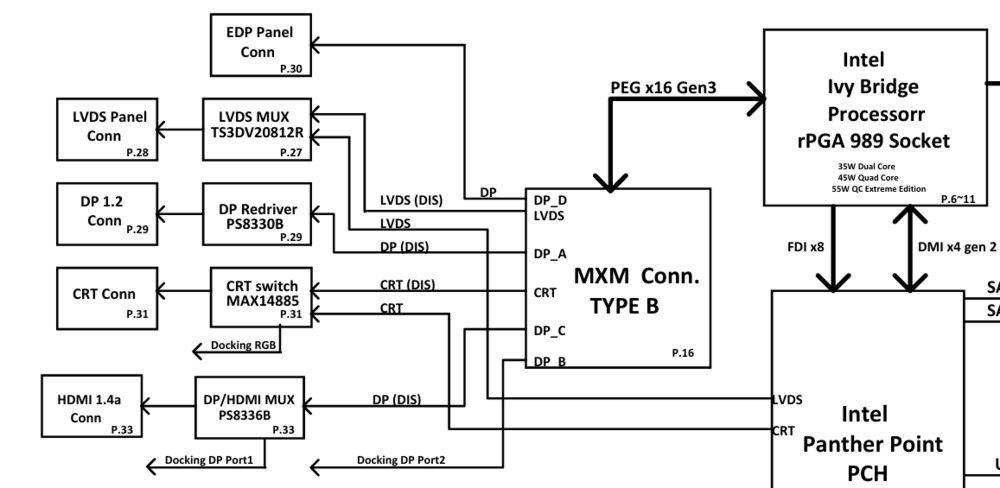
-
Actually there are also these vbioses : But you need a SPI 1.8V flasher to get the vbios on the card, using nvflash won't work. These vbioses have different display tables and maybe audio output as well ? I know for a fact that eDP is routed to DP_C which is non standard, almost all MXM laptop (except zbook 15/17 g2 and g3) have eDP routed to DP_D of the MXM connector. Meaning if the bios flash is sucessfull you'll need to run the card in switchable graphics mode to get a display on the internal display.
-
Precision M6700 owner's thread
JadeRover replied to Aaron44126's topic in Pro Max & Precision Mobile Workstation
Correct, DP_D is the standard (zbook 17/15 g3 has it on DP_C as well). Yes, you want the 6VCJW one Look at pictures when buying, it's the only one with a white "3D" sticker on it. All the other cables won't work. -
Precision M6700 owner's thread
JadeRover replied to Aaron44126's topic in Pro Max & Precision Mobile Workstation
That's actually a 40 pin edp cable that is only for the RGB lcd (the connector isn't a standard iPEX that plugs into a 4K lcd for example). I made a post about the difference in the cables, see here : You want the "3D" cable that is standard 40 pin 4 lane edp that was made originally for the 120hz 1080p screen option. Keep in mind that using an eDP lcd will force the MXM card to output directly to the internal LCD, located on DP_D of the MXM connector. There is no mux for the iGPU. That means that if you are testng vbioses or cards that don't have eDP/DP on DP_D you'll get a black screen, external HDMI and even VGA should work all the time. EDIT : that's assuming you wan't to upgrade the lcd to a modern 40 pin eDP IPS lcd (1080p >60hz or resolution >1080p). Upgrading to 4K has been done by a few members of the forum, look up @TheQuentincc -
Hello, Clearly the card is in a dead short, judging by your pictures, the capacitors are burnt and shorted. The board layers look chared as well, meaning deep under the board layers the + and - are touching and shorting out. There is no way the card can turn on in this state as the main power rail is shorting out to ground. If you know professionals get them to diagnose the card, if it's a board layer short or a capacitor short on the main power rail the repair probability is actually pretty high. The GPU die and VRAM would not be affected by the damage (if I guessed correctly on board / capactor short). You need someone with the skill to dig trhough the board layers, rebuild them and install new capacitors. There are videos on youtube that explain this pretty well for desktop cards.
-
Finally the new RTX MXM cards will work in our laptops!
JadeRover replied to SuperMG's topic in Components & Upgrades
Hi, yes the card will work in hybride mod, you'll loose a little bit of performance due to routing the display signal through the iGPU. I used a 1060M that had HDMi on DP_D (laptop booted with black screen in discrete GPU mode, booted fine in hybride mode and 1060M was recognized and used for games) Not sure the external display outputs will all work well, we'll have to look up the schematic of your model to make sure wich external display connections have a mux switch meaning the iGPU will run the external connections as well. -
Finally the new RTX MXM cards will work in our laptops!
JadeRover replied to SuperMG's topic in Components & Upgrades
It has been discussed a few times, but be careful, Zbook 15 g2 routes it's internal eDP connector to DP_C of the MXM slot, you actually need to make sure your card outputs standard DP to DP_C so that the mod can work. I had a gtx 1060M on my zbook 17 g3 that only outputed HDMi on DP_C so it didn't work, even when trying a crap ton of different vbioses. -
Need help for editing or getting VBIOS for 4080M and 4090M MXM
JadeRover replied to SuperMG's topic in Components & Upgrades
Do you know any pascal editors ? For the display table definition it is pretty much universal for nvidia, these guys know how to do it. They used a hex editor, they talk about it in the forum posts. -
Need help for editing or getting VBIOS for 4080M and 4090M MXM
JadeRover replied to SuperMG's topic in Components & Upgrades
Hi, Look here, these mac guys managed to edit the display tables on pascal Pxx00 MXM gpus iMac 2011 Maxwell and Pascal GPU upgrade | Page 21 | MacRumors Forums I personally tested their p3000 vbios and indeed the eDP is changed from port DP_D (stock vbios) to DP_C (to comply with the iMAC's MXM slot). I tried getting in contact with M0bil who seems to be the lead modder but no reply unfortunately He put up some links to this github saying it helped him mod the vbios but not sure how GitHub - envytools/envytools: Tools for people envious of nvidia's blob driver. I assume that display table modding should be the same for pascal and newer GPUs so there is hope if these modders tell you how to do it. The last heardle is that starting from pascal, nvidia vBios have a checksum lock that means vbios needs to be packed in a special way so that the security chip on the nvidia GPU runs the vbios (I tried manually editing power limits on a vbios and the p3000 and it wouldn't even post, even with 2 bytes being changed). -
HP Elitebook 8570W - is it still good ? Hardware modifications
JadeRover replied to GuitarG's topic in Custom Builds
Hello @GuitarG, super modding adventure, my hat off to you ! I have a question about making custom eDP cable, did you use sets of micro-coax cables for the individual wires ? Those with shielding around the data lines of the eDP data signals? I am asking this because I will attempt to extend a 40 pin eDP cable from a zbook 17 g5 so that it can go in to LCD panels that have the connector on the right side (looking from the back), by default, the zbook 17 g5 panels all have the connector on the left side (looking from the back). The current cable is too short and needs to be extended by 20 cms or so. There are some nice 4K 120hz 500 nits panels in my area and it would be a shame to miss out just because of a dumb lcd pannel connector placement. The fact that I want to push 4K 120Hz means I need very good signal integrity right ? Micro Coax seems impossible to solder by hand, the cables will be insanely close to each other and I can already see myself chasing shorts for hours 😧 -
Pascal is signed with a Hash that changes each time you modify a single bit in the bios. These guys found a way to rebuild the hash that validates the check done by the falcon module on the nvidia core.
-
Actually I don't know about that, guys like on imac forums modder M0bile found ways to sign pascal vbioses to make them work with their iMacs. They modified the display table definitions, power limits, clocks, etc... iMac 2011 Maxwell and Pascal GPU upgrade | Page 21 | MacRumors Forums They haven't been clear on how they did it, supposedely using this : GitHub - envytools/envytools: Tools for people envious of nvidia's blob driver.
-
Precision M6700 owner's thread
JadeRover replied to Aaron44126's topic in Pro Max & Precision Mobile Workstation
Hi, I tried your method and it worked ! Awesome ! thanks for the tutorial. currently running in 10 bits mod on a quadro M3000M -
Saw the pics that's some modding! Rip to that doner motherboard, killed for a 10 cents component ☠️ Tbh, even just a wire shorting out the resistor would have been enough. So 1070 goes in after 980m? And do you have ideas for the cooling mod? You'll prob need to solder more heat pipes + you can add a fan in the ODD bay as you are using the sata port with a very compact msata port, smart.
-
Great, good to hear the mod was successfull ! Glad I was able to help, enjoy the killer machine ! That's a huge amount of power you have in your ands, how are the temps ? The single fan must be doing a lot of work.
-
I tested the 1060 MXM but got black screen with backlight on (because of the mod). I had some white static lines that popped up for 1s but the screen was black all of the time. I could hear that the laptop booted into windows, spamming shift played the "sticky keys warning" sound. What I didn't try, and I should have, is testing the p3000 without the mod to see if the DP signal from the gpu on DP_C would be displayed on the internal lcd. It would be complicated to remove my solder prob now, but not impossible, I'll see if I have the time. I'll do some more tests also, like putting 1060 inside the dell 7720 that has eDP on DP_D and seing if the 1060 outputs. I have a 1060 bios with output on D. Looking at the 1060 MXM pcb, THE 3 PNL signals are going somewhere, the tracks are connecting to deep parts of the pcb so we'll see.
-
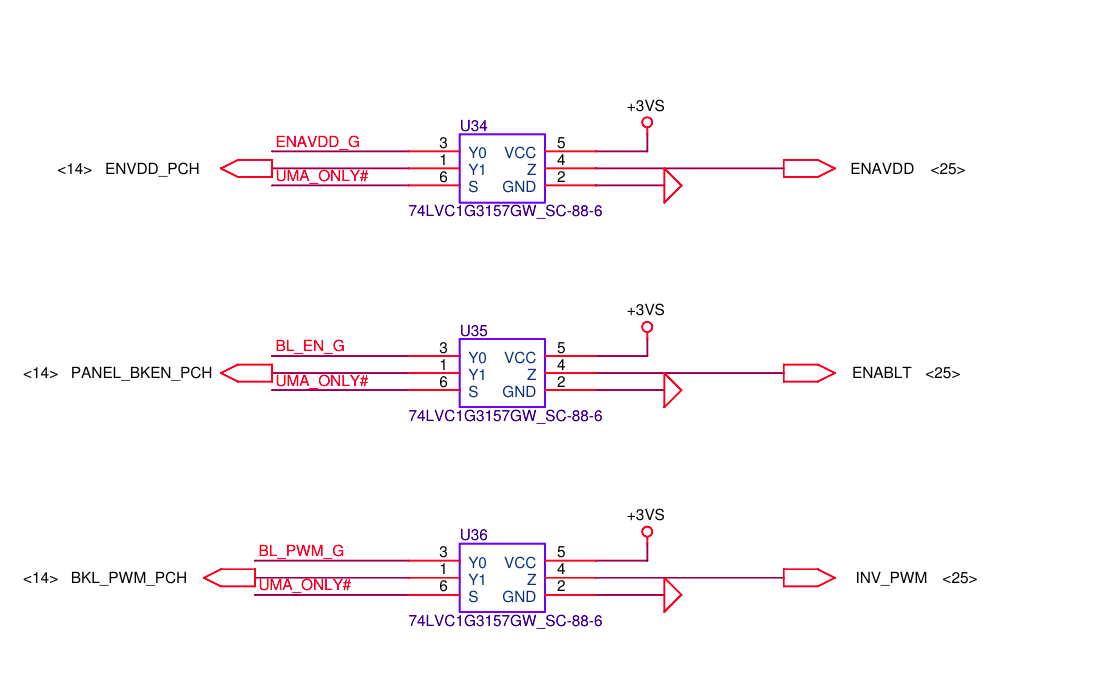
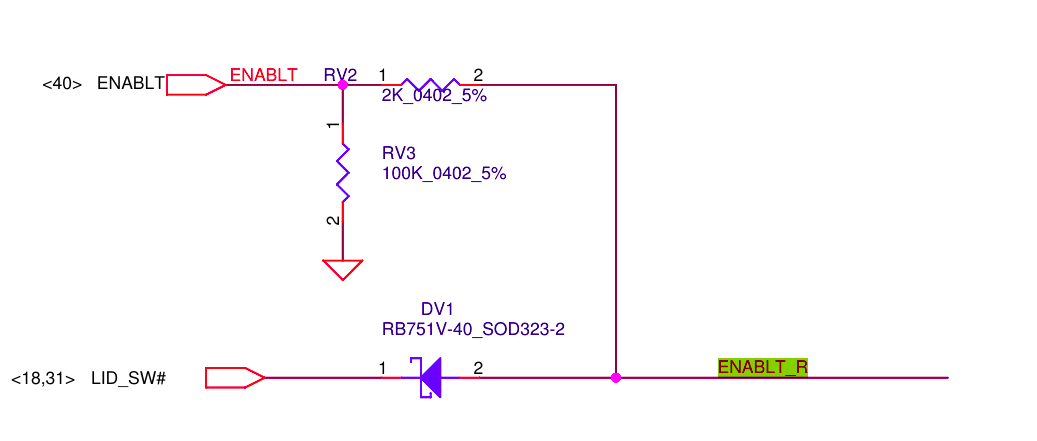
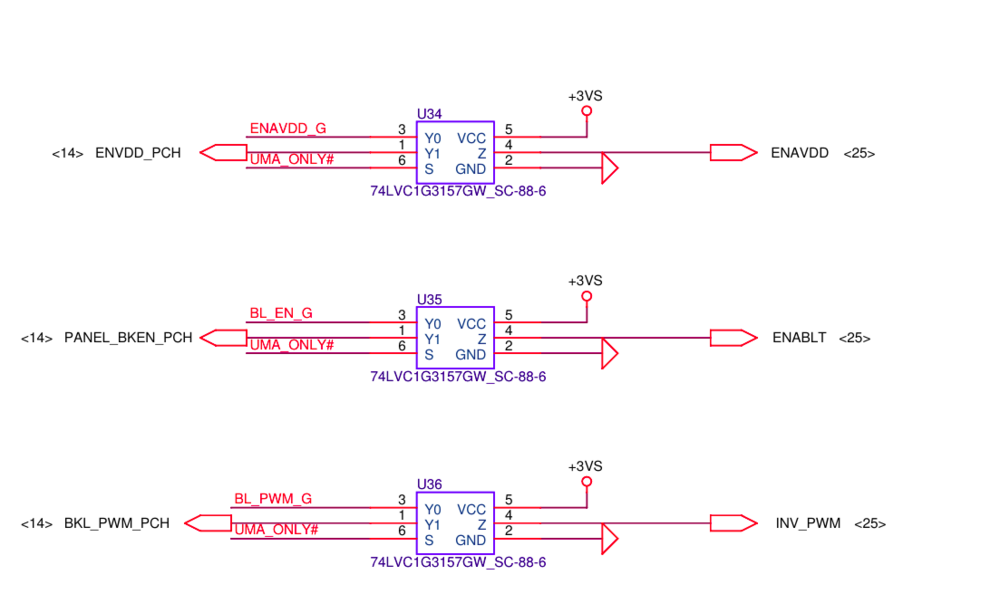
Yes it did work, there is no PWM transitor, only a selector that choses between the MXM_PWM and PCH_PWM (pic below) Yes, Zotac 1060 from a en1060 zbox (mini desktop), it has 2 DP and 2 HDMi so they probably used DP_C for HDMi but I'll test soon, I still have the OG vBIOS that was on the card when I got it. Hmmm, yes I know that it's the MXM gpu that sends the 3 pins to the LCD (more correctly to the switcher between MXM and PCH signals that then go to the screen). I wasn't clear ? I know that the mod consists of forcing 3.3v on these pins to make the lcd, it's backlight and it's PWM signal all show 3.3v logic... which forces them on. The lid switch is connected to ENABLET so that closing the lid turns off the screen. Switching the laptop off stops +3VS (where I connected the 3 signal pins) so that also turns off the screen, quite a complete mod honestly ! And yes I didn't want to buy an RTX card, cheapest one is 145 euros for RTX3000 (almost more than zbook 17 g3 + 1060m)
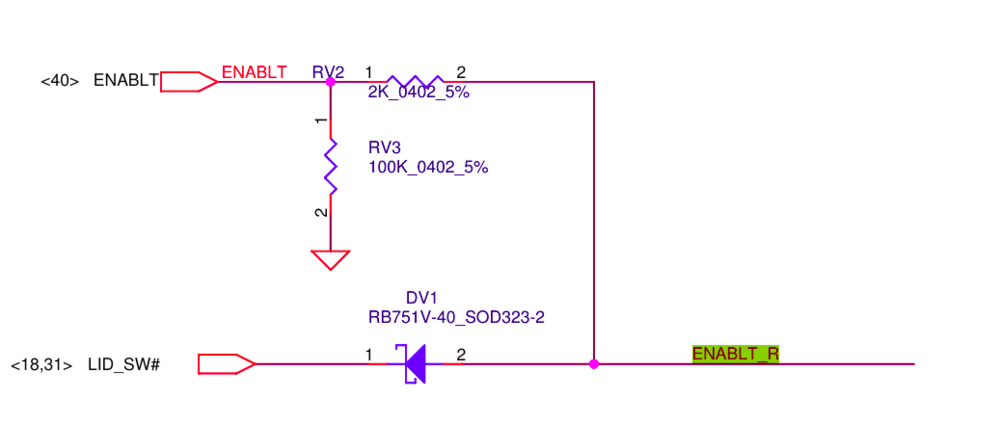
-
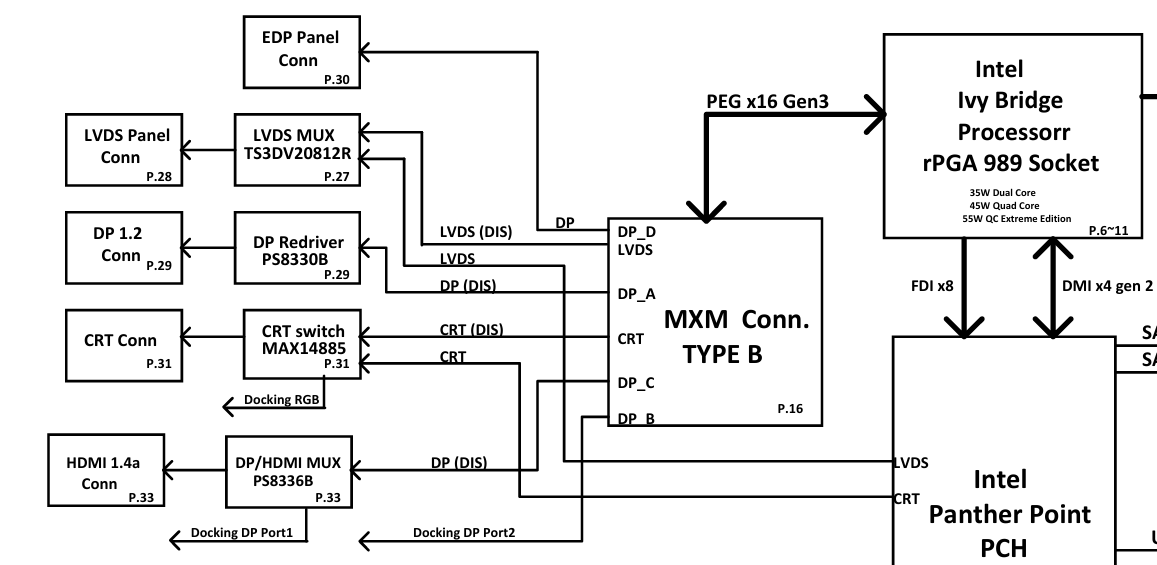
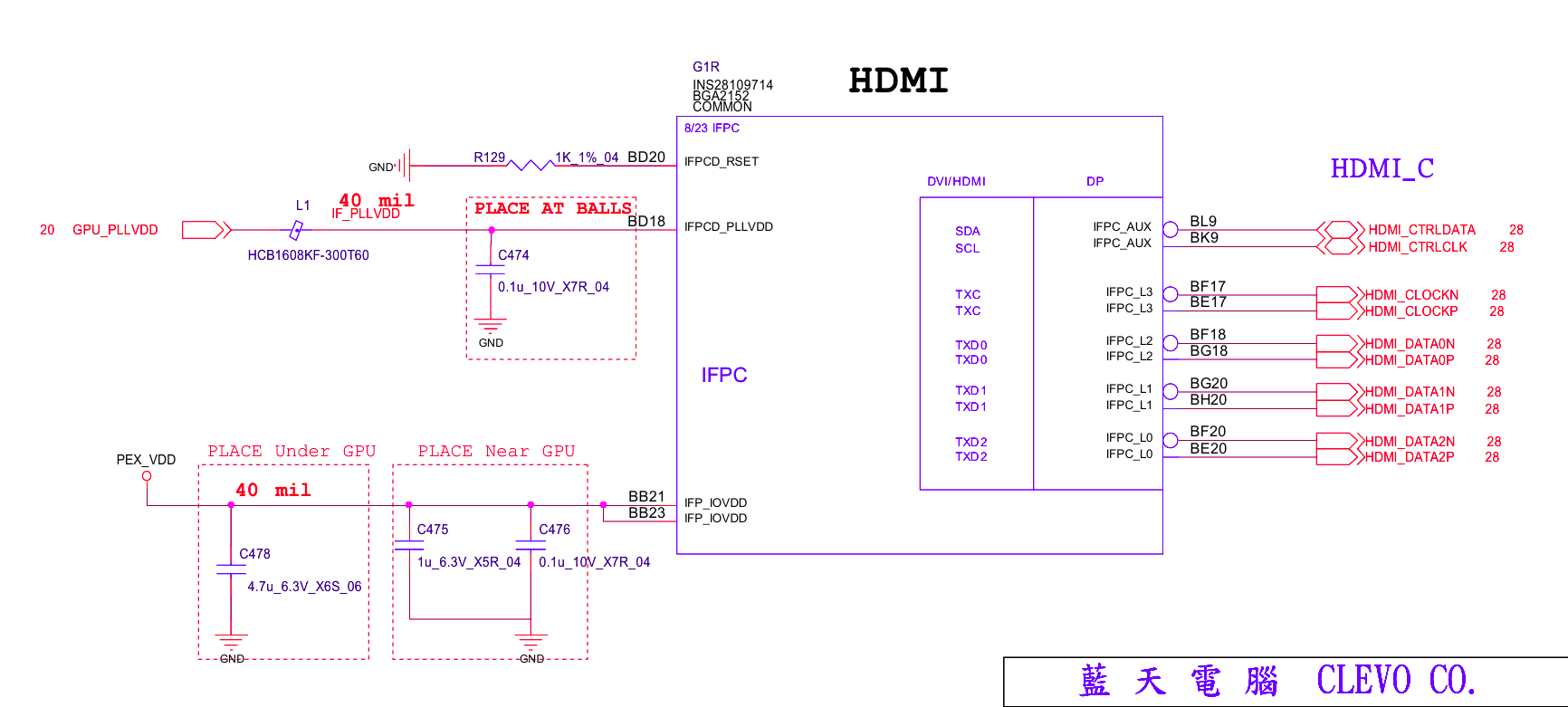
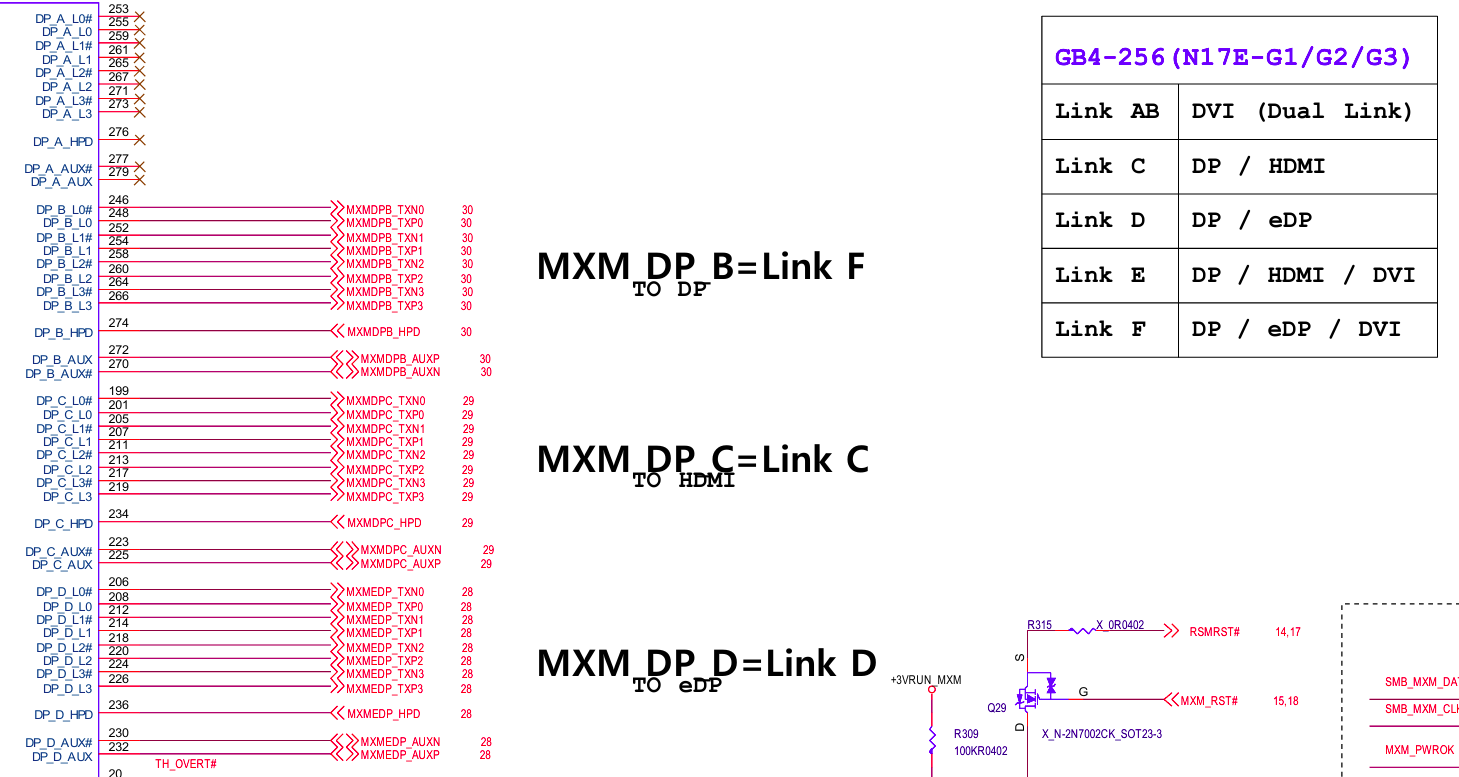
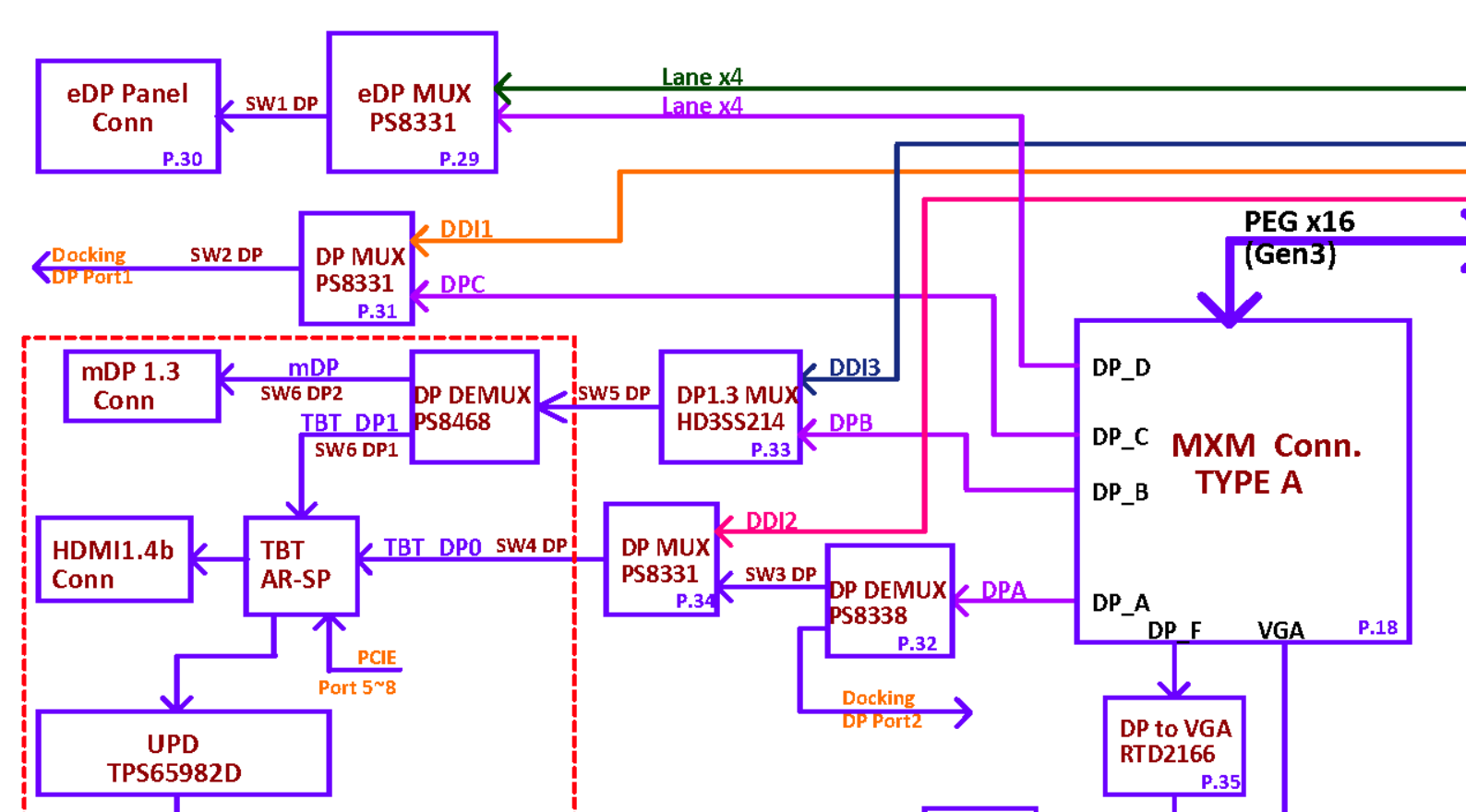
Haha I wasn't going to give up that easy friend ! So I did get it to work ==> eDP screen connected directly to a pascal GPU in the MXM slot ! (but not in the way I planned ... ) So I solder blobed the PNL_PWR_EN + PNL_BL_EN + PNL_BL_PWM (pins 23, 25, 27 on the MXM slot respectively) and connected them to 3.3v. The screen still turns off if I close the lid or put the laptop to sleep, but no suprise the brightness control is stuck at 100% (maybe adding an external arduino or micro controller to send a PWM to control backlight as a fix ??) HOWEVER the 1060M has NO DP ON PORT DP_C, only HDMi !! so with the 1060M in the slot, turning on the laptop gives me 1 second of white lines then black screen. I checked multiple bios and schematics of laptop that use soldered and MXM 1060M. All those that I saw have freaking HDMi on DP_C (pic below of a clevo motherboard, IFPC = DP_C for soldered GPUs) I'm starting to think that the 1060M doesn't have the capabilities for DP on DP_C, the only evidence that I found is that on the MSI GT72VR schematic (pic below) that uses a 1060M MXM, it looks like it should have DP on DP_C. Anyone has a vbios of GT72VR 1060 MXM ? It then gets fed into a SN75DP159 chip that has it's input as HDMI signals so I'm guessing that GT72VR 1060 MXM vbios has dual mode DP on DP_C (?) Anyway I got a for parts precision 7720 with a P3000 MXM gpu (45 euros for the whole laptop what a steal !), looking at it's schematic, the vBIOS of the p3000 should have DP on port C to meet the requirements of the 7720 schematic bloc diagram (pic below). And what do you know, it outputs directly to the eDP screen of the zbook 17 g3 !!! (Finally, I was starting to feel that the zbook 17 g3 was cursed after hours of searching for a DP on DP_C vbios...) So the technique of soldering the 3 PNL_ signals to 3.3v should allow any GPU that has DP (Display port) or eDP output on the same path as the eDP connector for the laptop screen (usually DP_D but for my zbook it's DP_C) will work. Thanks again @SuperMG for pointing me in the right direction. Also, I flashed the p3000 vBIOS on the 1060M with a programmer to see if it would at least display but still nothing.
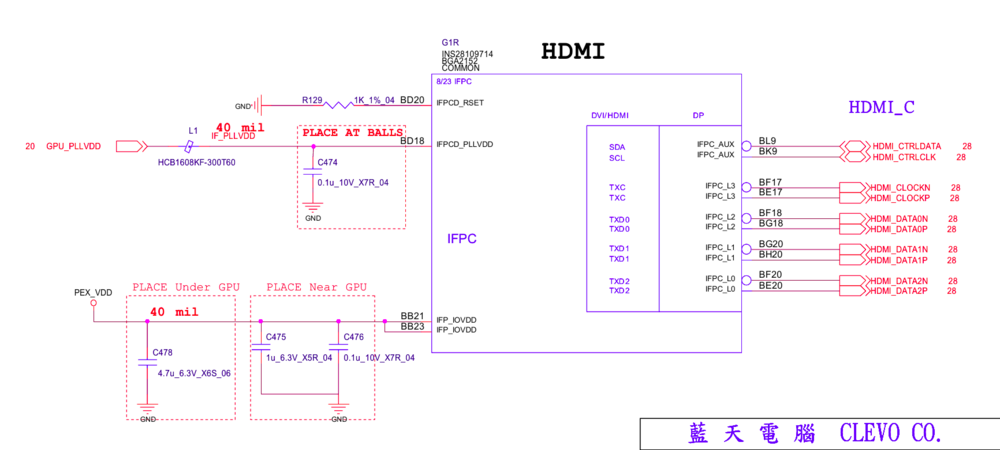
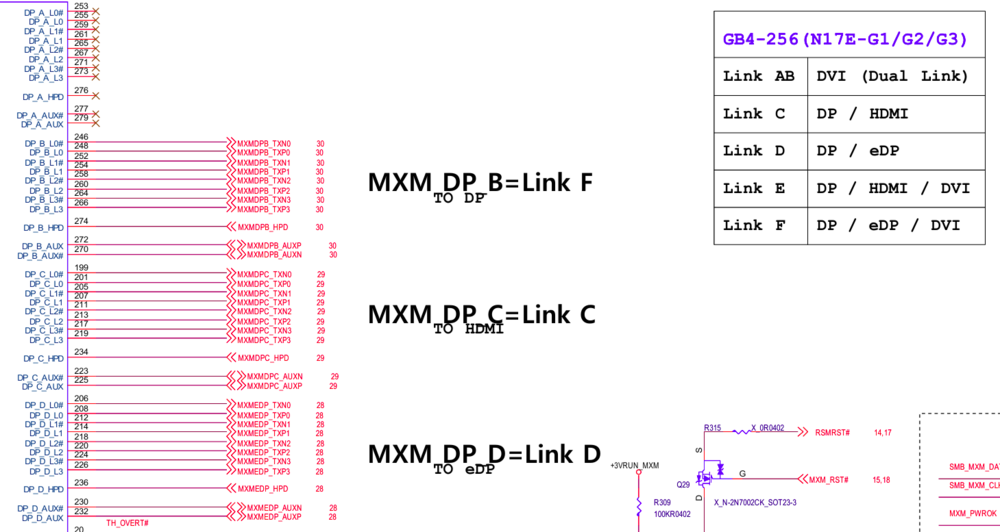
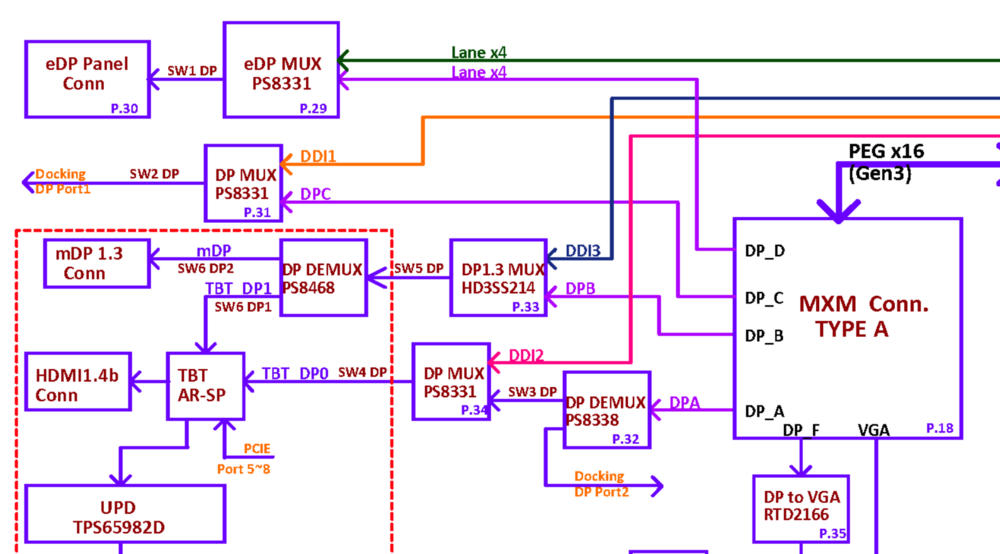
-
Yes, That's what I found as well, my g3 has edp on port DP_C of MXM slot. Problem is no vbios for 1060 has edp on C and I can't find a way to mod the bios to change DP outputs. Do you think running standard DP to DP_C with hardware mod could work to drive eDP? What should I look for to do this you think? Thanks
-
@SuperMG Hi, this is a great mod and could be essential for MXM upgrades !! Where you able to see if a laptop with only DP (display port) output on DP_D would run the eDP screen ? Wouldn't there be issues like screen brigthness adjustments and such ? (heck as long as it outputs a clear picture I wouldn't mind tbh) I would be intrested to try this on my 1060M because it outputs DP on DP_C (that is where my eDP screen is connected on the schematic of my zbook 17 g3) Thanks
-
Hi, this is a cool mod So these are custom 12v ish motors for the fan ? I might attempt this if all it requires is a small boost circuit, aliexpress has quite a few. I could try bumping it up to 6 or 7 volts, that hopefully won't burn out the fans. My zbook 17 g3 with gtx 1060 has a hard time keeping the gpu cool even when fans are set to the max. Could you maybe open the heatshrink tube that's around the booster circuit ? It's to see if the other wires, TACH and PWM are connected to the board he is using. thanks