JadeRover
-
Posts
172 -
Joined
-
Last visited
-
Days Won
2
Content Type
Profiles
Forums
Events
Everything posted by JadeRover
-

Precision M6800 questions and upgrades
JadeRover replied to Jers6410's topic in Pro Max & Precision Mobile Workstation
You can get a dell 240w charger to plug into the barrel jack of the zbook 17 g2 + add 100k resistor between the ID pin and the V+ pin so that laptops sees it as 200w charger. Then shunt mod the input power resistor so the system won't shutdown from over current at >210w. You should be able to run 230w load with 150w + 80w cpu. However you will probably need a heatsink mod as single fan cooler will quickly be overloaded. Luckily people using the zbook 15 g1/g2 frequently do this by adding a fan in the ODD space + extra heatpipes. -
HP Elitebook 8570W - is it still good ? Hardware modifications
JadeRover replied to GuitarG's topic in Custom Builds
@Vladka76 Yes, this should work, nice that 8770w has DP_D -> eDP, this will make GPU compatibility greater. I noticed a trend that up to zbook 15 g3. All 15 inch HP worstations with MXM3 connector have DP_C -> eDP which is a shame = special HP vbios needed or mac rumors vbios needs to be used (best card is the P5200). If not, there will be no picture on LCD. Unless you have a vbios that has standard DP_C -> DP (standard display port), then a backligh mod can be performed but screen is stuck at 100% brigthness. Couldn't find boardview, schematic is preffered tbh so good that you have it. I think you will need to mod the specific "Dream Color" cable that came with these laptops, the standard LVDS cable won't have cables connected to the pins associated with eDP, they will be unpopulated as why would your LVDS cable need to carry eDP wires ? Alternatevely you could repin a LVDS cable to connect to the eDP lines. What I think is easier is : getting DC cable, cut off the end that connects to the interposer board and solder a standard 40 pin ipex connector used by eDP displays (if cable length is enough to connect to display, it should be). Only problem is that eDP cables used or high bandwidth, which is the case here, need special coaxial cables that are HELL to solder (experienced this the hard way when trying to mod a zbook cable). These are usually soldered with lasers in factories D= Might be worth it to find a manufacturer who can build you the cable, on tabao or even aliexpress, sellers you make custom cables should offer it as it isn't much work for them. PS : Your pinout is correct, but you do need pin 44 that is eDP HPD (hot plug detect), required for eDP, not sure what the MARS signal pin is, you can trace it back on the schematic, probably a GPIO pin to tell the PCH or EC chip that a DC display is present in the system. -
HP Elitebook 8570W - is it still good ? Hardware modifications
JadeRover replied to GuitarG's topic in Custom Builds
I double checked again on the boardview of the 8570w motherboard and this is not the case The motherboard never converts LVDS to eDP, not possible, same for the cable or interposer board, the technology to convert LVDS to eDP came after these laptops were built. Famously the thinkpad T430 'IPS' mod uses a third party LVDS -> eDP converter. On the screenshot I showed just above, the motherboard LCD connector has both eDP and LVDS on the same connector, both coming from the GPU in the MXM slot, in a direct line, no conversion going on in the motherboard. The eDP cable you are talking about doesn't convert any signal, it just connects the eDP found on the motherboard screen connector to the eDP display. A LVDS cable that frequently came with these models connects the LVDS found in the motherboard screen connector to the LVDS of the screen. I talked about how zbooks do this. All zbooks, (starting g1, 15/17 models) have only eDP on the motherboard screen connector. After that, the cable carries the eDP signal to an interposer board -> see my post at the top of the page showing pictures of such interposer that converts eDP to LVDS. The problem is that the 8570w never shipped with a standard eDP cable that could connect into a modern eDP display. It was made to connect to the 40 pin eDP interposer board used to communicate to the Dream Color LVDS LCD. On the pictures of such interposer board, the connector that get's data from the motherboard is non standard to eDP display. Good news is that, unlike thinkpad T430 that needs an added converter board to get modern eDP displays working, 8570w just needs a modded cable that has it's end modified so that it can connect to a standard eDP display connector. -
Some 15.6 and 17.3 inch laptops of that era (ivy bridge + Haswell) used eDP to LVDS converters so that they could connect to LVDS displays that were more common at the time. You are in luck as your model came with a 3K option, what you have to do is hunt down that 3K eDP cable as it can only connect to a 3K eDP display (LVDS tops out at 1080p). Then, you'll have to check if the connector is 40 pins 0.5mm pitch or 40 pins 0.4mm pitch, after that you can buy a 40 pin display of your liking (making sure the pin pitch + connector position will work with the 3K cable). You can chose 1440p 144Hz for example I would not go up to 4K resolution as older systems can't deal with the bandwidth if the internal eDP connection is limited to DP1.1 (not always the case : happens if there is mux switch in the way, example precision M6700 has no mux switch = DP version limited by MXM gpu installed). If you really want 144Hz, the safest way is getting 1080p 144Hz as even if it is DP1.1 limited because of mux switch, you can still get 154Hz max
-
Dell Precision M4800 best GPU and upgrades?
JadeRover replied to ncurses's topic in Components & Upgrades
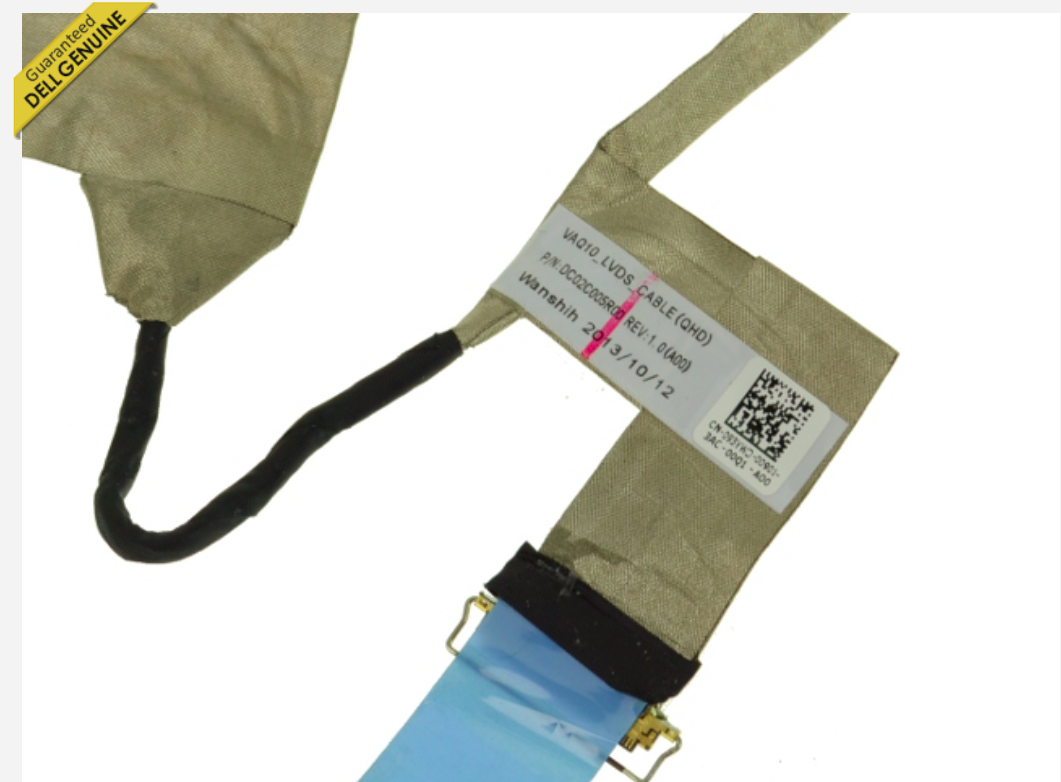
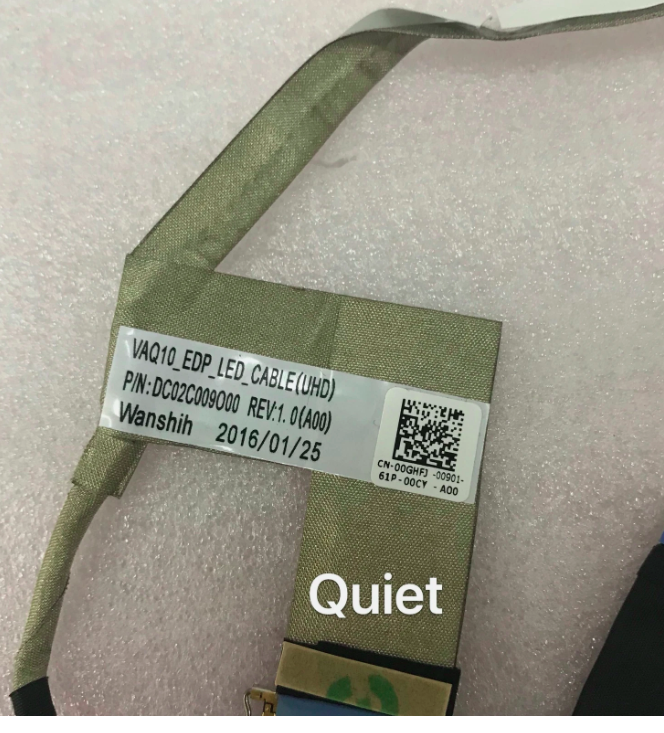
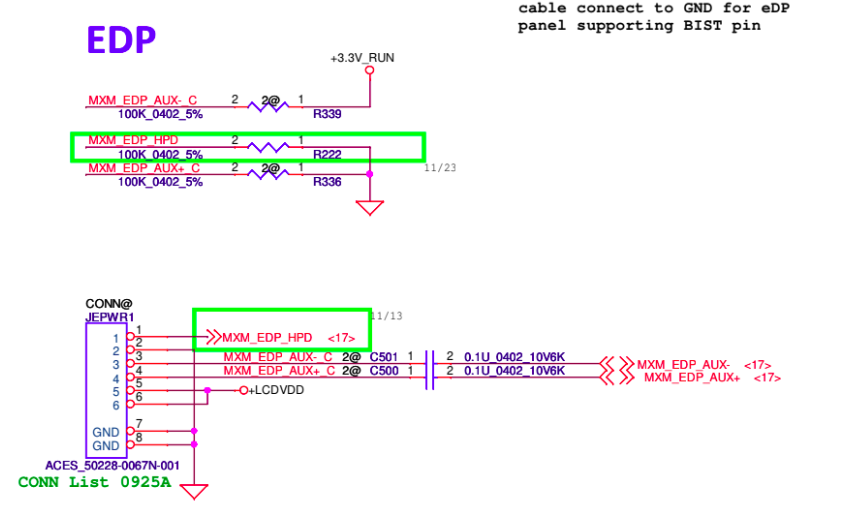
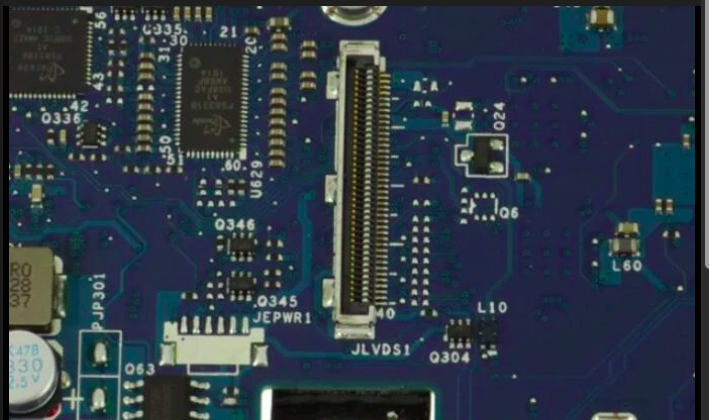
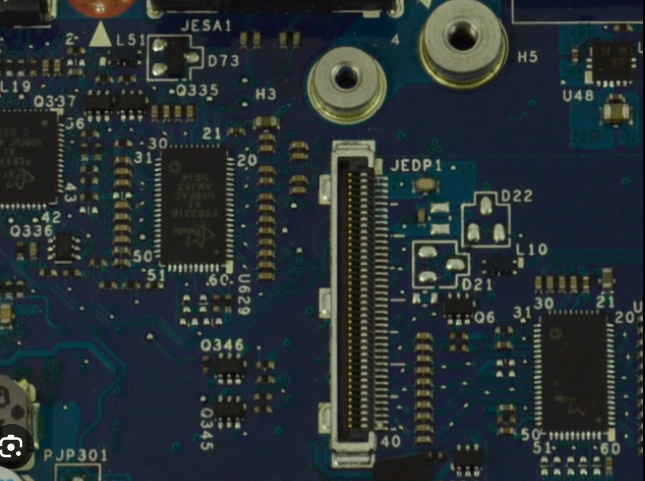
There is some (understandable) confusion regarding that. M4800 has 3 different motherboards with 2 different QHD capable cables (giving 4 lanes of eDP required for running a QHD/4K display): MOTHERBOARDS : -one "early" one (2013) with LVDS connector (JLVDS1) for the standard display - LA-9771p - WITH JEPWR1 connector SOLDERED motherboard ! has option for a QHD eDP display using the appropriate LVDS QHD cable. See following picture : - one "early" one (2013) with LVDS connector (JLVDS1) for the standard display - LA-9771p - WITH JEPWR1 connector NOT PUPULATED on motherboard ! has no option for a QHD eDP display UNLESS you modify this motherbard by adding the missing JEDP connector and 2x100nf capacitors. Then you can use the appropriate LVDS QHD cable. See following picture : - one "later" motherboard (2014) with eDP connector (JEDP1) for the standard display - LA-9772p - has option for a QHD eDP display using the appropriate eDP UHD cable. See following picture : CABLES : - "LVDS QHD" cable -> it has extra wires going to JEPWR1 next to the motherboard LVDS connector. See picture below : - "eDP UHD" cable -> it does not has extra wires going to JEPWR1 next to the motherboard LVDS connector. See picture below : Schematic extract showing the wiring of jEPWR1 that brings aux edp signales requires for eDP display. The 4 lanes of eDP are merged on the JLVDS1 connector. TLDR : - If you have the LVDS "not QHD capable" motherboard : you can't upgrade to QHD/4K unless you soldered the following to the missing spot on the motherboard : connector + 2x100nf capacitors. Then you can upgrade your standard LVDS display to eDP with the "LVDS QHD" cable - If you have the LVDS "QHD capable" motherboard, you only need the 'LVDS QHD" cable, however I believe that all the QHD capable LVDS motherboards had a QHD screen out of the factory - If you have the eDP motherboard, you only need the "eDP UHD" cable. I think this one is harder to find than the LVDS QHD cable unfortunately. Hope this clears things up !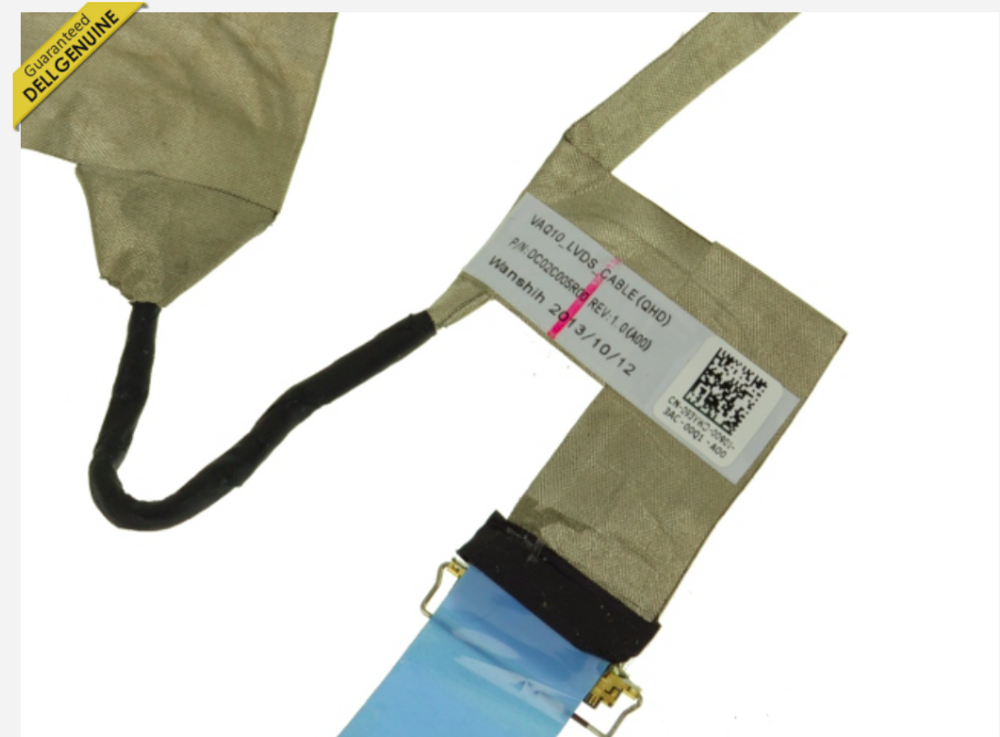
-
HP Elitebook 8570W - is it still good ? Hardware modifications
JadeRover replied to GuitarG's topic in Custom Builds
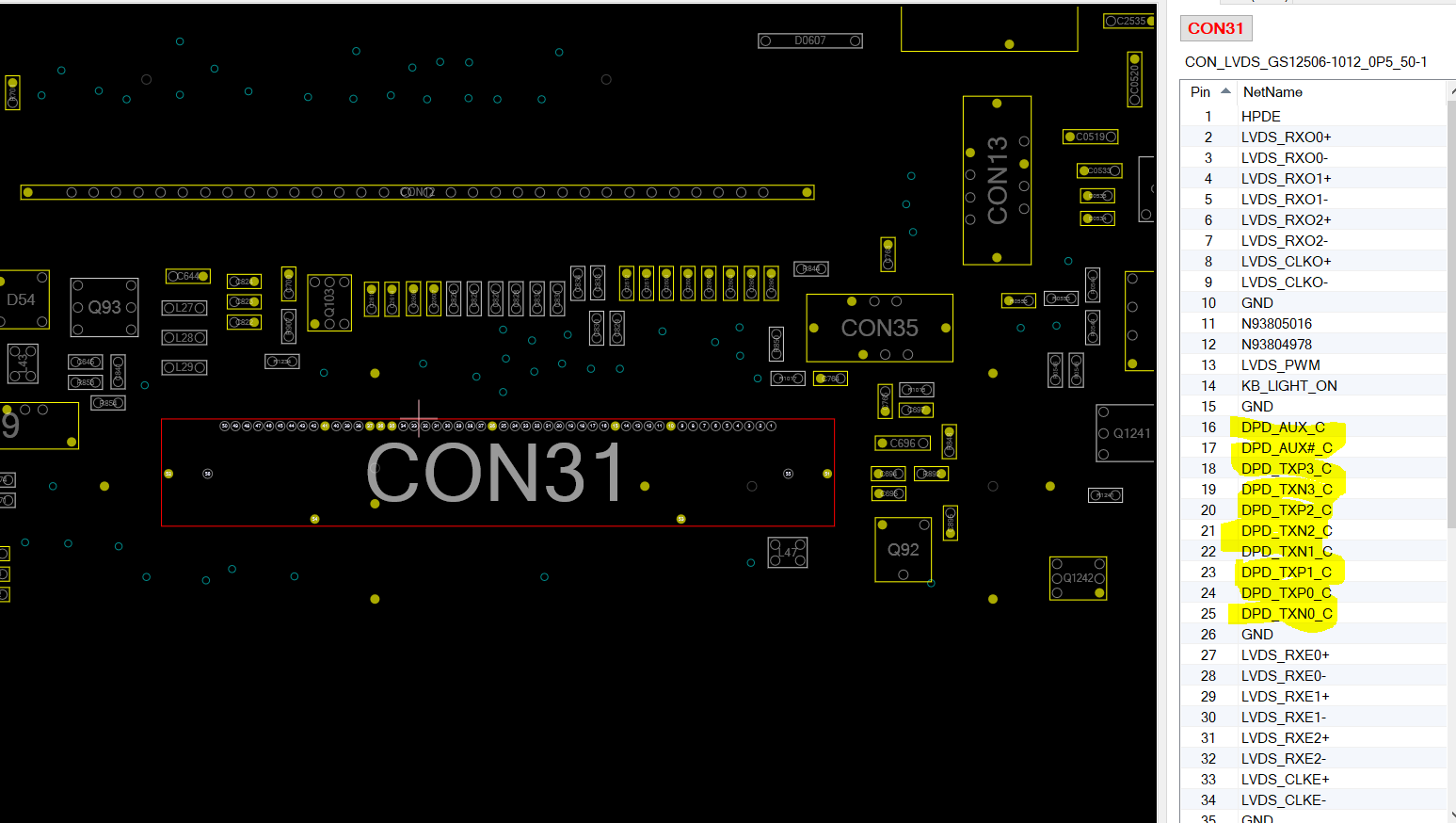
Welcome to the forums ! Nice modding adventure you've started there, 20 bucks GPU upgrade on a laptop is always nice =D Anyway, I was interested in you saying that this first vbios didn't work for you. I checked the 8570W boardview and indeed the internal display connector connects the eDP to DP_C of the dGPU (see screenshot). This arrangement is non standard, most MXM GPU vbios have eDP connected on DP_D. HP has a few MXM laptops that have eDP on DP_C -> zbook 15 g1/g2/g3 + zbook 17 g3. Meaning if you want to do a GPU upgrade you need to use a GPU that has eDP on DP_C (if not you'll get a black screen). The safest way to do so is to get an MXM gpu that originally shipped on the models I mentionned + flash the appropriate HP bios. Moreover, iMACs also use DP_C to drive the eDP display, vbios found on post #1 of this page for the mentionned GPUs should work for your laptop as well if you want to upgrade further down the line : https://forums.macrumors.com/threads/imac-2011-maxwell-and-pascal-gpu-upgrade.2300989/ = more GPU upgrades possible. You can also use a backlight cable mod if your GPU has standard DP on DP_C (not eDP).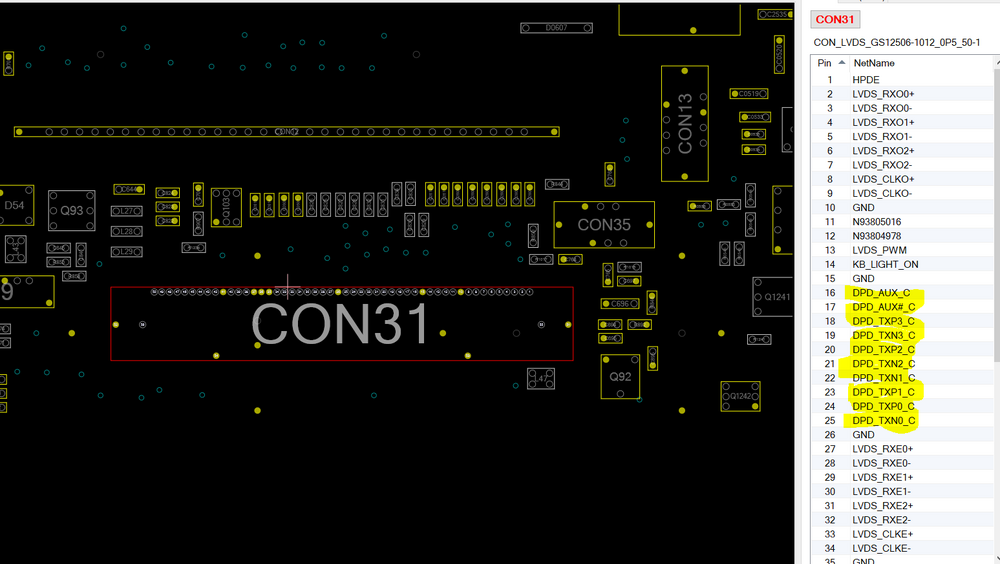
-
Precision M6800 questions and upgrades
JadeRover replied to Jers6410's topic in Pro Max & Precision Mobile Workstation
I don't think so, the 4940xm should beat the 4900mq at all power levels since you can undervolt it more than the 4900mq before your system crashes. If you are power limited for the whole system (which seems very unlikely with a 240w charger), the 4900mq won't perform as well as the 4940xm in any case. Anyway if you ordered the 4900mq, give it a try and see if it can do more than 3.7 since that is your initial goal. -
Precision M6800 questions and upgrades
JadeRover replied to Jers6410's topic in Pro Max & Precision Mobile Workstation
And at what power did they achieve this do you know ? My guess is probably 60w+ to do 4ghz all core on the 4900mq as my 4810mq requires 70w to do all core 4Ghz and it's a tier lower. Your problem is the power limit so I'd stick to the 4940xm -
Precision M6800 questions and upgrades
JadeRover replied to Jers6410's topic in Pro Max & Precision Mobile Workstation
Well that's just a number given by intel for the design TDP of these CPUs so that manufacturers can make heatsinks accordingly. What is important is the voltage per clock ratio that each chip can do. On my zbook 17 g2 with i7-4810mq, when pushing all core to 4.0Ghz it hits 70w. It would be wiser to stay with the 4940xm that has much better silicon meaning you can undervolt more before you crash meaning higher clocks for the same power. All haswell mobile quadcores have the same physical die (some with more cache than others), the way intel names CPUs is that those that can be fed less voltage (=less power) for the same clocks achieved are marketed as the XM chips. For example, this same 4810mq will crash at -20mV at all core 4Ghz. The 4940xm has way better overclocking headroom than the 4900mq. I'm ready to bet that the 4940xm reaches higher clocks than the 4900mq in your power limited system because you can get 3.7 Ghz all core @ -80mv witht eh 4940xm whereas the 4900mq will probably crash at -45mv = stuck at 3.5Ghz all core. -
Precision M6800 questions and upgrades
JadeRover replied to Jers6410's topic in Pro Max & Precision Mobile Workstation
Yes, that is because you are being power/current limited. By undervolting, the CPU can reach higher clocks for the same power/current, you need to investigate all power limiting factors, but in your case it sounds more like current limit as throttlestop shows "EDP other" limit reason -
Precision M6800 questions and upgrades
JadeRover replied to Jers6410's topic in Pro Max & Precision Mobile Workstation
That's a easy fix, solder big wires from the main power rail (19.5v after 2nd Mosfet) to the power pins of the GPU, GPU is fed main power rail through the MXM slot anyway. Even up to 4.3Ghz all core see the comments at the bottom of this page : Intel Core i7-4910MQ Mobile processor - CW8064701474105 / BX80647I74910MQ This is because this is a "900" series CPU, just like 6920HQ and 7920HQ, these have +6 turbo bins VS the +4 on other i7 mobile CPUs But it sounds like you were hitting a hard power limit/current limit so bumping the turbo bins won't do you much good. Power limit editing on my m6700 worked great, can't help you more from what we said in PM with the m6800 as I don't have the machine (nor the m4800 that should have a similar implementation of power/current limit in the bios) -
Precision 7510/7520 Owners Thread
JadeRover replied to M4980's topic in Pro Max & Precision Mobile Workstation
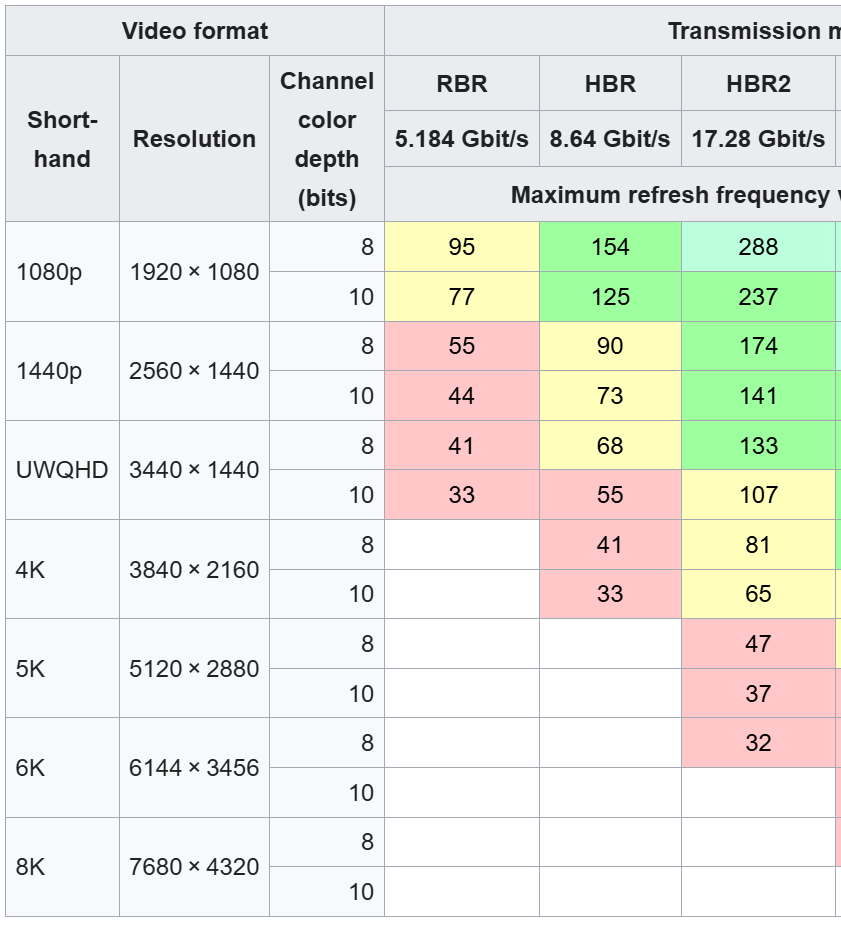
Yes I used the stock UHD display cable : 06GXDN it is the only way to get 4 lanes of eDP displays working = displays with > 1080p and or > 60Hz (without making your own display cable) The display I have is this one : NV173QHM-ny4 BOE NE173QHM-NY4 Overview - Panelook.com I got it as it was a good deal on my local second hand shopping website (40 euros for the display) Display connector side doesn't matter as the UHD cable is made for displays that have a connector on the left side (looking from back of display) and the cable leaves from the left hinge (looking front of the laptop) = You can use "left" or "right" sided display. The display I used has a connector on the right side (looking from back of display) so I had to make the LCD cable loop back on itself inside the laptop lid so as to connect to the display. There is enough room in the "chin" below the display in the back panel to get the cable to loop back without making the LCD bezel bulge. I taped the display bezel back in place and no problems whatsoever since. The only limit is bandwidth as we are limited to a DP 1.3 connection, even in dGPU mode, see here (DP1.3 columm on the right) : My display works as it is 1440p 165Hz 8bit. If you try to use 10 bit 1440p 165hz display you will have to run it at a lower refresh rate to use 10 bits or run in 8 bit mode to get 165Hz. During testing I got 4K 10 bit to work at 60Hz, trying 8 bit 120Hz gave artifacting and flickering image. Hope this helps ! If you have more questions I can try to answer them as well. Regards,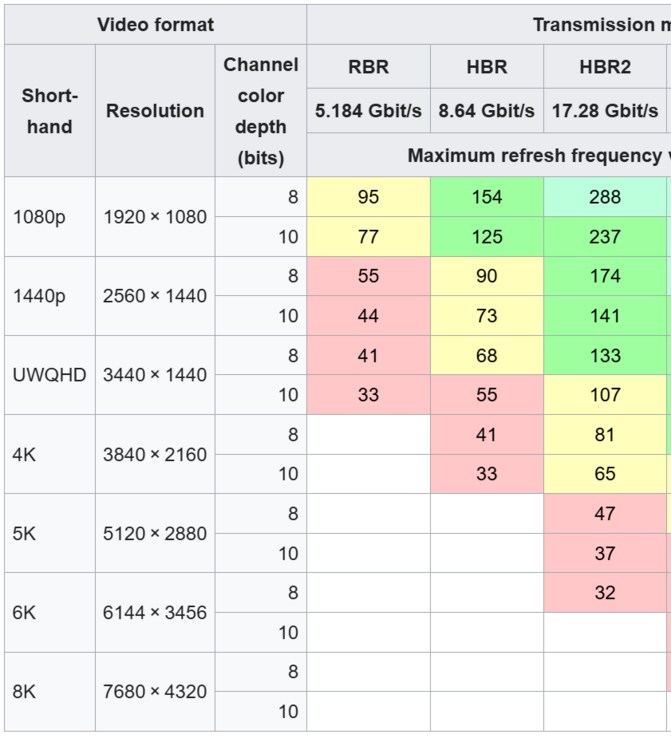
-
Precision 7510/7520 Owners Thread
JadeRover replied to M4980's topic in Pro Max & Precision Mobile Workstation
I ran a 4K120Hz IPS display on my 7720 but I couldn't get the 120hz to work, even when selecting 1080p 120Hz, I was stuck at 4K60hz this is because the MUX switch on the laptop limits the bandwidth to eDP/DP 1.3 speed, even in dGPU mode. When I tried to force 120Hz the laptop would show massive artifacts and glitches and it reverted automatically after 15s. However this could be due to the display as it's eDP 1.4 and might have compatibility problems with the system. However I got a 1440p 165hz IPS running at 165Hz as of right now on my 7720, that's to give you an idea of the max bandwidth you can run on these systems. If you are into modding, look for 16 16:10inch OLED displays, specifically this one that is listing really cheap : 2880x1800@120Hz (you'll might at 60Hz) from an HP spectre 16 : Matryca HP HP Envy x360 16-ad WQXGA TS C | eBay The sellers maybe don't sell out of Europe, they usually have good deals on used displays, I got my 4K120hz display from them, a few tiny scratches and one slight spot in the corner but apart from that the display is really nice. Regardless, 16 inch 16:10 can be modded into 15.6 inch laptop, you just need some vertical bezel headroom as the display is around 2 cm taller and it is also 0.3cm narrower. Display in this size and aspect ratio come in OLED variants as well. Finally you can hunt down early vivobook 15s for their display as they have a drop in 15.6 inch FHD OLED display. I don't know about mini-LED displays though. -
Precision M6800 questions and upgrades
JadeRover replied to Jers6410's topic in Pro Max & Precision Mobile Workstation
Did you managed to get CPU overclocking working ? Also memory overclocking should be possible on m6800. Looking at the IFR extract, with setup_var from grub you can change related profiles to enable XMP on you ram modules. You can also write custom XMP profiles to your non XMP ram sticks, up to 2400Mhz DDR3 if you are feeling lucky ! Writing to DDR3 spd is a lot easier than DDR4 spd btw. Here is a link to the guides and tools + proof that someone got 2400Mhz working on i7-4810mq -
Yes that's what I understood, to do this you had someone do it ? Because I looked into doing this myself for my zbook 17 g5 but having a good 4K120Hz signal requires some individually shielded cables that are like 0.3mm wide cable + conductive shield. It would be extremely complicated to do by hand. I lack the skill. Unless you solder unshielded cables but then the signal integrity won't be as good. Id' imagine
-
Hello, probably a bit old now, but how did you route the eDP cable to the display ? I saw that the display you used has it's connector on the right looking from the back, where as zbook 17 g5/g6 4K displays have the cable on the left looking friom the back. Wasn't the original cable too short ? Did you have to make a custom one to extend all the way to the new 4K display connector ? Thanks.
-
HP Elitebook 8570W - is it still good ? Hardware modifications
JadeRover replied to GuitarG's topic in Custom Builds
And yes I get your idea, since the motherboard outputs eDP signals (4 lanes of eDP) but it terminates in an unusable connector. The only solution is to DIY / get made a custom cable that connects to the eDP connector on the motherboard and then directly to the eDP display, bypassing the DC board that would create an unusable signal. 4 lanes of eDP is on part with modern laptops, you can connect 4K dislays or 1080p >120Hz displays as well. Worth looking into as the only custom part needed is a custom eDP cable, the LCD can be an off the shelf 40 pin eDP display. -
HP Elitebook 8570W - is it still good ? Hardware modifications
JadeRover replied to GuitarG's topic in Custom Builds
Yes, dell m6600 and dell m6700 DC models have that DC conveter board that transforms the incoming eDP to 50 pin LVDS + 10 pin power cable used by the DC LCD. The HP zbook 17 g1, g2 and 15 g1 that have the DC screen option also use such converter boards. Keep in mind that for all the models stated the converter board looks something like this : So if you get the DC cables for your model you see that it connects to your board in a non standard eDP format = can't use that cable to connect to a standard eDP panel conenctor. Also the zbook 17 g1 and g2 all have this converted board as they all have LVDS displays and the motherboard outputs eDP. Not sure why HP chose this approach, probably because eDP lcds were rare in 2013-2014. so zbook 17 g1/g2 with 900p to 1080p screes have this board if you want a sure way to get your hands on one. -
Dreamcolor Display from HP ZBook 17 G2 into 8760w?
JadeRover replied to loopster's topic in Components & Upgrades
That's odd, so the laptop refuses to boot in your scenario ? But it does in the same scenario + VGA ? You are running dGPU mode or Hybrid graphics ? -
Dreamcolor Display from HP ZBook 17 G2 into 8760w?
JadeRover replied to loopster's topic in Components & Upgrades
That is the correct, Zbook 17 g1 uses a mux switch between dGPU and iGPU that goes to the eDP connector on the motherboard. Then that eDP signal is converted to LVDS and fed to the panel, they probably did this as 17.3 inch eDP panels were rare in 2013, they used off the shelf LVDS ones instead. HOWEVER, iGPU has only 2 lanes of eDP (you can see that on the schematic) and the dGPU has the full 4. When you have a DC screen it needs 4 lanes of eDP, all other stock screens require only 2. So with a stock screen BIOS will give you option for Hybrid graphics enable/disable. When DC screen is plugged in, BIOS sees this and immediately disables hybrid graphic option and forces display through dGPU = no display if you don't have a dGPU installer or the dGPU you installed has no eDP OR it has DP (display port) but wit no backligh control pins = Black screen. HP RTX3000 does have eDP on the correct port, DP_D so this card should work on the zbook 17 g1. I will test this soon as I have HP RTX3000 andzbook 17 g2. Also here is an even cheaper RTX3000 (close to France in Europe) : Nvidia Quadro RTX3000 6 Go GDDR6 N19E-Q1-KD-A1 (HP ZBOOK 17 G6) | eBay 90 euros -
Nice !! Looks complicated to get all that wiring down. I was thinking of doing smething similar on my soon to be zbook 17 g1. However I was going to use an arduino connected internally to one of the not in use USB ports for the fingerprint reader. That way I can code a PC to arduino interfacing app that can cantrol the fan speeds internally from the laptop without having to use external switches. This does reqire coding skill tho and I lack some of that.
- 7 replies
-
- 1
-

-
- 8740w overclock
- 8740w cooling
- (and 1 more)
-
Dreamcolor Display from HP ZBook 17 G2 into 8760w?
JadeRover replied to loopster's topic in Components & Upgrades
Uhhh, that not an acual picture right ? We were talking about the pinout of the MXM connector that links up the GPUs display outputs on 4 different channels : A, B, C and D Usually eDP from the GPU is located on channel D called DP_D But for it to work the laptop must wire the eDP port to DP_D of the GPU ! The confusion is that some zbooks : Zbook 15 g1 + g2 + g3 and zbook 17 g3 have it wired to DP_C meaning no output on the internal screen -
Dreamcolor Display from HP ZBook 17 G2 into 8760w?
JadeRover replied to loopster's topic in Components & Upgrades
I will soon get a G1/G2 not sure, blindly bought it for 40 euros, seller had no info at all. On g1 schematic it has eDP on DP_D One day when I have time I while write a complete guide on zbook 15/17 that have MXM slot (g1 -> g6) -
Dreamcolor Display from HP ZBook 17 G2 into 8760w?
JadeRover replied to loopster's topic in Components & Upgrades
Actually the pinout of 8760w motherboard eDP connector is not compatible with zbook eDP Motherboard connector. 8760w has eDP and LVDS on the same connector wheras Zbook had only eDP on the connector. pluggin zbook display cable on 8760w will short out LVDS and cause no boot at best and motherboard damage at worst. Therefore you can only salvage the display from the Zbook 17 g2. You will need to source the DreamColor cables + board made specifically for the 8760w. -
Dreamcolor Display from HP ZBook 17 G2 into 8760w?
JadeRover replied to loopster's topic in Components & Upgrades
The display is the same : LP173WF3-SLB3 also same as the ones ending in SBL1/SBL2/SBL4. They use an eDP cable going to a converter that converts the 40 pin eDP int 50 pin LVDS that then breaks out into 2 cables that plug into the display. Motherboard eDP connector -> (eDP cable) -> eDP to LVDS converter board -> (2x lcd cables) -> LCD 50 + 10 pin LVDS input What is sure to work is get a non working dreamcolor motherboard cable + board + LCD cable from 8760w and use the lcd you salvaged from the zbook.