
Jerryzago
-
Posts
195 -
Joined
-
Last visited
Content Type
Profiles
Forums
Events
Everything posted by Jerryzago
-
Need Help Flashing & Obtaining Unlocked Bios AW M18X R2
Jerryzago replied to nicholas1020's topic in Alienware 18 and M18x
First of all, grab the A11 BIOS from this post I think M18x R2 doesn't like the sleep method for the BIOS flashing. Also you are on a later version (A14) so it will possibly cause boot issues. I will describe the process with the correct steps. It is a long way, but it will surely be error free. For good measure if your GPU is a newer than an 880m, it should be removed from the system. 1) Blind flash and BIOS downgrade to A03 Download the original Alienware unmodded A03 bios from Dell at Drivers and Downloads | Dell [united States] The file is named "M18R2A03WIN" Extract the contents of M18R2A03WIN to a new folder named "Alienware recovery" anywhere on your useable computer. In there you should have a bunch of files. (9 in total) Look for the one called QBR10EC.fd Rename this file to M18R2.hdr Place the file M18R2.hdr on a formatted fat32 usb stick on its own. Thats it. Blind created Recovery process: To do the recovery process you need to remove your m18x r2 battery. Unplug the back power cord as well Plug the usb stick with the file M18R2.hdr in the M18X's e-sata port Now hold down the END key (located above the numbers key pad) at the same time while your holding the END key plug in the power cord only, you will hear the fans turn on full bolt. Release the end key and wait After a few seconds once the file is read from the USB stick you will hear 20 or 30 beeps (sounds like a garbage truck reversing) After the beeps stop the m18x will shut down and reboot itself. ( 1 or 2 times depending) Once reboot all will be back to normal A03 bios. Connect the battery back if you wish after successful boot If you successfully boot, enter BIOS and check version 2) Upgrade to official A11 Just download the official A11 and flash it through windows. 3) Download the unlocked A11 from the post above and flash it with the instructions provided. Use a flash drive to create a boot disk into dos Unzip ALL files into the root of the flash drive (flash.bat, r2final.bin, fpt.exe, flash.bat, prr2.exe, fparts.txt,m18r2.hdr, m18r2.hdr.bin, readmefirst.txt) BOOT INTO DOS – Note, that when you set the bios to legacy in order to boot into dos, you MAY have to reinstall OS! (Just be prepared to reinstall no matter what) Once you boot into dos, run the file flash.bat It will unlock your bios (THANKS TO SVL7’s BIOS UNLOCKING TOOL – ALL CREDIT TO HIM FOR THIS TOOL!) Let it flash… Reboot your pc, and enjoy the MASSIVE updates! -
Need Help Flashing & Obtaining Unlocked Bios AW M18X R2
Jerryzago replied to nicholas1020's topic in Alienware 18 and M18x
Clarify first: You want to unlock the M18x R2 with the 3rd gen I7 CPU Or The Alienware 18 with the 4th gen I7 CPU; Both have different ways to unlock the BIOS. -
I used the BIOS from this post I hope you both are not referring to AW 18 R1?
-
It might be a bug related to Bios. If I set mine to SG, I get 8 beeps no matter the settings. I have a 880m, I might get into more testing when my 4930xm arrives.
-
Here is a galley I have with BIOS settings. I have included a firestrike result and a GPUz screenshot. https://www.3dmark.com/3dm/141209928? https://photos.app.goo.gl/qgvUHAMnNTbnqgqJ6 Feel free to ask me for a specific photo.
-
I will prepare a photo gallery with the settings. I hope it helps. I have a 4930mx on the way and hope it still doesn't throttle the GPU.
-
That is what it is supposed to do for the 17 R1. Even with the unlocked BIOS the dGPU is there, regardless the option in the advanced menu. If I select dGPU or SG, It results in 8 beeps.
-
Well did test Speedfan in in both of my laptops. M18x R2 controls all the fans together. So it is either 0rpm, 1900rpm or 4000rpm. HWinfo seems to work better in this scenario, since I can make my own fan curve scenario based on what gets hotter first. I have a 3940xm @ 4,4GHz on all cores and an HP Quadro RTX 3000. For the 17 R1 I can set individual settings to the fans. CPU can work seperatly to the GPU. With HWinfo, any modification to the fans, it would "brake" the GPU fan and set it's speed to 0rpm until I powered it down. With speedfan, I can have the GPU at 0rpm and CPU fan at 2000rpm and full blast when gaming. My 17 R1 has the stock 4710qm and the PNY Quadro RTX 3000. I will order a 4940mx/4930mx and see where it will oveclock.
-
Just tested it today and it works. I will test it in my 17 R1. If I get a total control of the fans, I will take a shot for a 4930xm and post a benchmark here that Hansell and RTX don't throttle with these settings.
-
I know that it doesn't makes sense. I can only assume that throttling is kind like a "bug" in the BIOS, and this trick is something to overcome. Like back in the days of the M18x R2 with dual 980m SLI and the whole igpu to peg switch during boot.
-
That is reassuring. I hesitated to upgrade my 4710mq. Stock fan curve was good or Did you have to make a modification? I mean using HWinfo to set fan speeds, GPU fan is constantly 0 rpms. So I am relying to stock controller for cooling. I have read here, people result to hardware modding the fans (like an external switch) for maximum performance.
-
I have the exact same question. I believe the unlocked Bios would be the answer to the 18s throttling problem. What CPU did you use? I want to go for an MX one, but I believe the extra power load might make the system throttle.
-
I have an Alienware 17 r1 with a 4710qm and a PNY RTX 3000. It doesn't throttle. I initially didn't have throttle and I manage to recreate and get rid of it by messing with the advanced settings (unlocked bios) regarding the PEG GPU. Optimus is enabled. Have a look at my post here in the Alienware 17 section with the title "Alienware 17 R1 Fan issue". https://notebooktalk.net/topic/2350-alienware-17-r1-fan-issue/?do=findComment&comment=51211
-
Is this GPU is similar to 980m? 980m has native support for the 18r1. Why not install drivers and "rebrand" is as an 980m. Maybe the limitations will go away. Also do you run this GPU in PEG or SG mode?
-
Thank you for your feedback.
-
For my 17 r1 Ranger (since it's same generation) I grabbed something called "Dell Command Center" from Dell's download page. Works as it should.
-
Download windows 11 iso from media creation tool. Download Rufus software to create a bootable installation media. Select the media drive from Rufus, select iso image to burn, and from the settings check to remove the restrictions that prevent windows 11 install on unsupported hardware. (It's a menu with 5 options. Check them all).
-
This is what I got from techinferno I make this thread for people who have bricked their bios on their r4(not the vbios), since the release of the A05 I have seen multiple people bricking their bios. The solution to this problem is really easy. Go to Drivers en downloads | Dell [Nederland] and download the .exe file. Use winrar to extract this file, you will have a file named like this QBR00EC.fd, rename it to M17R4.hdr. Now format an USB stick to fat/fat 32, and ONLY put this file on it. We are almost done!!! Unplug the battery from your laptop and be sure the power adapter is not plugged in, and put the USB in the eSate(NOT USB SLOT). Now hold the end button and plug in the adapter, your alienware should come back to live now!!!! It will beep some times and restart few times. Note: Leave CMOS battery in, or it wont work 😄 Thanks to SVL7/Brian, clearing things up for me, just go back into bios flashing 😛 Hope this helps. If not, the programmer is your best bet.
-
Use the older one. eSATA port only and USB stick in FAT32. No other files needed, just the BIOS file in the root folder. You will get there, procedure must be accurate to the point to succeed
-
Messing around with the iGPU settings, brakes these laptops. At least for the M18x R2 which is that same generation like as the M17x R4, needs the very first BIOS release. M18x R2 needs the A03 official file. Try using the earliest you can find from the official Dell site. After you manage to boot, upgrade to the unlocked one again.
-
Awesome results. So we can safely say, the 3080 is another step to upgrade our M18x R2? It works with minor heatsink modding and custom drivers?
-
I tried this and it worked for ma HP Quadro RTX 3000. I flashed (and briked) it with dell vbios successfully. Sadly the PNY Quadro RTX 3000 kept giving me errors when the programming was about to start!
-
Looks like the secondary GPU is on it's way out. If it were the cable, the problem would be there regardless the iGPU or the 880m. Disable SLI for starters to see if the problem is still there.
-
It has an QM77 Express Chipset. So a 3rd Gen I7? It might be possible, and since mine worked in an Alienware, I believe it will be compatible. I cannot guarantee that though.
-
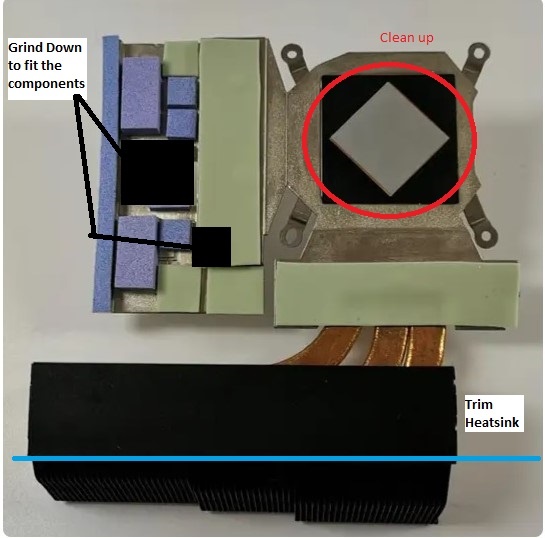
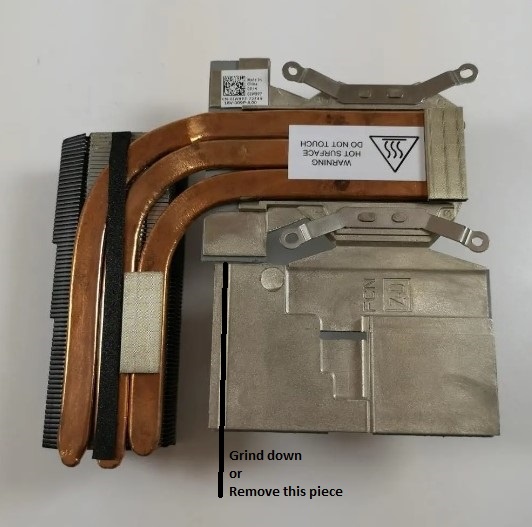
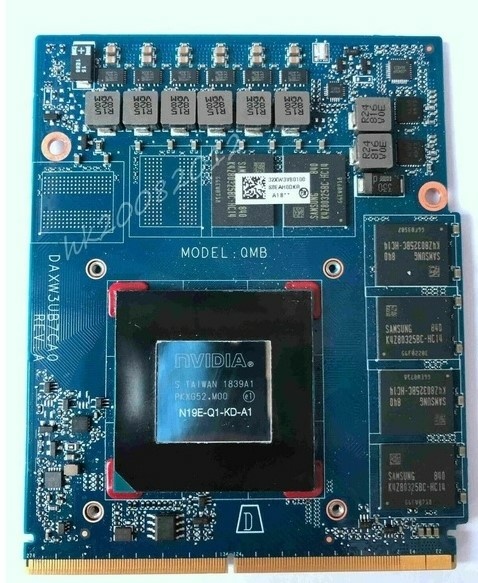
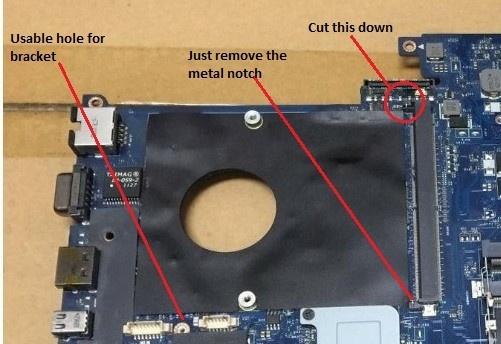
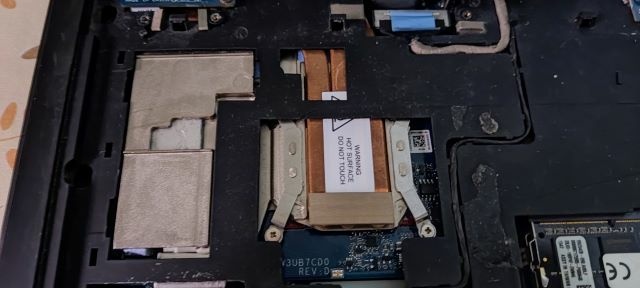
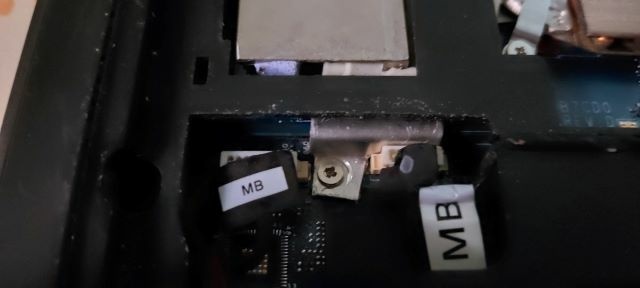
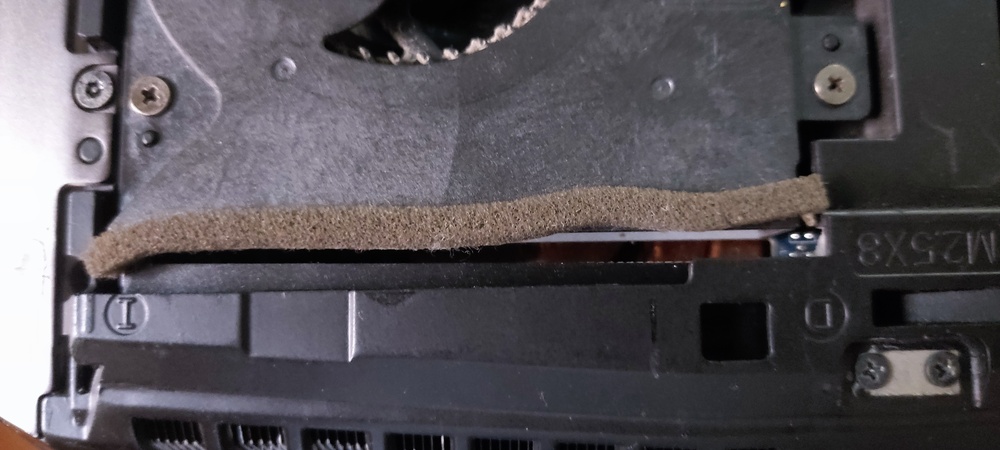
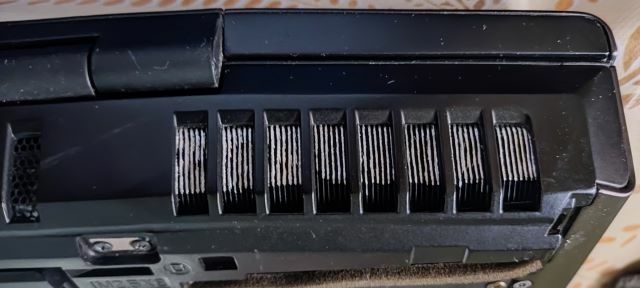
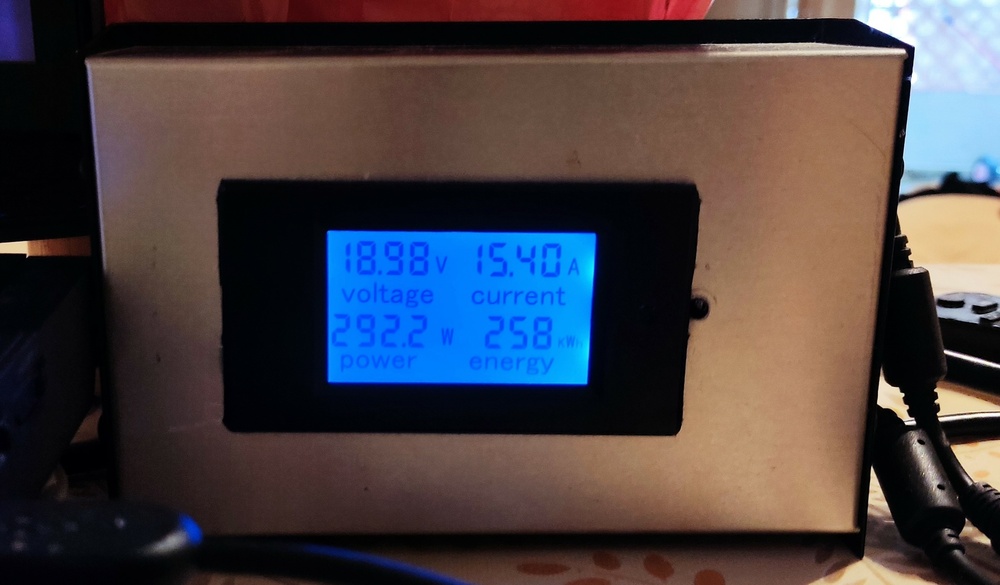
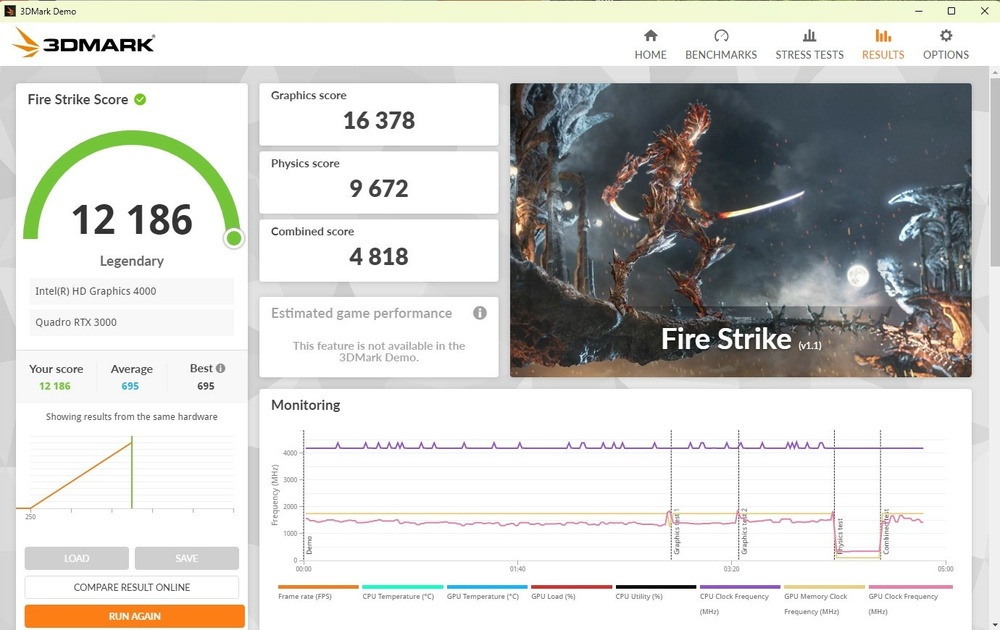
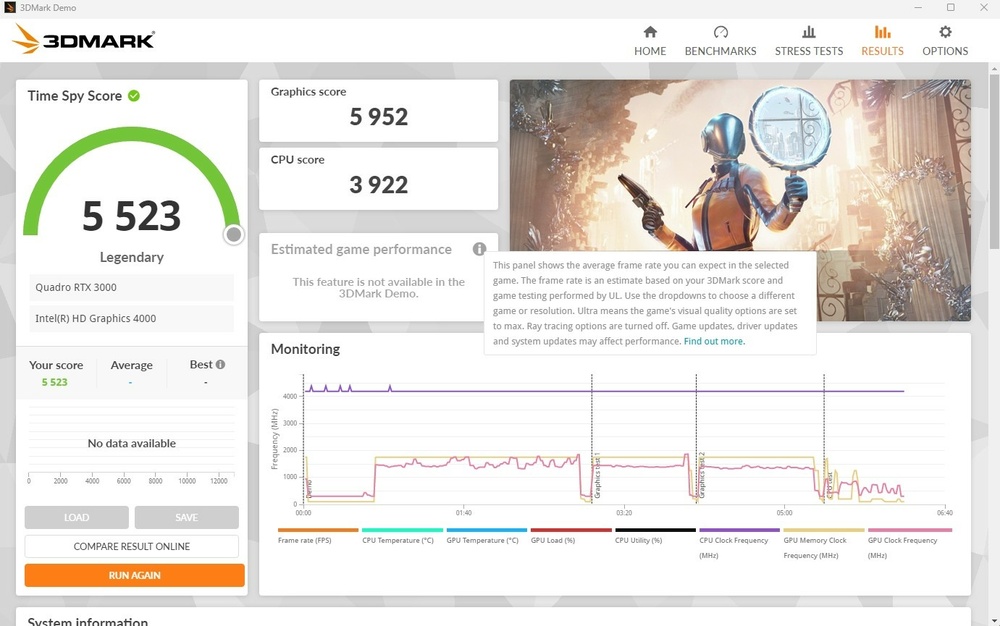
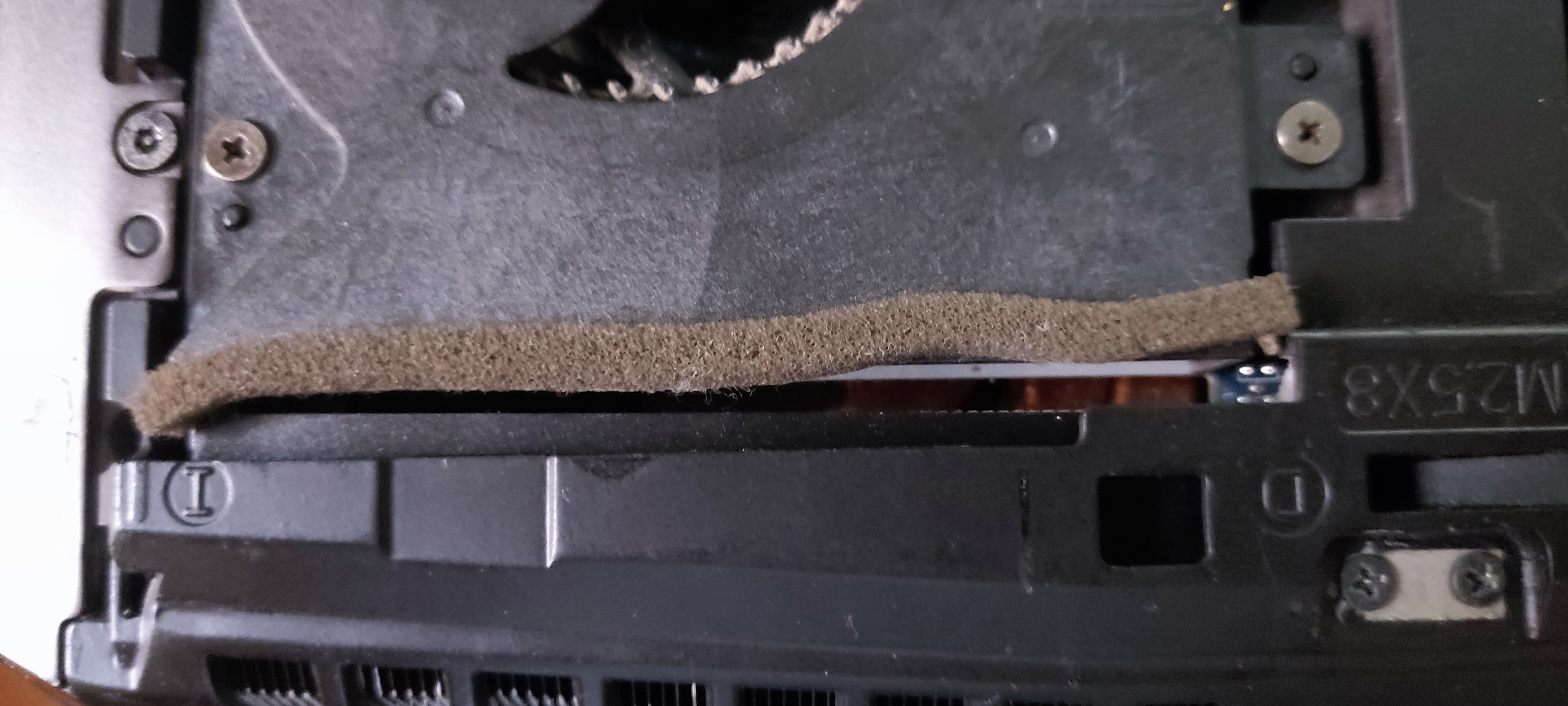
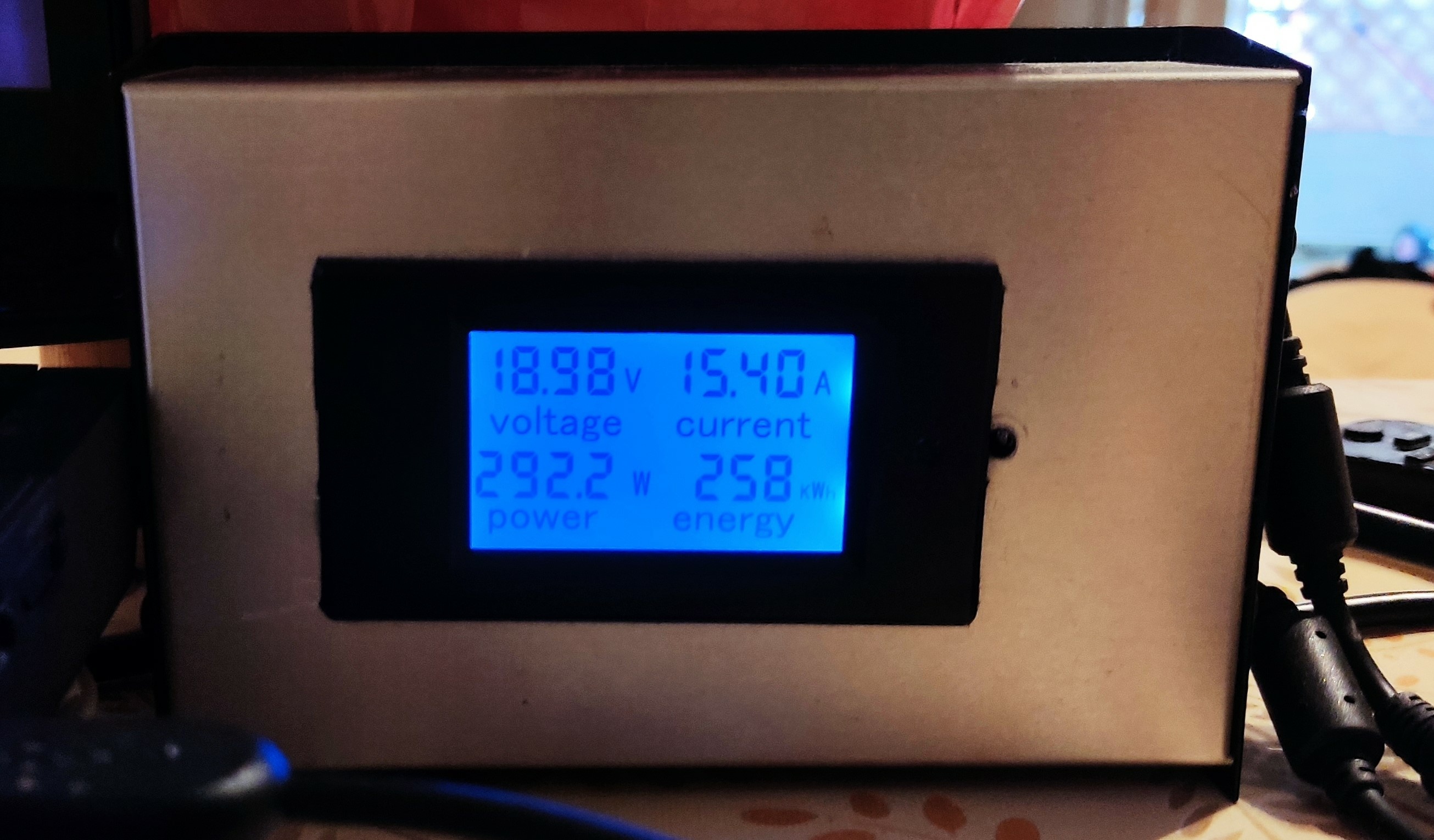
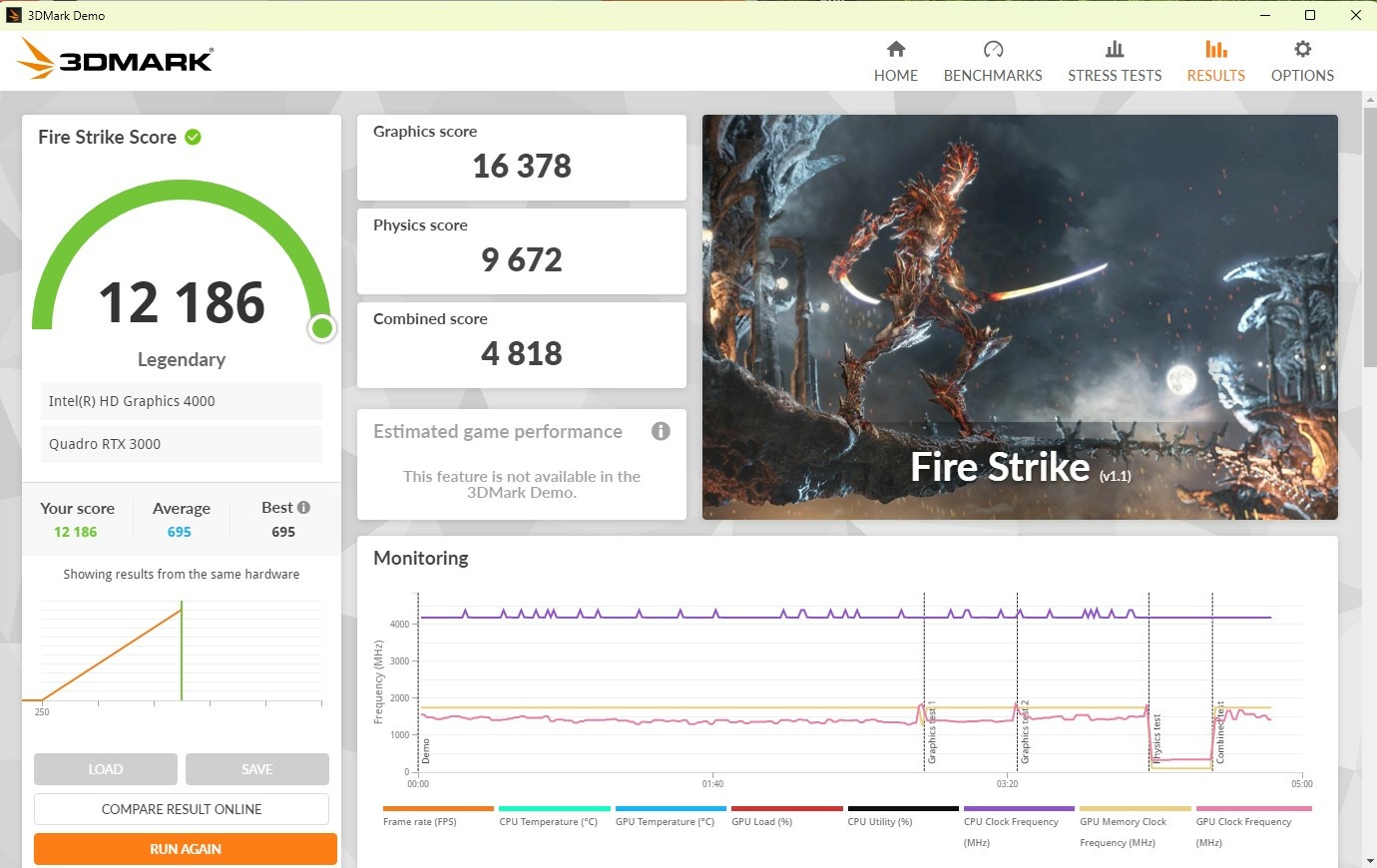
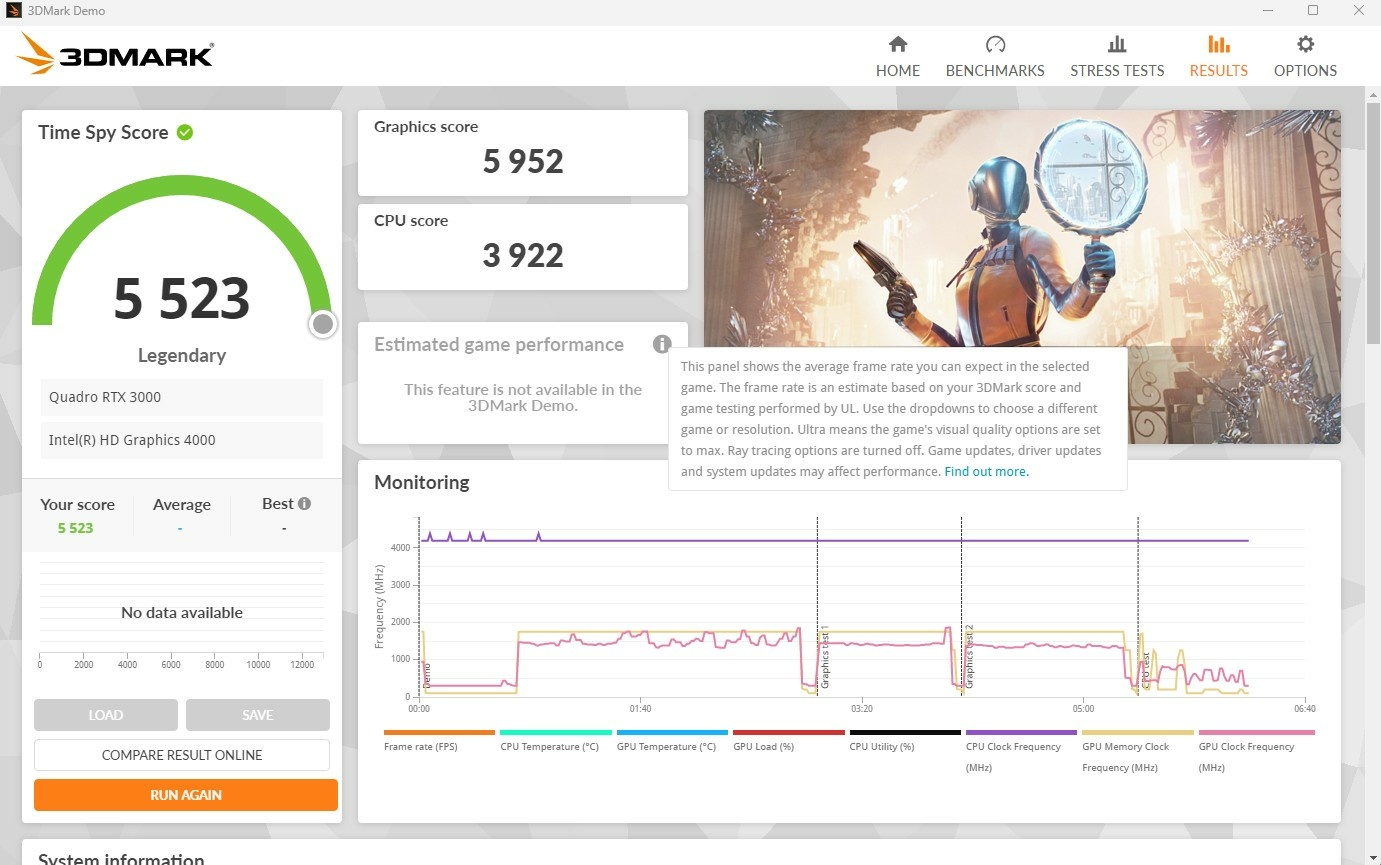
This is a complete guide on how to upgrade your M18x R2 with the HP Quadro RTX 3000 from an HP ZBook 17 G6 with the blue PCB. 1) Before you start. It is mandatory to install either swicks A11 unlocked BIOS to be able to use SG mode, since M18x R2 dowsen't support GPUs later than Maxwell aka 9XXm series. Files and methology are here in this forum. Having a version above A11 officilal, will require a downgrade and then unlock. You can do this process before you dissasemble your laptop. Keep in mind, setting SG with both GPU slots populated, results in a no boot condition. Unlock your BIOS and set the system to IGFX and verify your BIOS dispays the IVY Bridge as GPU ONLY in the fist page. Lastly grab an X-Bracket, beacuse the HP pegs are too short for the heatsink. You can use your old one from the gpu you are removing. Familiarize yourselfs with the NVCleanistall software. You can install drivers for unsuported GPUS easily without modding inf files. Physx Software will have to be installed seperately after the driver installation. So grab both NVcleaninstall and Physx installation software. 2) Mod the heatsink. I got myself an extra heatsink, in case I mess my original one. The mods needed are, trim the colling fins, as the core is offet both vertically and horizontially to the standard MXM cards. I advice trim and test fit the heatsik when you will have the laptop apart. Also the notch in the center of the left side where are the VRMs are, and a section of the RAM heatsink, needs to be grind down to accomodate the new VRMs. Picture is from an AMD heatsik, but the same applies to the Nvidia heatsink. Also a small part from the top, needs to be removed. Look below. 3) Mod the MXM Slot Though the mods are permanent, I will not make your motherboard unable to accomodate MXM GPUs in the future. Just make sure you store safely the small metal notch. You will have to trim down the top notch, and remove the metal pin inside. The lower notch can stay in place, but the metal pin needs to be removed. I marked a hole that I used to make a small bracket to hold the GPU in place, since none of the screw holes, aligh with the motherboard. So it is best to insulate them with tape and keep the nylon cover of the GPU (if it still has it on). 4) Install the heatsink Install the heatsik to the GPU. Take extra notice if it sits flush, and extra trim might be needed to the section where the VRMs will take place. Put thermal pad accordingly. I used 1mm pads all around and some PTM 7950 on the core and on top of the two VRMs that had clearense issues with the heatsik. 5) Install the GPU Place the gpu in the slot. As I said, none of the screws aligh, so I made a small allouminium bracket and screw it onto the motherboard. I place some thermal pad to apply pressure to the GPU and insulation. The core is offset, and doesnot aligh with the chassis hole. This is what holds the GPU in place, along with the lower notch fro the MXM slot. I used a short screw, because the hole is used from the other side. That area where the GPU is installed, will have a small bulge on the keyboard. The fan shroud no longer makes contact with the heatsik. You can install some insulating tape to keep the air from escaping, but I haven't and it really has no problem. 6) Boot the system up Boot into BIOS and change from iGFX to SG in advanced settings. Enter BIOS again after reboot and check if BOTH Ivy Bridge and NVidia GPU are present in the front page. Procced to Windows. Best to change to Full UEFI boot and disable secure boot. I haven't tested if it works in Legacy mode, so I cannot say that it will not be an issue. 7) Drivers Use GPUz to find yout GPU id and see if it shows in the device manager. Install the Intel Drivers first if you haven't already. I used the ones from Dell's site. Reboot and start NVClean install. Install the drivers you want, adding your Hardware Id and GPU name. After that, install the Physx software too. 😎 Run a benchmark Run a benchmart to see if everything works like it should. Temps should be at around 75 degrees for the GPU core and 80 for the hotspot. Above that, might need some attention. Power draw for the GPU is 80Watts due to vBIOS limitation. vBios is flashable so in the future, if someone might have the skills, maybe help push this GPU further. Maximum Power draw for my system is 300Watt with my overclocked 3940xm. Results are below. Please let me know if I have forgot something to add it.