
srs2236
-
Posts
275 -
Joined
-
Last visited
-
Days Won
1
Content Type
Profiles
Forums
Events
Everything posted by srs2236
-
Did you increase voltage to 1.45v? If so, does your RAM even post with 1.5v? Mine doesn't unfortunately and I don't know why. But this is very nice, especially for non Ballistix memory sticks =D rev.E rules for frequency. Maybe not for timings but for frequency its good. Happy for you, you have same primaries as me =D If i put 16 tRCD and tRP instant BSOD.. =D CL of course doesn't even train on 13. And then the tRAS is up to debate so good job!! I had same like you, in the beginning my laptop could barely train the 3200. After I found the right slots it would sometimes train 3333 but not 3300 xD Funny, I actually wanted to mention to you to try to train on 133 reference clock instead of 100. And then the add odd function or whatever it was. However, now after running it for so long with this OC, it also trains 3400 for the first time pretty much always but never works after reset. I still want to look in to the command rate and if thats not possible I want to try something similar to the motherboard of my P775 like this guy did to his desktop motherboard:
-

My Clevo P775TM1-G Components: RTX2080, CPU, RAM..
srs2236 replied to cylix's topic in Notebooks and Desktops
Unfortunately same here too😅 -
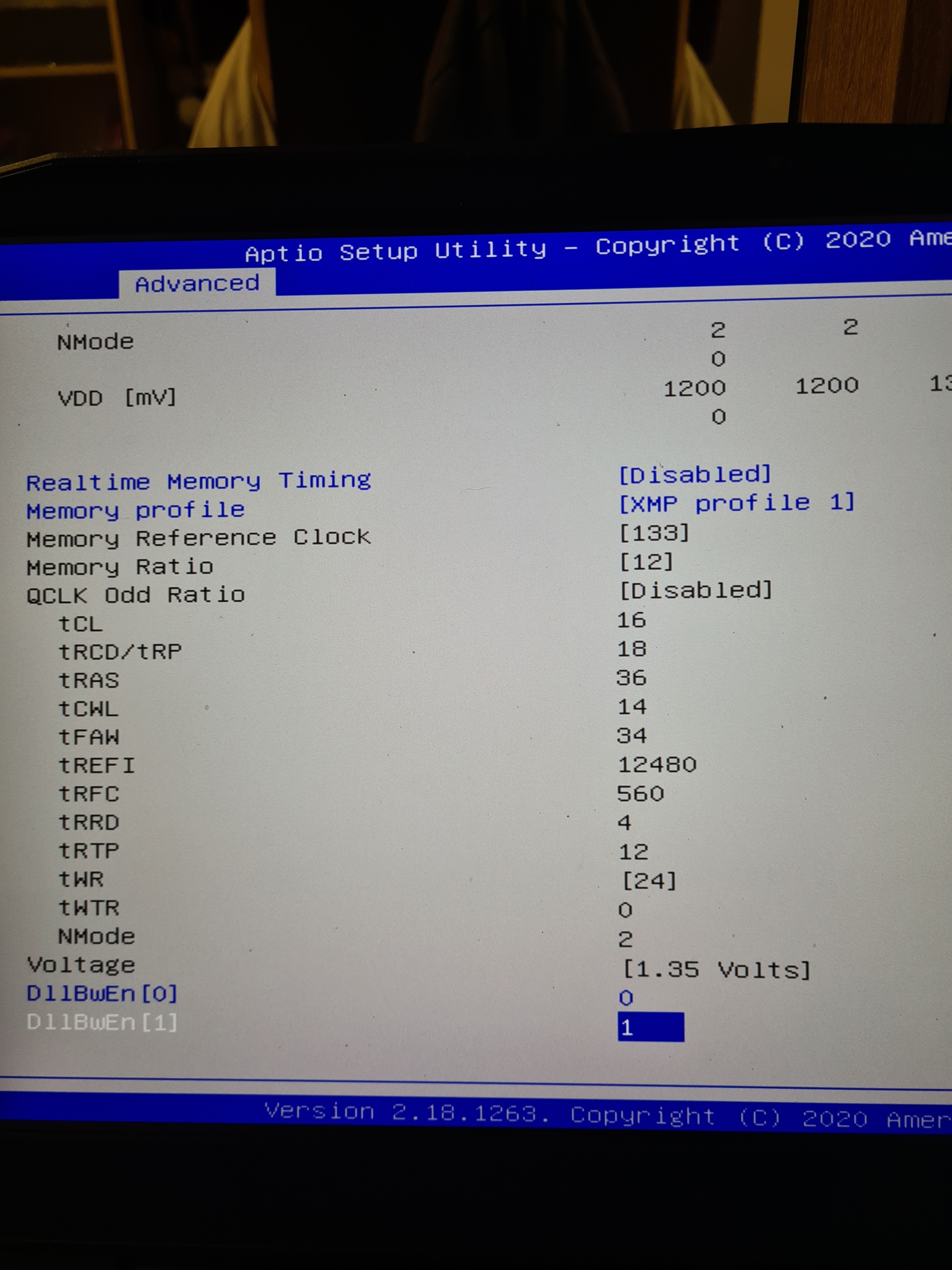
I actually use both, but the Control Center I use only for fan adjustment. I think I have mine set to performance all the time because my CPU is always at 5GHz no matter the load. I use XTU for everything else. Mostly for statistics about my CPU. When I do CPU overclocking or something I first test with XTU and when I have found stable values I make them permanent in BIOS. If you enable Real Time Memory Changes in BIOS (or it was named something similiarly) you can make RAM timing changes on the fly in XTU, even the Tertiary timings. This option is available only in unlocked BIOS or the dsanke BIOS for example. If you have no hardware flasher, I actually have one BIOS from personal collection that I could send you. It was made specifically for me and it was latest BIOS but just unlocked and flashable through windows. I have a PCSpecialist model so beware, but I'm pretty sure it doesn't matter. I hate that the BIOS is half broken for memory overclocking. For example, have you noticed that it is impossible to switch command rate to 1 (CR2 is defaulted no matter the choice). On unlocked BIOS you have the menus for Tertiary timings but none of them actually do anything, you can set whatever values you want they dont stick. Then there is the weird 3400 bug. Like I am 99% certain 3400 would work if the "Retrain on Fast boot failure" (or something like that) actually would work. You can choose disabled or enabled it makes no difference. Broken entries that change nothing. They are there but they have 0 impact. I do have one more trick up my sleeve, I am thinking of downloading ThaiphoonBurner again and try writing a new XMP profile on my Ballistix. And in the new profile I can customize the timings even more. For example first thing I would like to see if it will accept command rate 1. Even though the BIOS doesnt register the change maybe it will read correctly from SPD (XMP) and apply it correctly. Sorry for my rant🤣
-
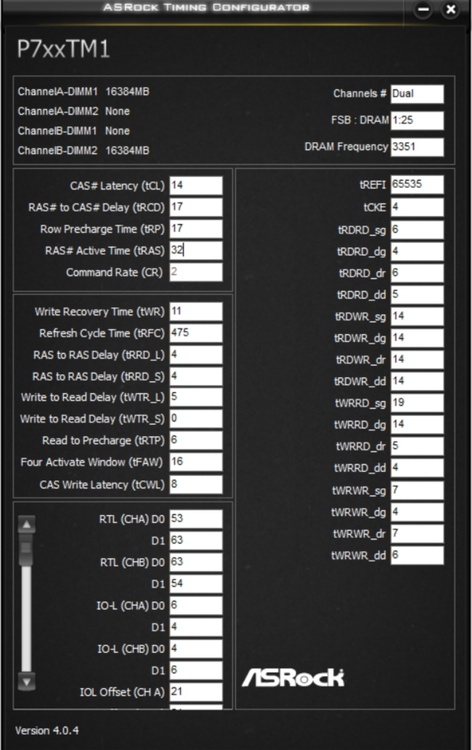
Yeah, I was not sure about the tRAS. Somehow, from my testing, I saw a latency decrease from running it at 32 instead of 34. Also, I have seen formulas not only like you say tRCD+tRP, but also tRAS=tRCD+4+tWR (32 if you put my values in) and tRAS=tCL+tRCD (31 if you put my values in). I would leave it even at 31 but at 31 it starts to BSOD for me with memory_managment errors. Which seems weird if it automatically defaults to sum of tRCD+tRP then why become unstable? Try it yourself, I am curious about your results. When I get home I will also double check. But I am pretty sure that it was an improvement because I did very rigid RAM OC testing, even buying new sticks just to try to OC and stuff. This was my best result:
-
I am not home anymore so can't share timings, but I found an old post of mine on reddit, this should have all the same timings as I have now. I doubt that your motherboard is better than mine, I would like to believe the tolerances between them would be smaller. I think that when I changed my 9900K for 9900KS there was a change in RAM OC headroom. I remember that I could lower my timings even lower than before. So it might be CPU affected. But it to be honest shouldn't be. Maybe it's a case of how well the CPU can manage bad signals or something because on desktop the i9-9900k shreds at RAM oc. Also, I just noticed my 4th Slot has some pretty serious burn damage only god knows from where😂😂 so so much for a good mobo. Luckily it was only ground pin but still odd. I will be adding a heatsink to that ram though, so hopefully the temperatures will go down. About the screen, the 4K is nice for anything but gaming. For gaming it is absolute trash. Ok maybe some story games but absolutely not for competetive games like Warzone. Stick with your 1080p panel. Me myself I use a portable 240Hz asus monitor. Also 1080p.
-
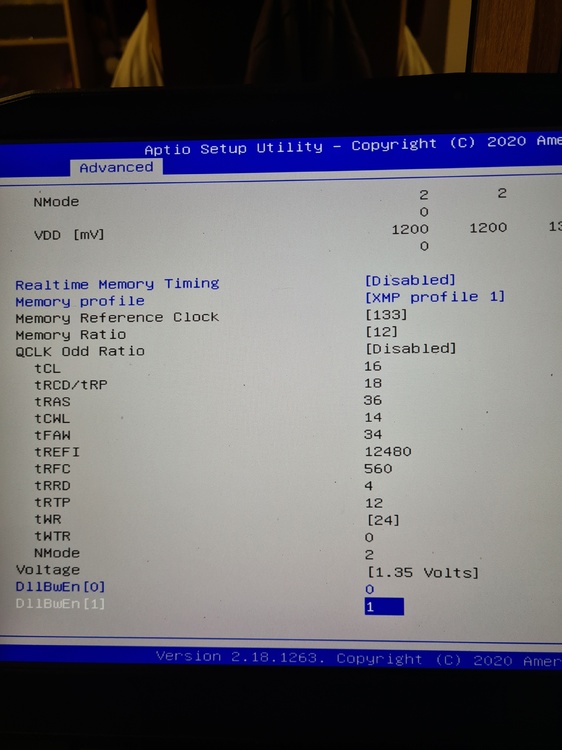
Default XMP for Ballistix.
-
I take it back. I re-read what you wrote about your RAM and see that you have Micron RAM operating at the same primaries as Ballistix. When I have time I will send you the default timings of my sticks. Also I don't think you will be able to do 3400. The P775 is limited by motherboard at that point. Like my Clevo will train the ram once no problem, boot into windows with 3400 no errors everything is perfectly fine. Then, upon either sleep, shutdown or restart it just wont boot back up. It will restart and get stuck in ram training loop which is super annoying. Yet it will sometimes train the RAM with absolutely ridiculous timings crash litterally at bios but never retrain. Super annoying. I feel like im being held back in terms of frequency by some design flaw either in BIOS or hardware for 3400... I have even had 3466 once boot to windows no problem just to get stuck in memory training one restart later. And the most annoying part, the first boot always works. It's only after that next system restart or whatever that it gets stuck. And only thing that helps is CMOS battery removal, no FN + D helps there.
-
I won't send you my BIOS, but I can refer you to dsanke BIOS. I tested it myself it's unlocked and works fine. You will have more control over your memory. The filename you are interested in would be P7xxTM1-0729-9900KS or the one with 128GB ram support. I would recommend taking the one without 128GB ram support if you dont need it. https://mega.nz/file/GF5hWJzT#72_PDOPkchG4DR0GR4OhQYOtwy-WxhhWr4tmnaK755k I still recommend flashing with hardware flasher and so does dsanke. I flashed with hardware flasher. Also me sending the default timings for 3200MHz won't do you any good. You have to experiment and find the lowest for your kit.
-
Is G-Sync really working?
-
No, only PCI-E Gen. 3 But based on my testing there still can be benefits of a Gen. 4 drive in a Gen. 3 system altough very small.
-
Ahh. Mine is already scratched like hell and the empty area to right side of touch pad is even squeaky when pressure applied to it xD Also the power cable comes out so easily. A little pull and it's out.
-
For me it is hard to say because I didn't drop temps =D However, I can sustain much higher TDP under load. Now it maintains pretty much 100W under heavy load. So thats 135 to 150W + 100W. But the CPU is constant 99C so no changes there xD I think before with my 9900K was like maybe 60W or maximum 70W. It's hard to say but my 9900K was not able to sustain 4.7GHz under load in games that was for sure. But now my 9900KS is more like 4.7Ghz to 5GHz hovering all the time depending on the load in the game. But almost never going below 4.7GHz so there is definately an improvement. The biggest improvement in temperatures was for the GPU anyway. Most of the copper mass is added on the GPU side and not the CPU side. The temperature difference for the GPU was massive compared to old heatsink. But thats probably also to do with the fact that the die size of the 3080 is actually smaller than the 2080 at the same TDP. It is definately an improvement but its hard to say how big. Hope it helps a little. You could try doing some benchmarks to see the maximum TDP on the CPU. But yeah I am already used to it being 99C all the time. I don't know if its going to be bad in the long run or not. See the thing is that the actual problem is that only one of the cores will mostly hit 99C for me. The others are sometimes 90C while one other is 99C. So not all cores are actually 99C. Most of them are not. Thats something I have noticed on my P775.
-
Yeah, slots 2 and 4 is what I meant when I was telling you about the slots. The thing is that Slot 4 and 3 is labeled correctly but Slot 2 and 1 is for whatever reason swapped in BIOS and OS. So that's why I said Slot 1 instead of 2. I think if you will check in for example CPU-Z you will see the same thing. Slot 1 and 4 will be occupied. I really don't want to send my own BIOS because of serial numbers and whatever else there might be that corresponds to my P775. Also I put a lot of effort doing most of the mods myself. However I can help you unlock it if you can dump yours. There are also other forums that can help with unlocking if you search it on google. For now I would advice to just update to latest stock Clevo BIOS. Both the BIOS and the Embedded controller (EC). This is where you can find both the BIOS and EC latest revisions: https://my.hidrive.com/share/yze8mg-wf8#$/BIOS and EC Firmware/CLEVO/P_Series/P7xx_Series/P7xxTMx/P7xxTM1(G) If you need instructions let me know. I think for BIOS you will need to run WMEset.exe that's in the archive that will unlock ME Region write capabilities. For the EC I think you will need to flash the EC1 first and then the EC2. To update the EC I think you will need to make a freeDOS bootable flash drive with the firmwares on the root of the drive or something along those lines and flash from there. I originally asked for my unlock of the BIOS on a specific P775TM1-G thread on bios-mods.com. However, now I am 99% sure I know how to do the unlock myself. When I have free time (on the weekends) I could try and test to see if my unlock would actually work. I am also quite curious about the Dsanke enhanced one. I wonder what enhancments other than unlocked BIOS does it offer. I have seen 128GB support talked about here and there. Not sure if the latest Clevo bios by default supports 128GB or not. Same for Prema... But I guess I will never know. I could poke around with the Dsanke one though. One annoying thing is that the latest Clevo BIOS unlocked allows Tertiary RAM timing changes, but will not apply them upon reboot. Changing some of those values for example in XTU can bring actually huge RAM OC benefits that I would like to have permanently set in the BIOS, but have not been able to up until now. (They get set to whatever values IMC chooses upon training the RAM) If you have updated yours to latest, and want the unlocked one I can try to help. Also do you have a hardware flasher like the CH431A? Because I would give 0 guarantees whatsoever about the BIOS mods I would provide.
-
You should look at the video mentioned by @ssj92 - https://youtu.be/R1CG9sCMmnA I think this is how you can do it aswell. This video and the SEMI-SLI or whatever is probably the same thing. That's my guess anyway.
-
That's really about it for now without a new heatsink or some cooling mods. Only thing you can do is run your fan speeds at max at all times. This is what I do when gaming. And what you did is undervolt. You can do it in BIOS aswell if you want a more permanent solution but just make sure to find a stable value first using CCC or XTU.
-
Yours doesn't look too bad to be honest. Looks good. The CPU thermals is a real problem for the P775 so thats to be expected. I have the same issue. First thing I want to ask if you have tried is undervolting. Undervolting can work great for reducing thermals on the CPU. I think that should be the first thing for you to try. As for other things, well, I havent tried anything other than repasting and some K5 Pro so can't give advice. Some people Delid and put Copper IHS with liquid metal, some people increase mounting pressure etc. Havent tried anything like that unfortunately. Also I forgot to say it but the P775 runs RAM best at certain slots. Best OC capabilities are when it uses one RAM in the slot under the keyboard I think it was Slot 1 (if my memory is correct its the one on the downside) and the other in Slot 4 (if my memory is correct its the top most under the back cover). These two slots work great for OC. Atleast for me anyways but I have seen similiar stories on old NBR forums if I remember correctly.
-
Hi! 1. No, but an unlocked BIOS is preferred because you unlock a little bit more than stock and you unlock the possibility to choose voltage higher than 1.35V. I personally can recommend the Crucial Ballistix as it is by far the best SO-DIMM's you can get for this laptop unless you can maybe find the extremely rare G.Skill and Corsair 3600-4000MHz ones. I personally tested G.Skill ones aswell (3200MHz, CL16) and they overclocked very very poorly. The Crucials on the other hand are limited in frequency by the P775 motherboard itself and not by the RAM itself. For my unit, completely stable max frequency I can get is 3333MHz. And the Crucials love more voltage so I have run mine at 1.45V for almost a year now without issues. And the voltage is necessary because I have reduced the timings on my Crucials drastically, but here your mileage might vary. My RAM primary timings are 14-17-17-32 from 16-18-18-36 but secondary timings are drastically reduced aswell (keep in mind this is in 3333MHz). For more in-depth timing adjustments of the RAM you can ask me if you choose to go ahead and get these sticks. Just beware that there are two Micron die's available for the ballistix. Personally I would recommend going with 2x16GB sticks of rev. E die sticks. You can tell either by looking at the back of the sticks for serial number or by looking how much ranks the RAM has. The potential disadvantage here is you might get a single rank sticks opposed to dual rank which is technically better for performance and by my testing the rev. E overclocks a tiny bit better than rev. B but that could be silicon lottery. I can help you identify which die revision you will have if you send me some details. 2. This is just my opinion, but I am happy with the way I have it: Updated to latest Clevo BIOS; Unlocked it; Updated CPU microcode, RAID modules, Ethernet module, to the latest revisions; Updated the Intel Managment Engine to latest revision and also edited it a little to allow Base clock or BCLK overclocking in the BIOS (Can achieve interesting RAM OC results and etc) Added support for RTX 30 series GPU's Some people say that Prema is the best but I have no idea because I have never tried it and I am not sure if someone even has it for this laptop specifically anymore. Any requests for them are apparently deleted or something here so yeah. If you have a hardware flasher and can make a dump of your BIOS I can help you with all these modifications but I have never flashed any of my modified BIOS binaries with software so I have 0 guarantees whatsoever that it will work for you in that case. And I just remembered there is some Dsanke version out there but I have never tried that aswell. I just updated to latest clevo BIOS and proceeded to do the rest as I put it before. I might have done something more that I just can't remember but thats the essentials basically. 3. No, I absolutely do not recommend the upgrade. The upgrade from 2080 to 3080 is already kind of dissapointing in itself. Only a slight performance upgrade, less heat and 16GB VRAM. Thats it. So for the 3070 its even worse, no VRAM upgrade, yeah would probably be much less heat but the performance difference is probably very tiny if not the same. I could only kind of recommend if its a 3080. I got my 3080 brand new for 789,43 EUR and the AliExpress heatsink for 247,31 EUR so thats not even a good deal for you. If you really want it try to keep an eye on eBay. Sometimes there are listings for bids which go for way less. 4. Well the absolute speediest of the speediest is KC3000 in RAID0 which I have in my setup. I would say go for KC3000 if you want the best of the best. However if you can't get the KC3000 I would just say go for the 970 Evo Plus in RAID0. I tested the Wester Digital SN850 in RAID0 and it had some dissapointing results to the point where there was no real reason to really choose it over the 970 Evo Plus. I havent tested the 980 Pro but the SN850 and the KC3000 is supposed to be better than it so I would guess there is no point of even looking at it. THERE is however a brand new Samsung SSD coming out but I am not sure about its performance on PCI-E 3.0 so can't really comment on it. You would have to make resarch on it yourself but it should be really good its the 990 Pro from Samsung. Enjoy your P775 machine!
-
*Official Benchmark Thread* - Post it here or it didn't happen :D
srs2236 replied to Mr. Fox's topic in Desktop Hardware
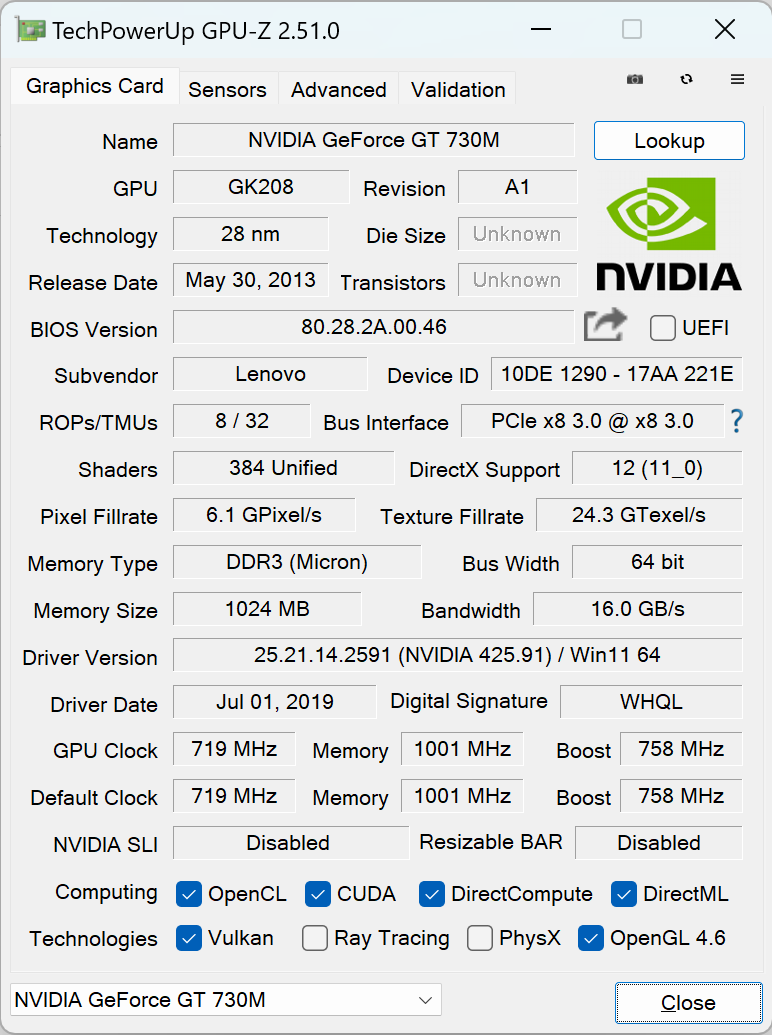
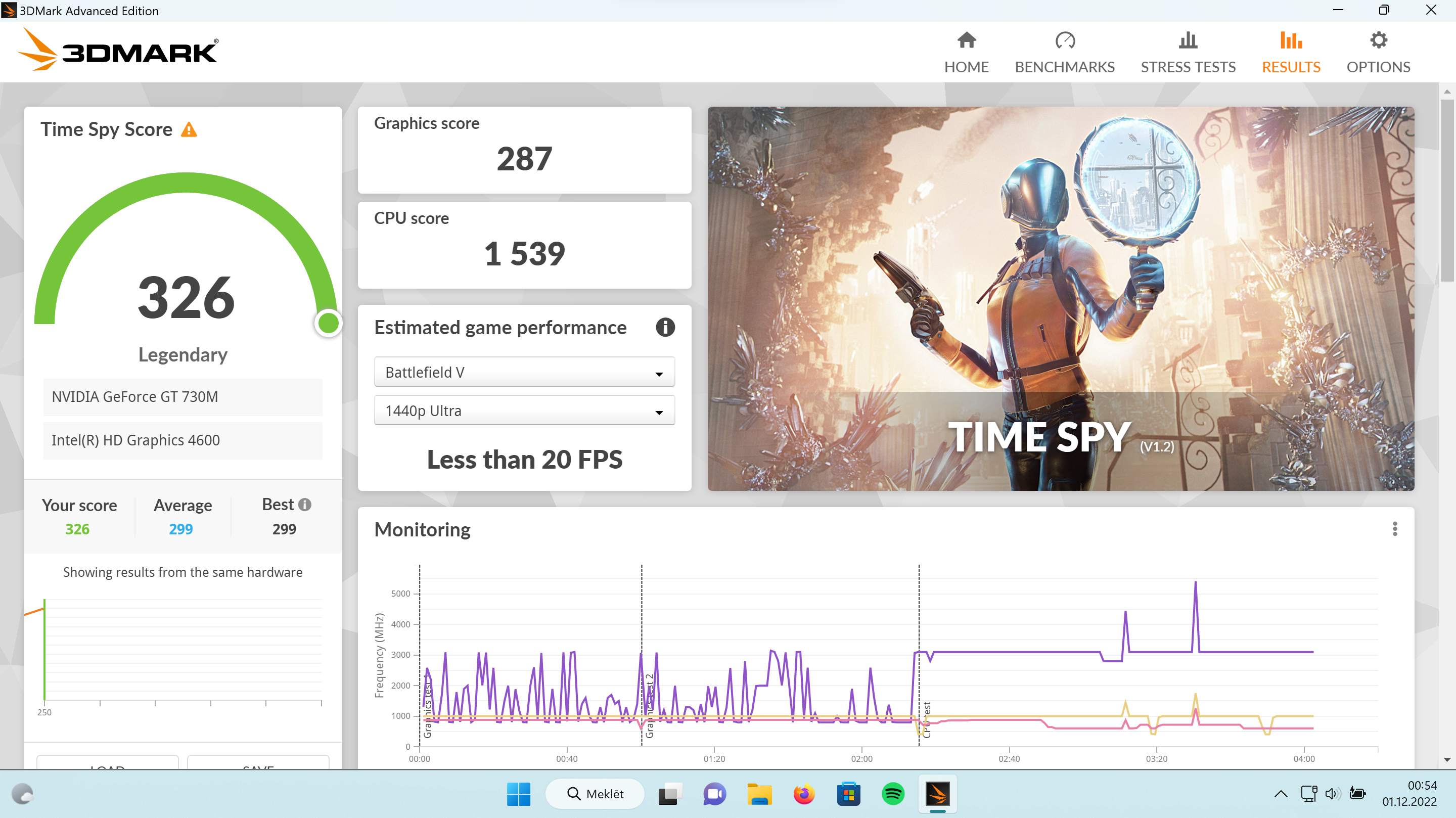
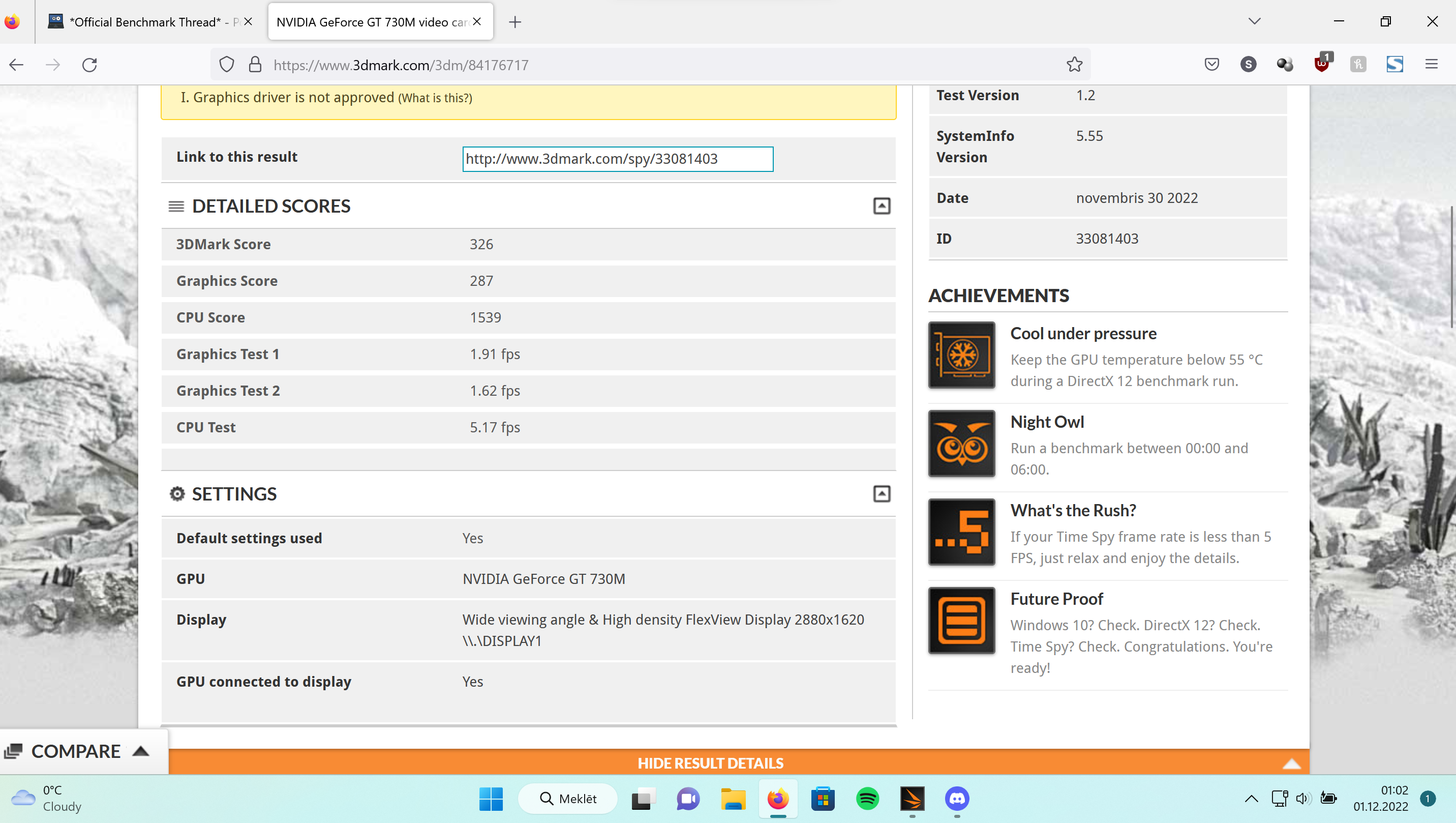
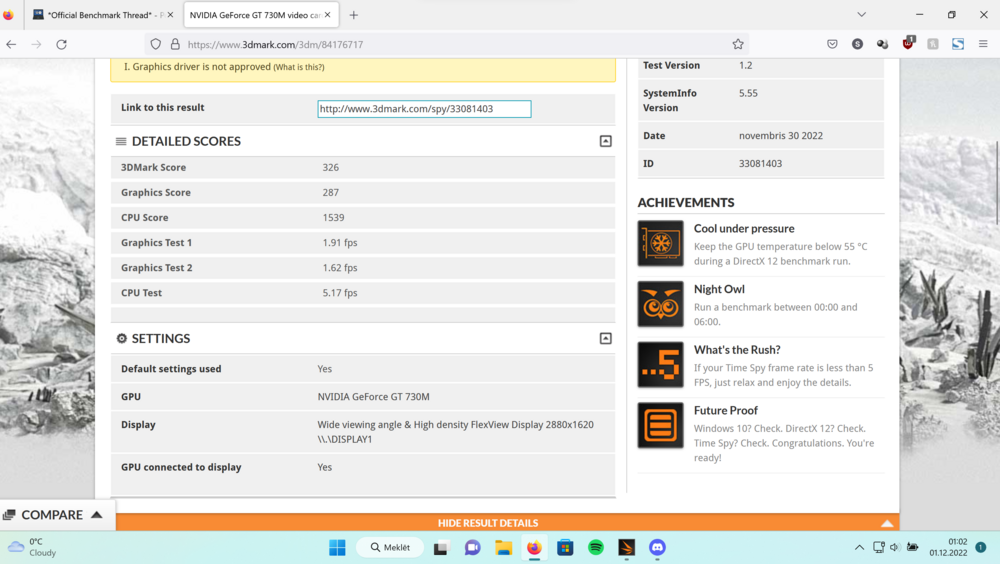
The test runs approximately for 2 minutes and 10-15 seconds. Let's say total 135seconds. Average fps in both tests was like 1.7FPS. That amounts to an outstanding hard earned 230 frames generated with my T540p thinkpad during GPU tests. To be honest I was suprised this ancient GPU could run the TimeSpy benchmark to begin with. It is a GPU from 2013... But wait till I overclock the thing... B) Will become unbeatable force for sure!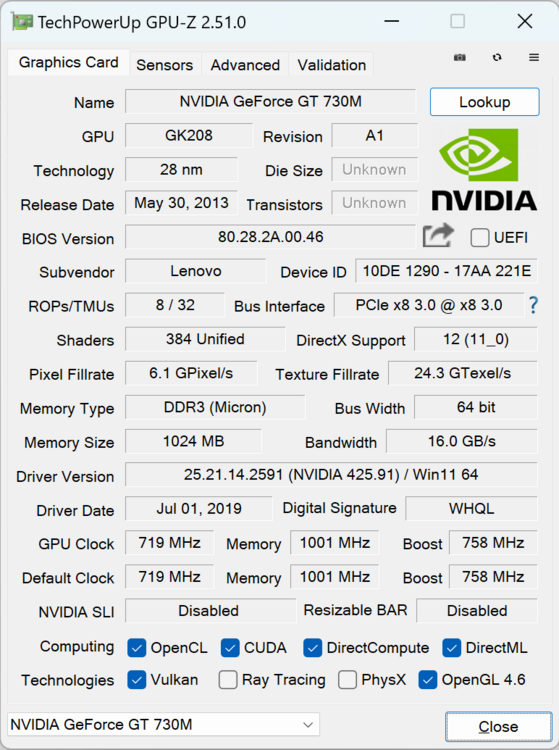
-
*Official Benchmark Thread* - Post it here or it didn't happen :D
srs2236 replied to Mr. Fox's topic in Desktop Hardware
I always thought you need top hardware to get legendary results. I was wrong. xD I'm pretty sure I got world record here in 3dmark TimeSpy. Out of 1 other contestant xD I'm stoked, got multiple achievements aswell =D lmao: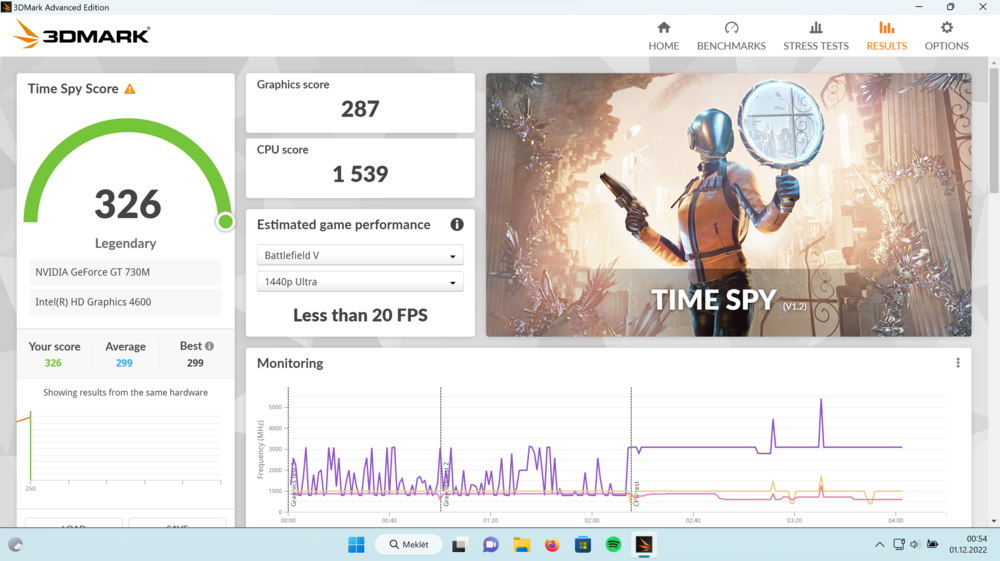
-
Is this something that can happen to desktop motherboards aswell? I wonder what happens when its too tight... Seems odd that it wouldn't work because of that.
-
I don't know why but I am wondering if both of your RTX 2080 are fine. @cylix@razor0601c What if for both of you the 2080 just died and that's how the motherboard acts when no GPU is connected? Did anyone tried a different GPU? I wish I could dissasemble mine and check if the motherboard acts same without GPU connected. But I can't because I moved countries and now even such things like good thermal paste will be expensive or just simply unavailable for me😥 I do plan to open mine up eventually, but not at the moment. Obviously, it's highly unlikely but you never know!
-
clevo p870tm/tm1-g Official Clevo P870TM-G Thread
srs2236 replied to ViktorV's topic in Sager & Clevo
Are they even better than K5 Pro and Gelid Solutions GP-Ultimate? Have you done some testing against them? And do you have any recommendations for thermal paste? Currently using Kryonaut by Thermal Grizzly -
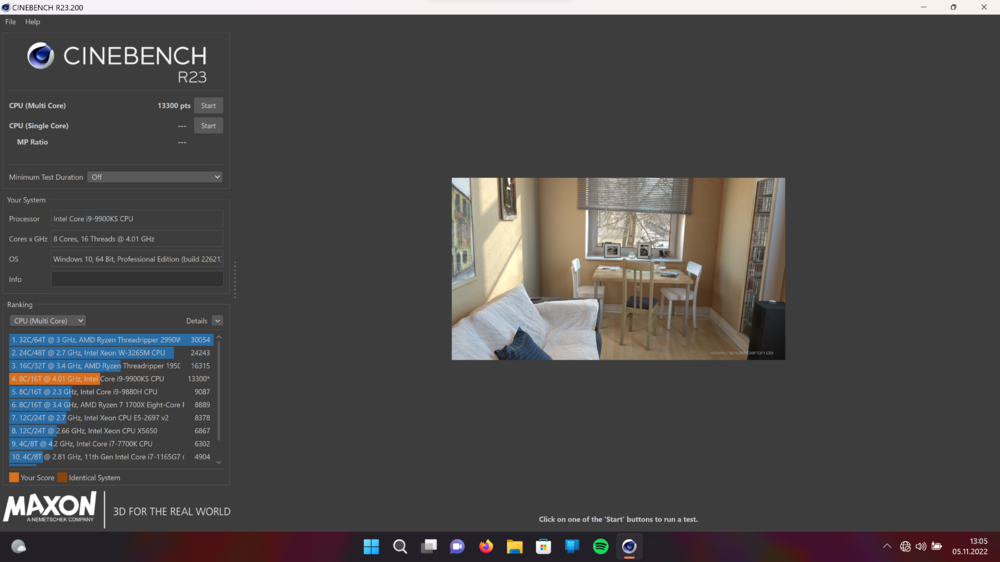
Now is not looking that bad at all. However, that's why 10 minute test is important as this is just after one iteration. The reality is that after 10 minutes of the test the score drops down to 11700 (best case scenario). I will never ever get this CPU performance in real world scenarios. + I could squeeze even more just for scores sake but I don't want to bother as that will be with the CPU reaching 99c in seconds (I am severely bottlenecked by thermals). Anyways this is on a P775TM1-G just posting for comparison sake.
-
Just realised why you were getting high scores! Both of you (who posted scores) didn't do throttle test of 10 minutes (which I did and didn't even know before there was a way to turn it off). I would like to see what both of your scores are with the throttle test. That's more in line with real world performance and therefore more practical. Anyways, off to do a quick test with mine aswell as I am sure I can get more than 11700 that way😏
-
My 9900KS ain't even close😭 The best I had was 11700 something. And that was with max fan speeds and the CPU cooking at solid 99c😂 But maybe will order a new IHS and have a look into HoneyWell thermal paste/pad magic thing?!?