Leaderboard
.thumb.png.362386d2804d5f9fbcf2ec7f5aa009c5.png)


Popular Content
Showing content with the highest reputation since 10/01/2025 in all areas
-
We are a very small, tight knit community that started as a cast off from the original NBR forums which were already dying to the point they shut them down in totality. Those forums at one point were so large and influential that representatives from the major laptop makers would frequent them on the regular for interaction and feedback but with changing market conditions, social media and other means of delivery coupled with niche and specialized laptops dying out and being replaced with thin fast and cheap laptops the writing was on the wall. You can't blame laptop makers for this as they simply go where the $$$ is and the vast majority of consumers have zero desire to tinker with their laptops and just want them to work, with good battery life and be light and portable. Every year, we saw true DTRs dying off and those original representatives basically abandoning NBR till all that was left was Clevo and their last somewhat true DTR based on desktop chips was their 12th gen hybrid 15.6" model (Clevo NH55) which did poor enough to signal the end of DTR anything as we knew it with interchangeable CPUs and GPUs. The first real death stroke was Nvidia basically abandoning MXM and upgradeability standards. ----- A community such as this is only as good as the enthusiasts who still have a passion for some older hardware and many of those, myself included, have moved onto more modern laptops because all the modding in the world will not approach the power modern models provide. The best you can do with modern laptops is look for models that at least have or offer the possibility of flexible BIOS so you can at least tune your hardware. Prema still offers his BIOS services on some models commercially followed by MSI which still has their excellent unlockable BIOS options. Dell/Alienware does offer some limited options as does Asus. You can also look to make mods to the actual cooling system itself from something as basic as upgrading the thermal interface material to modding the actual heatsink and fans themselves along with the chassis to improve air flow. Good luck!8 points
-
For the past 6+ years I have used my own desktop PCs for work and now I will be using a company-issued turdbook for work. I repurposed my dual Acer 4K 160Hz panels for the work PC since I will be needing the massive screen real estate for work. I grabbed a 40" Samsung Odyssey G75F 5120x2160 180Hz WUHD monster on sale at Micro Center for $638 (model LS40FG75DENXZA) and it seems pretty great so far. It doesn't like the 4090 and neither does my ASUS 4K 120Hz monitor. I have to lower the resolution to not have a BIOS or Windows Boot Manager black screen (same problem using the ASUS screen with 4090) when using DisplayPort. Something about 40-series firmware and high refresh rate 4K on DisplayPort is glitchy. There are many examples of people complaining about this online. Using HDMI 2.1 it functions flawlessly. The 5090 doesn't care whether I use DisplayPort or HDMI.7 points
-
We opened this forum so that it can be a soft landing pad for those who still surfed those forums could still mingle. Personally I wanted to keep in contact with those of like mind in hobbies that I also enjoy. Forums have become fragmented over time especially for laptops as manufacturers become more and more locked down both on software and hardware. The identity of the forum may change over time as a result. That being said we are able to keep the forum relatively light in cost so as a result we are comfortable keeping it alive effectively forever. You can always PM me if you have questions or concerns I do try to be as fair as possible in moderating.7 points
-
The main problem is, that this community has rather few members and not everyone left is tinkering around with their laptops anymore. Like me for example. Normally, i only login once a week, because there is not much interesting activity. This is not, what NoteBookReview once was. Unfortunately. In addition, there are not many models on the market available, that can be used for modding. Almost none with current hardware. Which makes such a forum really difficult to maintain.7 points
-
Hey everyone! Still rocking the same system. My 5090 has been strong! Hard to think its already been 8 months since I got it. 6 months of that has been shunted for 1200w. It has been getting rung out hard though. I essentially lost interest in talking about this hobby and just been using it for work/gaming daily. 😆Something has pulled me back in to talking about the hobby though. I suppose I needed a break from the daily PC discussion lol. On another note, tonight I flashed my Acer Predator 4090 18" laptop to some random unverified Asus 4090 Laptop bios from techpowerup, and this thing picked up tons more performance. I am able to pull 175w steady in games, I could never do that before, usually 150-160w before. So, I checked my bios, and apparently my bios was the 1215Mhz clock/ 1590 Boost. And the bios I flashed to now is a 1590 clock/ 2040 boost. My GPUz said mine was a 175W bios, so thats why I never tried this before. So, I flashed out of curiosity. And it's just blowing the doors off of the prior bios that was on this Acer Predator. I am not really sure why. But I can run another +250Mhz on the core. It is really odd. Anyways, hello everyone!7 points
-
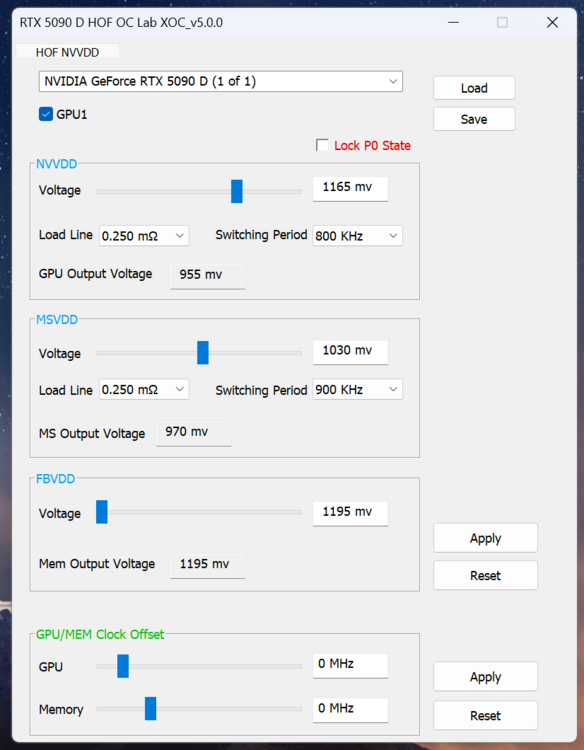
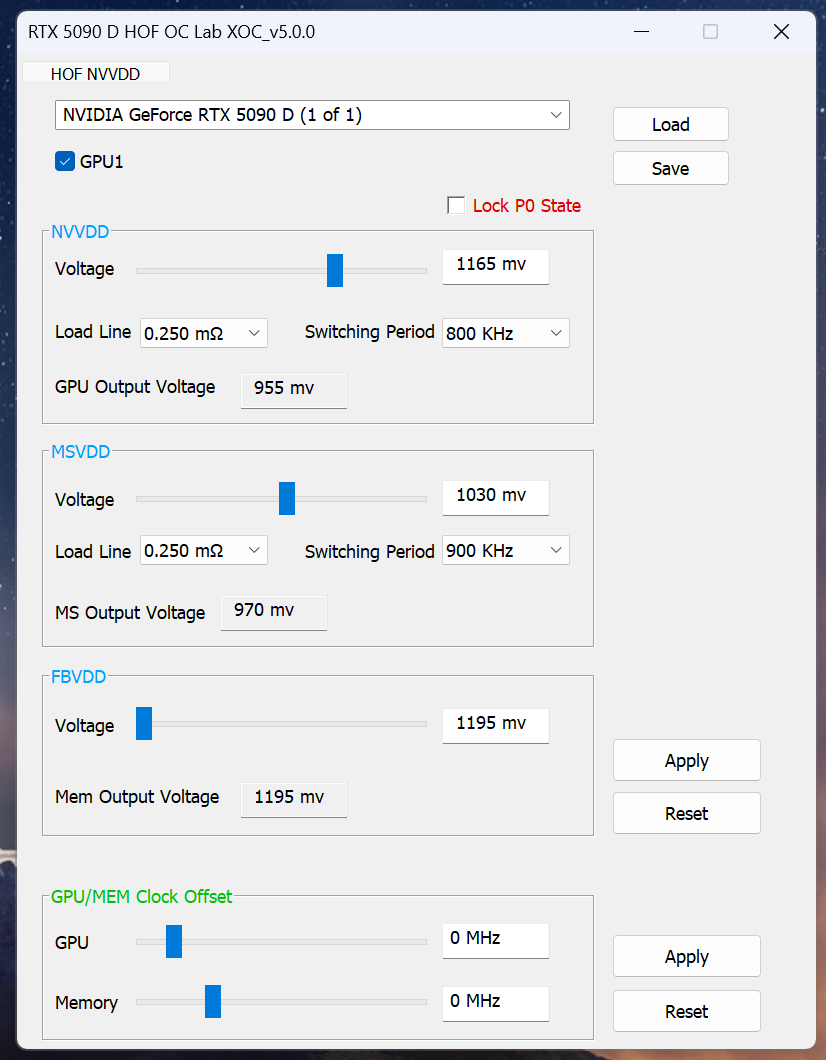
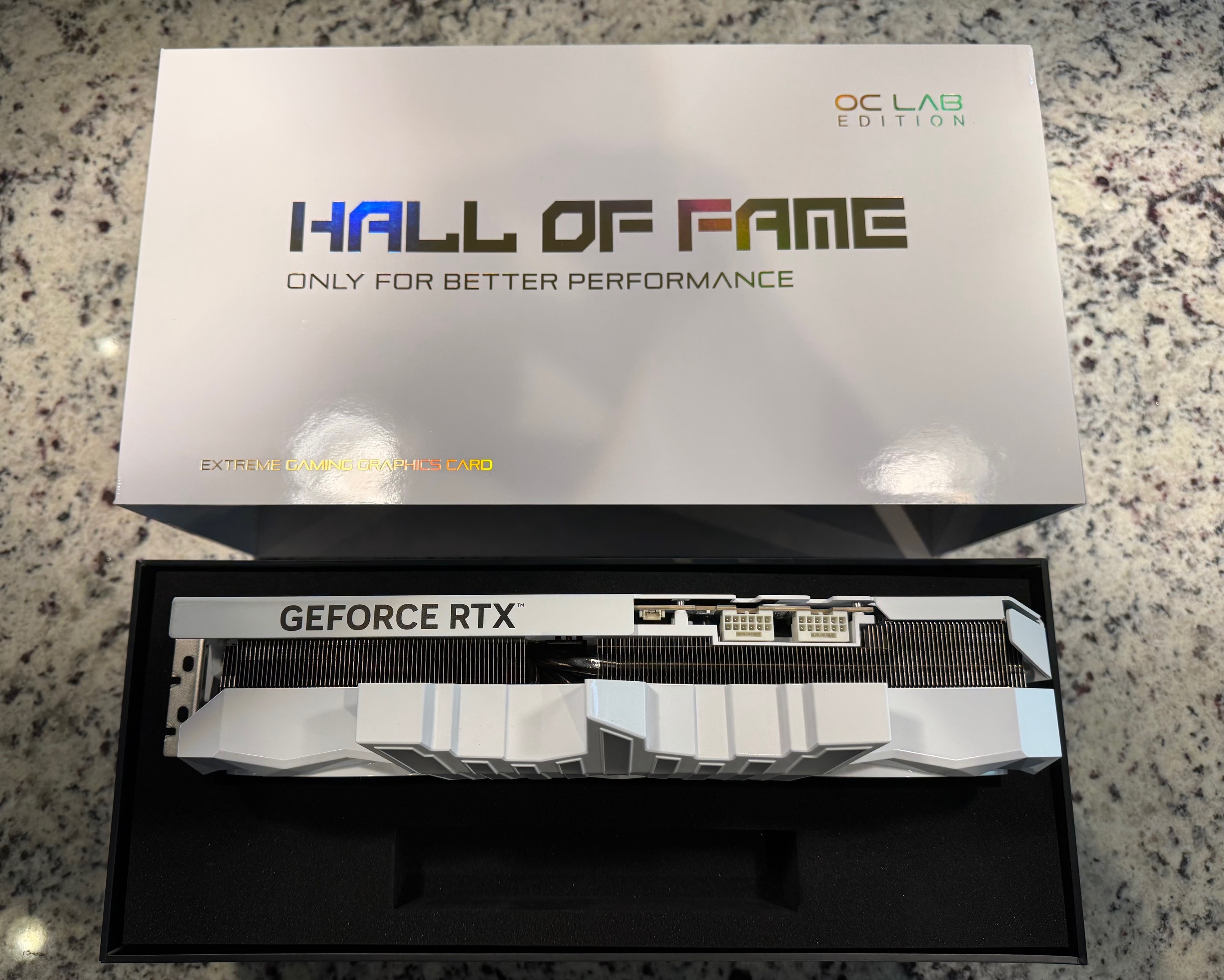
The stock voltage is 1.15v and the stock power is 600w. The XOC vBIOS is publicly available on tech power up and is 2001w, which further unlocks voltage and memory another +1000 over other 5090s. Some nice individual over at OC.net PM'd me the extra special HOF tool for even further voltage, LLC, and switching period control. Basically the same as the old KingPin tools. Ordered the HOF 5090D IceMan waterblock on AliExpress. Figured the card is pretty rare and any future owner will def. want the ability to put it under water to take advantage of the voltage and power limits.
 7 points
 -
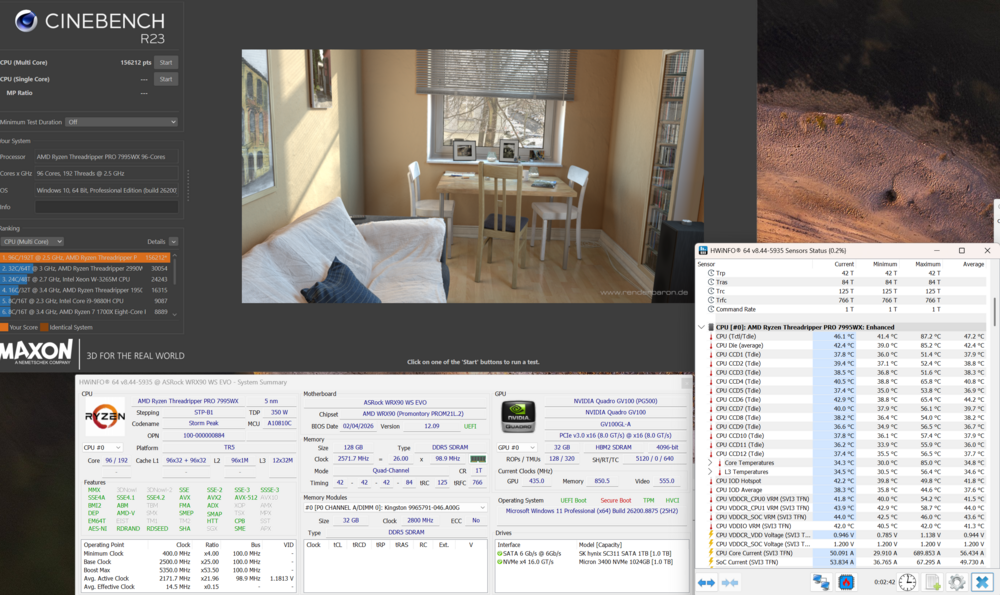
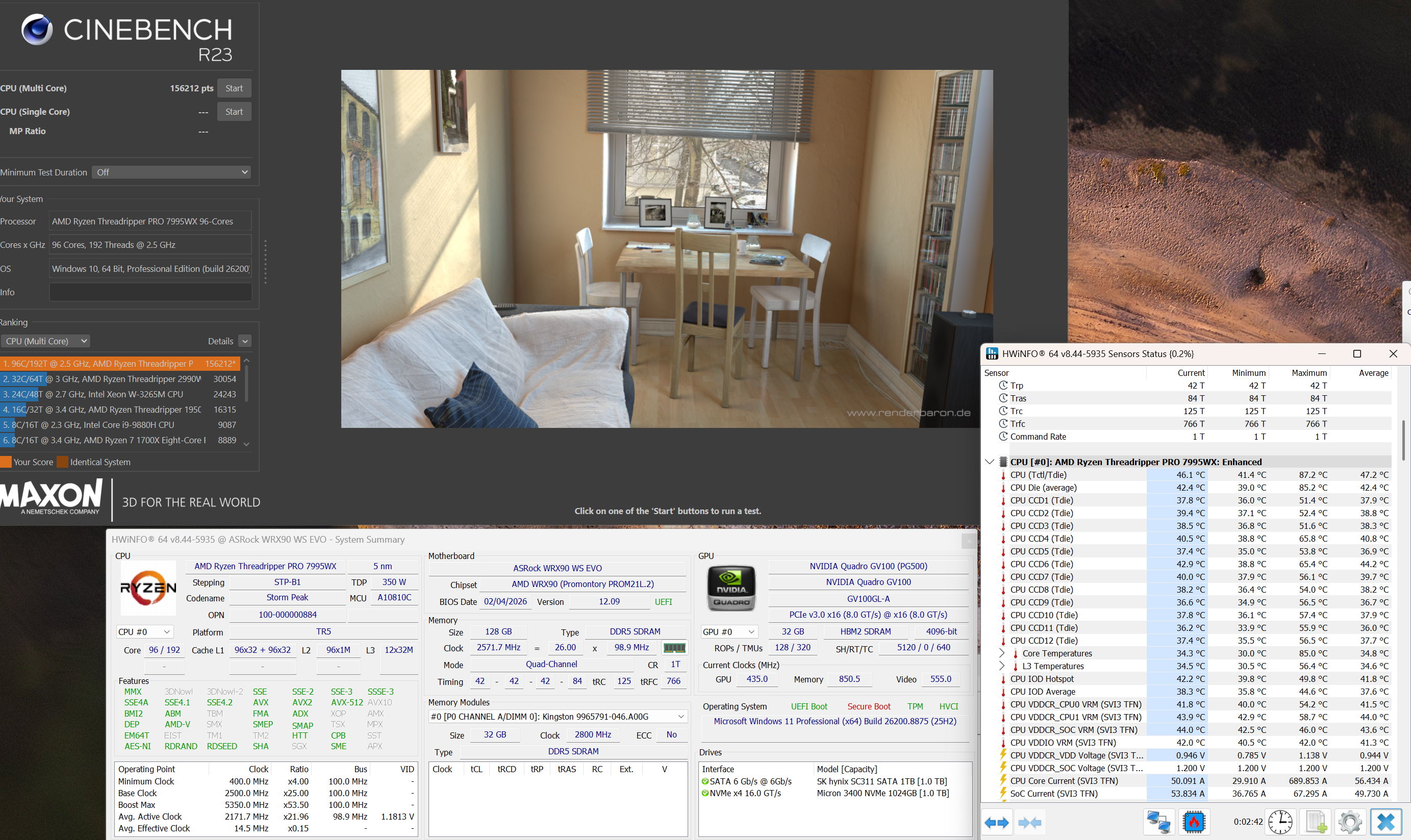
I had some time to play with the threadripper platform and tried a PBO with scalar 2x and -10 on all 96 cores, went from 119k to over 153k 😄 But the second try it shutdown 🤣 Still have the 1200w PSU 1U inside that the case came with so i think this is the weak link..i need to mode the case, cut it so i can add Bquiet 1200w ATX PSU titanium but dont have the time for the work right now
 6 points
 -
Getting 1,000+ FPS is something I have never experienced before. Below is Ark Ascended doing just that on all low settings and 1080P. 6000c26 with 65k tREFI, all tuned to the max with 2167fclk. My son took a picture of me with my phone while I was in the bios breaking things (So posting it here! lol. 😂 )6 points
-
Sometimes this is why I love this hobby. O it's no supposed to work Intel? Lets see about that.6 points
-
Maybe someday I can be bothered with Memory tuning, but its not going to be today, or tomorrow, or the day after :) I enjoy overclocking to yield tangible gains in gaming. Looks like PCIe Bifurcation works on my Aorus ITX x570. That being said I had to scrunch up the ribbon cables so much for the test that I think it was rendered non-functional. The 7900 XTX wouldnt show up at all and the 3090Ti was misbehaving quite severely reporting the link at PCIE 2.0 But it POSTed! so thats progress of a sorts. Got a shorter ribbon (60mm) so hopefully that works i'll test this weekend.6 points
-
Grab it before its too late😁 Remember its an limited edition. MSI RTX 5090 Lightning Z GPUs listed on eBay for almost $27,000 — limited edition graphics card demands 500% premium from resellers As you can see... The world is filled with stupids. I'm sure there is some out ther that are willing to pay $27K for the Lightning.6 points
-
https://www.overclock.net/posts/29562444/ What grade are you in? Are your classmates really mean to you, or is it a parenting issue?6 points
-
While I missed the boat on the best pricing for 8000MT+ RAM, I am happy I spent the 150 to 180 for each of the nine 4TB NVMe SSDs I got over 2025. I went nuts on the Acer GM7000 SSDs. I did a quick calculation, I have over 100TBs in SSDs (spread across 8TB, 4TB, 2TB and 1TB drives) in operation. If I were to buy them in today's prices, I'd have to spend over 30K. Damn! I guess being a frugal data hoarder has it benefits once in awhile.6 points
-
I've applied for a lot of jobs I am ideally suited for and could do with my eyes closed that have not worked out. Ageism is illegal, but it is more real than anyone wants to admit. I have one that looks even better that I have my third interview for today that I pray works out and it would probably end up being the best one I have applied for. The one that looked promising that you referred to is not off the table, but the President wanted to see how how the financials looked for 2025 and how January revenue looks before adding a new c-suite resource to staff. On the WireView Pro... when you get around to it, this screenshot might be useful if you run into any complications getting Windows to correctly identify it. I think the key is manually installing the driver in Device Manager, immediately powering off and unplugging the PSU long enough for the board and everything attached to lose power. It appears there was some sort of delivery failure. I replied and it shows to have been sent, but you evidently cannot see the reply on your end. Thanks for checking on me, brother. I really appreciate it.6 points
-
Happy New Year everyone.6 points
-
Merry Christmas, everyone. Blessings to all of you.6 points
-
Merry Xmas and happy holidays to all! It bit funny and ironic we just talked about your adventures with Best Buy.....good luck! Two observations on the yellow tip again: If it were black, you wouldn't be able to see even the mild scorch marks. Companies should start including these in white or yellow for clear visibility of scorching. I still suspect there are plenty of black connectors out there already with scorch marks. You just can't see them. The bottom row strikes again with the weaker, [ ] design which I posit is susceptible to physical stress and speeds up the cycle as they are heated up and in conjunction with the physical stress are pulled ever so slightly open making them even more susceptible. --- These connectors really should not be physically stressed at all and the weaker the design (like MSI's bottom row array) the more the stress can cause meltdowns in conjunction with migrating imbalance of amps over time for various reasons.6 points
-
Merry Christmas to all my extended family in this thread!!! Now, I am in a bit of a dilemma. Bestbuy has the Prime 5070 TI for $749.99, brand new. I just spent that on the "Like New" card from Amazon. I am going to cancel the card from Amazn and begrudgingly buy from Bestbuy. Here goes nothing....6 points
-
So I ended up snagging a pair of V-Color 9600 2x24GB DDR5 off of eBay new from a seller I've dealt with before In today's market conditions, couldn't beat the price of $489.99 plus I had two coupons for eBay (basically, "you haven't shopped us in a long time!" coupons) for $15 off and $10 off respectively. I was able to use both of them knocking it down to $464.99 for a total of $495.80 shipped and with ebay rewards, that knocks another $15 off of it making it $480.92 to my door. Am I doing backflips? No, but much better than those G.Skill sticks that would have been $650.40 to my door.....still..... This is *exactly* why I try to avoid new platforms because once I start it gets ugly real fast. 🤣 Remember 11th gen? I was just going to pick up a 11700k and the cheapest Z590 board and use my dirt cheap DDR4 sticks to "give it a whirl." Within 4 months, it is several 11900k's binned, Asus Z590 board and EVGA Z590 along with multiple kits of DDR4.... I'd like to say I won't end up binning some 285k/290k chips, but that would be most likely a big ole fib....🤣6 points
-
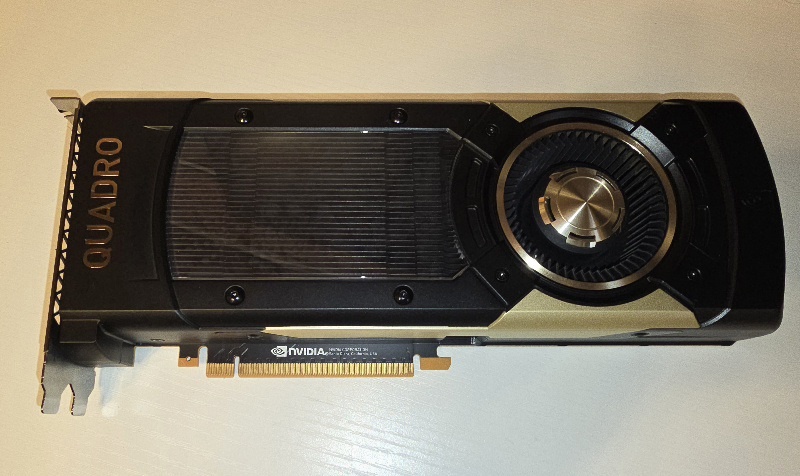
Regarding 5090, still have some telegram bots reporting new drops and prices, yesterday was a founders 5090 drop from nvidia directly on their website for 2099 Euro. Got the notification and went on the site. Got one in the shopping cart but after like 5 minutes of thinking if I need it, I decided to close the website. Every game I play like battlefield 6 or stalker 2 works perfectly on the 4090. So it just a waste of money for me. Also went to the website like almost 40 min later and they were still available, tried to put one again in the cart and it went through, I was against one click to order it and closed again. So it looks like the market is saturated a little. Also got this baby to play with. Nice looking card😃. An oldie but still packing a punch with those 32GB HBM2 memory for larger AI models. Will try some qwen 2.5 and Llama bigger ones on it
 6 points
 -
Sold my Z890 Apex and 285K to @win32asmguy Paid for and shipped to them this afternoon.6 points
-
I haven't uploaded a video in a long time. Now that I finally found stable settings I wanted to save a permanent record for myself and help anyone else that feels like they are spinning their wheels. Moving from Intel to AMD overclocking is more difficult than moving from Windoze to Linux. Maybe (just maybe) there is something in here that would be useful to Brothers @jaybee83 or @Raiderman6 points
-
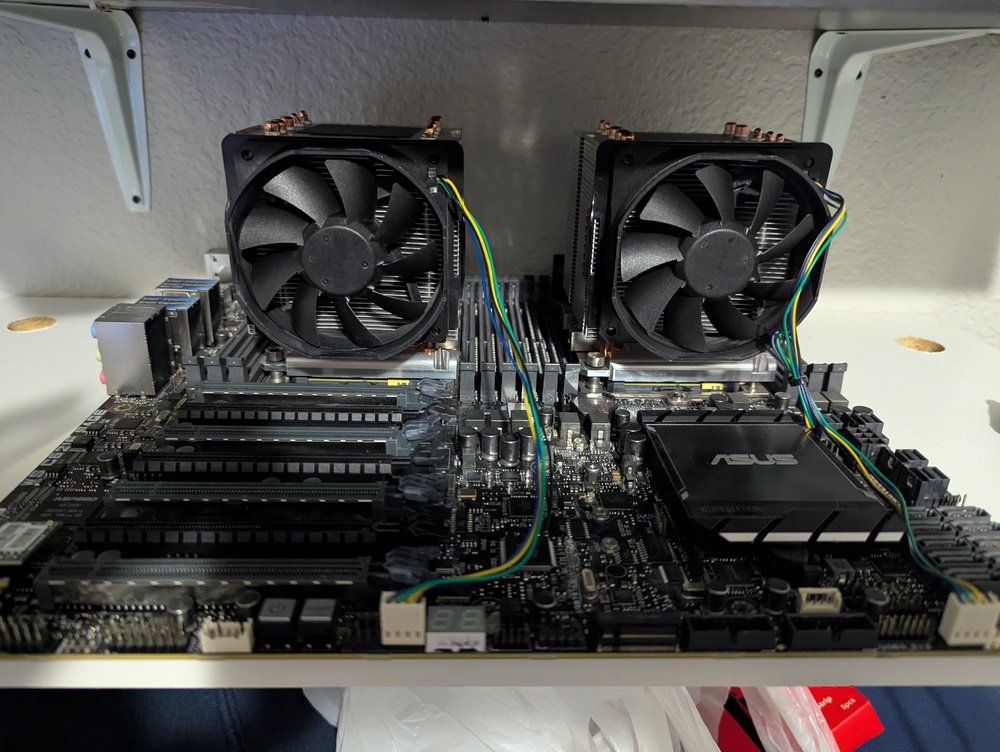
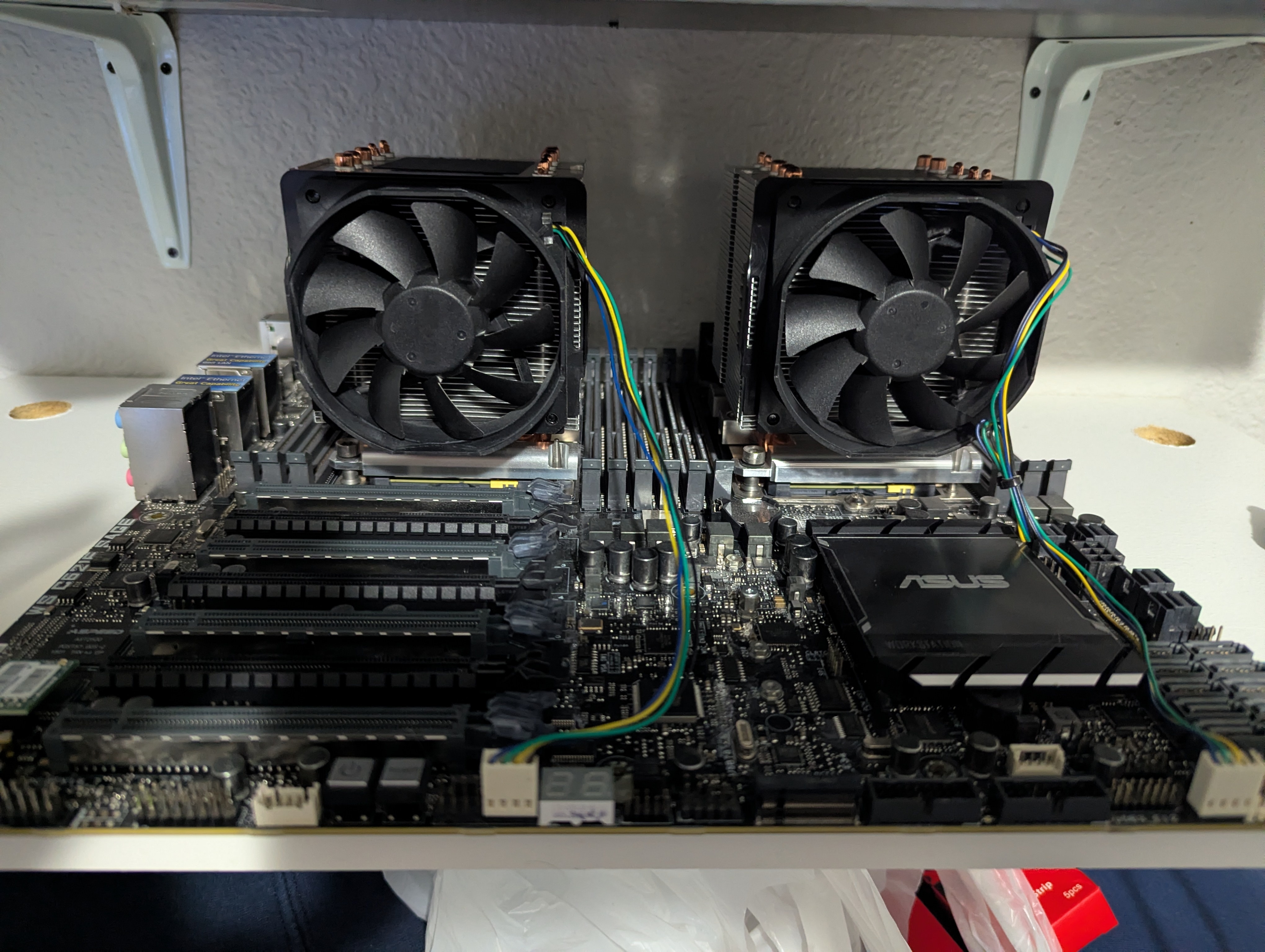
A little preview of what I'm building next Sage 621e
 6 points
 -
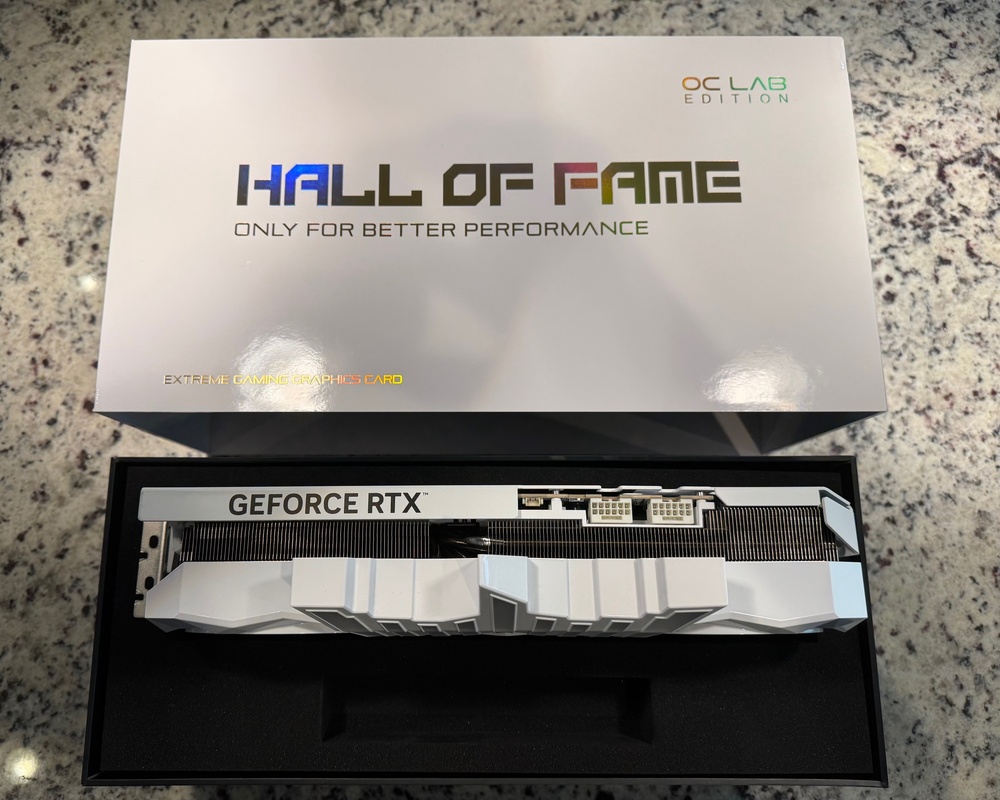
Sometimes I feel like I make the worst decisions. Found this card brand new from a small shop in Florida.
 6 points
 -
Looks like my promotion is finally in the works. I am getting reports of multiple departments fighting to get me in their camp. Its a nice complement, but Im still treating it as non-existent until I get an offer letter. Due to my "detailed" approach, which is really just a really nice way of saying I demand details and ruffle quite a bit of feathers in the process. It has been deemed necessary for me to become an Engineer for Proof of Concept. Basically I work with onboarded clients and make the how-to for green IT'ish people to facilitate their orders. Still wont be able to justify a 5090 though lol5 points
-
so my 1 1/2 year old son figured out how to open the magnetic side panel on my corsair 9000d. next he decided to pull out one of the hard tubing causing coolant to spill everywhere. nothing was damaged thankfully, but I did learn my pump only runs like 50% most of the time even with cpu on full load, causing high temps. I fixed that and well this is what happens next lol. 4.5Ghz on all cores W7-3465X. Yeah I probably should have kept my 2 RTX 3090s instead of selling them. Turns out they would have lasted awhile longer , but my RTX Titans are fun too. Still need to do the shunt mod. i forgot if it was @electrosoft who sent me a picture of the mod. I saw you were rocking an AMD system. It's unfortunate Intel didn't release the W790 platform with a sibling for a true HEDT successor for us "normal" people. I bought the motherboard for $949 on "sale" at the time. I was lucky to find someone selling a QS CPU for less than half of the $2899 MSRP for the CPU. 128GB RDIMMs before the rampocolypse for ~$700. Overall it came out a bit more than a i9-7980XE platform did back then but this platform screams Mr. Fox especially with the X unlocked CPUs. Nothing like overclocking +1.3Ghz on water pulling over 500w of power. 😂5 points
-
Sold to our beloved friend @Reciever5 points
-
Well priced too. I think I'll pick one up for a proper "just in case" scenario. I went back to running the Matrix vBIOS because it keeps my game clocks steady over 3200 everywhere. Fallout 76 is no problem. I can even run stock settings, but WoW will trip the WVP2 without adjustments with the 800w bios. On the flip side, my hot spot differential is ~12c with the stock factory application so I'm good atm on that front. No native 12vhpwr on PSU? 🤣 Nice on the warranty just in case. How did the A-die fare in the 5080 variant for comparison? Would it boot at 1050mv VSOC? Let us know how stability testing goes... let's see how this 9955X3D in the 5090 variant compares to the returned 5080... How are the noise levels between the two?5 points
-
Thanks for asking bro Fox. And huge thanks. I'm taking it one day at a time. Now I'm trying to reduce my cigar/cigarillo consumption. I may have halved my consumption from around 36. But it's still way too high even with vaping. I have started vaping with low nicotine levels. I'm also trying to reduce or better said change my (food)lifestyle. Eat more healthy food to try lower the blood pressure/cholesterol. It's way above recommended. This on top of medicines I take for it. There is some big changes so I don't know if everything is feasible/doable. It's now 14 days since I had a stroke, so it will take time. The question is whether I can achieve my goals. It's too early to say. But I'll try.... So small steps each day. But it's hard. Very hard to change how you have lived the last +30 years. Big changes at +60 is hard 🙂5 points
-
IT WAS THE CABLE!! I think my 5090 did it in lol. Swapped the 12vhpwr. No crashing!!! 🤩🤩🤩🤩🤩🤩5 points
-
Hey y’all! How you all been doing? What’s new? 5090 prices looking kinda crazy right?5 points
-
Got second place for 5080 leaderboard... MrFox's 3DMark - Fire Strike Score 68585 marks with GeForce RTX 5080 @ 3187.00/2250 MHz hwbot.org http://www.3dmark.com/proxycon/images/futuremark-fb-mini.jpg I scored 68 585 in Fire Strike AMD EPYC 4585PX, NVIDIA GeForce RTX 5080 x 1, 49152 MB, 64-bit Windows 11} www.3dmark.com5 points
-
Perhaps when Reddit and Discord are going to force everyone to verify their ages that users who do not want to do that are going back to traditional forums. Until that time we have to accept that we're not as large here as the old NotebookReview forums once were.5 points
-
https://www.3dmark.com/3dm/153759825 | https://hwbot.org/benchmarks/3dmark_-_fire_strike/submissions/5988575 Not too bad for the cute little guy.5 points
-
That why its a mod and its not easy to pull off, a lot of time and money but its cool to see other people doing this to fight back against NVIDIA. Sadly AMD refuses to take advantage of NVIDIA's mistakes to make themselves a good option. Speaking of the RTX3000 series there are rumors that NVIDIA is bringing back RTX 3060 GPUs https://www.notebookcheck.net/GeForce-RTX-3060-re-launch-Nvidia-preparing-to-bring-back-5-year-old-gaming-GPU-later-this-month-claims-report.1245823.0.html This is stupid, why politicians from both parties always create terrible solutions that wont change anything especially when kids are very tech savvy. Plus this bill is useless especially when Parents buy PCs for their kids they register the account (MS Account) or whatever under the parent's name and age, It would be more scary if they have to verify the age of the user through a webcam every time you wanna login. Just another excuse for the government to take more money out of regular people pockets. Also the media is nothing but propaganda and ragebait same with social media.5 points
-
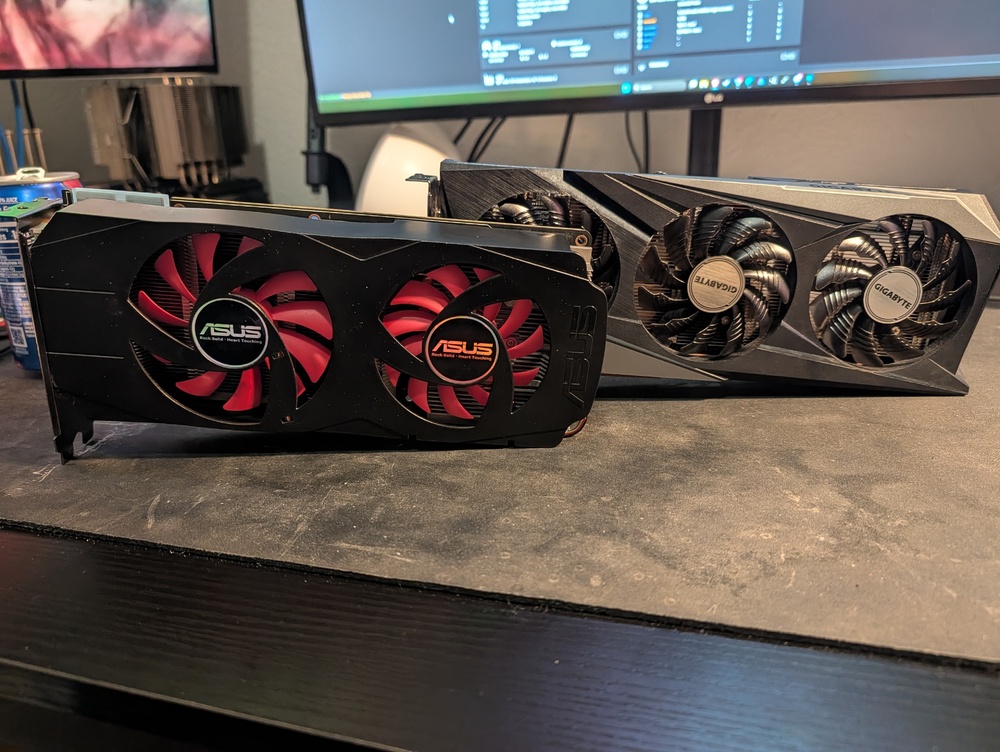
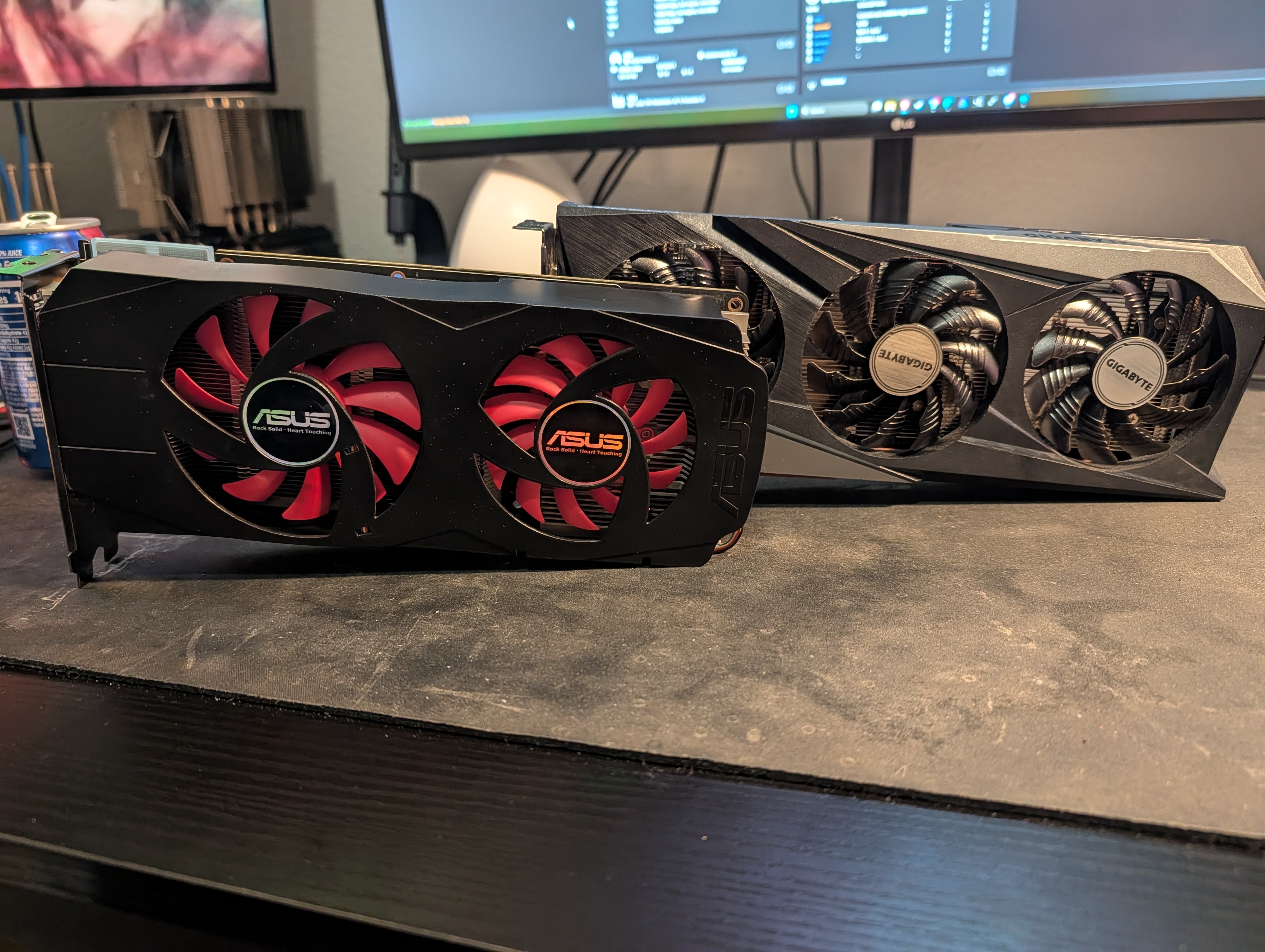
Couple of new additions to the roster. Traded one of my 5700 XT's to a coworker for his 6500 XT. It'll act as my frame Gen mule on the TV and main gaming monitor. The second was my first real GPU. Anyone care to guess what it is?
 5 points
 -
I don't know what's more insulting.... Not sending a replacement set which they do have in stock but it now costs almost 3x as much or having the balls to deduct 15% from the refund for the original cost because of use depreciation when in actuality the items valuation depreciation actually increased over two fold..... In this situation, you either offer a product replacement equal or better than sent in for repair. You don't offer a refund because the replacement set is now worth so much more and you DEFINITELY don't then have the cojones to lop off 15% use depreciation. That is absurdly greedy on a gobsmackingly large scale. Not that Silicon Power was ever really on my list except besides a few freebies tossed my way for evaluation, but they will never be on my list to buy pretty much anything. 😠 Heh heh, what I liked most was him flat out saying he won't be soldering on another connector for him. Makes me think Dufus asked if he could also add another connector with the repair and was told, "nah bruh." 🤣 Ended on a sad note, though. His sister was murdered in Washington State. 😞 It was good to see the large outpouring of support though via his sister's gofundme and messaging. ♥️5 points
-
Another reason why I want to live part time in Norway @Papusan besides the Snow and Cold. When a government agency can produce an entertaining video that also points out a serious consumer issue, you got to give it to them. "The memories may be yours, but the photos are mine" WOW. The Norwegian gov took shots at all companies.5 points
-
Not sure if it'd work on other mobos, but i bet there is a generic tool out in the wild somewhere. What happened to memory prices? Chip shortage? I've a brand new unopened 2x16gb Trident Z5 6000mhz rgb kit, and feel extremely wealthy! 🤣5 points
-
I can only agree with some of the previous speakers. Unfortunately, genuine DTRs are completely extinct these days. This has mainly to do with Nvidia's contracts. I know from reliable sources that they want to control everything and only tolerate soldered variants, especially for laptops. The only exception Nvidia makes is for industrial devices and military technology. Clevo was really the last major milestone in terms of BIOS and MXM standards. I had the ideas for my P870xx projects years ago because Clevo was still doing real high-end development with the greatest possible flexibility. I would like to thank the people in the forum for their support. I hope my desktop extension will be fully operational soon.5 points
-
I can smell it, too. This gal lets a Jensen in the car. Or, is it a Nadella? They smell the same. And, I can feel it.5 points
-
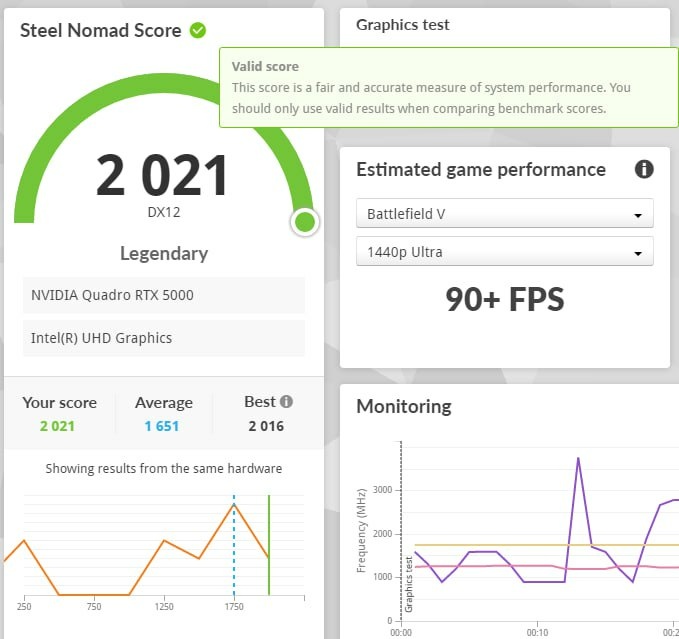
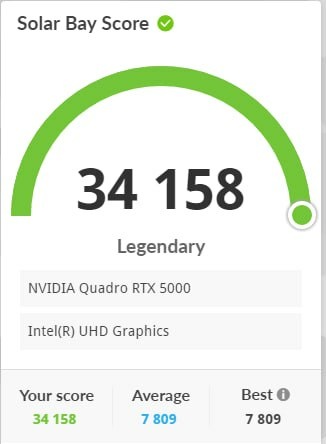
Record setting Precision 7550 with a 7750's 110W Quadro rtx 5000 shoved into it https://www.3dmark.com/3dm/151229648
 5 points
 -
THIS is why I love MSI...... MSI just contacted me about my RMA on the AI1300P to inform me they have zero stock of the newer revision (AI1300P PCIE5) and would the following PSU be an acceptable replacement: https://us.msi.com/Power-Supply/MEG-Ai1600T-PCIE5/Specification Uh, yes, that will definitely be a suitable replacement!! I'm going to wait till it gets here and then do my system with it along with the swap to Ultra 265k, WVP2 and custom 140mm fan cooling for the DDR5.5 points
-
All of my 32GB ECC DDR4 are in use, unfortunately. I do have one W-1290 server that I only turn on once per month with 128GB of 2933MT/s RAM (32GB x4) that doesn't particularly need that much RAM. I only purchased that much RAM to max out the server. They are UDIMMs though. The crazy part is the price for them didn't change. I paid around $850 for the two kits around three to four years ago. They cost the same now. I am starting to realize I only buy RAM during shortages...LOL.5 points
-
MSI finished my RMA and got the FedEx package today. To my complete shock, they gave me a brand new unit and the new ATX 3.1 version. Honestly a great RMA experience with MSI.5 points
-
Isn't it infuriating when the bias is clear in these videos for CPU comparisons? Either run default vs default EXPO vs XMP based on actual AMD/Intel speeds or take the time to properly test and OC each platform with similar levels of overclocking. I'm fine either way, but be consistent. The problem is 99% of viewers won't go over the fine print or even care. They run right to the results and move along. One reason I still watch FrameChasers and especially BlackBirdTech is they push max tuning on each so you can actually see the end product if both are OC'd within reason to gather some data for your own analysis.5 points
-
Microcenter 9070xt return story and some nice information on GPU checking and return procedures: ----------------------------------------------------------------------------------------------------------- So all is well that ends well. Made the trip back up to MC St Davids to return that 9070xt and found out a few things. I had asked how a defective / non working card had slipped out for sale and how two more open box Challengers showed up for sale the next day. The rockin' tech assist associate let me know exactly how everything works. The one I bought had been shipped to their main return hub in Ohio from another store as a return then redistributed to the St David's store which means they do send out refurbs/returns that are supposed to work and seed them to stores to resell. You can tell if it is a main hub open box/refurb item (any item) with the green sticker on the side along with a marking. Sales associate pointed it out to me. If the card is returned as defective/not working and verified as such, the card gets marked down as defective and sent to ohio. Ohio then contacts the main companies for replacements/repairs. If they get back a new card in return, it goes back in new stock. If they get a refurb, it goes in as a refurb. Either way, they are then seeded back out to the various MC branches. What this means is you will never return an open box item that won't eventually be sent back to Ohio main returns and then reseeded to various MC stores. As such, there is near zero chance for you to return an item in the hopes of repurchasing it as an open box status. The problem with mine is it wasn't marked "defective" when returned (original new buyer probably just thought it was incompatible) but even then the main hub is supposed to check all cards for working status before shipping out open box / refurbs. Probably Amazon Renewed/warehouse magic where it is assumed it is working and just a return and they didn't check it at all. The receiving MC does not check the working status of open box / refurb items received since they are supposed to have been checked by Ohio main. On the other hand, the original store that took the return was SUPPOSED to check it before sending it to Ohio either way and they failed to do that. St. Davids immediately checked it even when I said, "it is dead. Get ready to see your VGA diagnostic light fire up white" A few seconds later after plugging it in I heard the tech chuckle and go, "yup, there's the VGA fail light in all its glory." 🤣 Refund immediately issued. It wasn't St David's fault but the original store who took the return and failed to plug it in and check it and Ohio mains for not checking it too. I did ask if for open box purchases can the customer request a quick check to make sure it at least posts and he said sure. I will keep that in mind next time. Thanks for attending my Ted Talk.....5 points
-
Process Lasso is definitely the way to go if you have a dual CCD processor with 3D V-Cache. No need for Micro$lop XBOX feces bloatware and the extra chipset driver crap. Just select the EXE and choose the affinity and BOOM, every time you launch that game it uses the CCD with the cache. When you close the game it is back to using all cores and threads. Easy, peasy... no hokey pokey nonsense with flakey rubbish from the Redmond Reprobates.5 points
-
Out of space for files. Link instead5 points




.thumb.jpeg.6525223bcae8200a11192d197e3f8fff.jpeg)






This leaderboard is set to Edmonton/GMT-06:00