Leaderboard
.thumb.png.362386d2804d5f9fbcf2ec7f5aa009c5.png)



Popular Content
Showing content with the highest reputation since 09/24/2026 in all areas
-
Looks like my promotion is finally in the works. I am getting reports of multiple departments fighting to get me in their camp. Its a nice complement, but Im still treating it as non-existent until I get an offer letter. Due to my "detailed" approach, which is really just a really nice way of saying I demand details and ruffle quite a bit of feathers in the process. It has been deemed necessary for me to become an Engineer for Proof of Concept. Basically I work with onboarded clients and make the how-to for green IT'ish people to facilitate their orders. Still wont be able to justify a 5090 though lol5 points
-
back from vacation gaiz! and damn... who wouldve thought that my hardware setup actually generates more returns than my actual stock portfolio?! LULZ but even at an average selling price of 6080€ (bought my Suprim at 3300€ incl. tax and shipping, so +84% markup now) theres literally zero incentive for me to sell. just goes to show that when it comes to my PC hardware hobby, the passion and fun i get out of it far outweighs any monetary benefit it might generate. since basically all our everyday expenses are pretty much on the frugal side (aside from travels), i guess u can call that my one splurgeful vice 😄 btw if anyone is looking for a game to max out the power envelope, im currently playing Resident Evil 2 Remake and it basically pegs the GPU at 700-800W, was surprised to see that! was also pleasantly surprised to see Control Resonant getting released, got it right away 🙂 games backlog is filling up very nicely with lots of awesome games im looking forward to! same way im looking forward to the AI bubble popping.... 😛4 points
-
The 5090 pricing is really crazy right now for sure. I have not been tempted to sale my 5090 Astral, but my brother sure has been pestering me about selling it lol. Amazing GPU! I like it so much better than my FE, and I really liked my FE. But I think most of the likeness for the FE came from the low price and ability to actually get one fairly quickly after launch. I have decided to keep the 9950X3D2 that runs the 2,200fclk. The IMC has no issues stabilizing tuned 6400c26 with a mere 1.500v VDD, and 1.400v vddq. Using the new to me G.Skill 6000c26 sticks, and reducing VDDP voltage to 1.050v, has made its IMC feel just as strong as the other one. And now I actually got its tPHYRDL’s matching on both ram channels with both at 35, which is great! I noticed on AMD that they are sensitive to waterblock mounting pressure. And maybe this last mount last night swapping back to the 2,200fclk chip, must have gotten something perfect. I swapped between these two chips and unknown amount of times. I think I ran each one at least (3) times. This one also boosts higher in games. No PBO+ or anything like that is enabled. It’s running higher clocks on average by about 70-100Mhz. The AMD CCD0 and CCD1 in Windows is also quite good! I see my games typically use CCD0, while windows services are targeting the slower CCD1. It’s pretty amazing to see this work so well. For now I am hanging on to that 5090 Astral.3 points
-
Yeah, it does. If a person had the soldering skills and DDR5 BGA template, that would be a cheap way of "making" RAM as long as they didn't need 8000+ MT/S speeds. Congratulations, brother. I am glad that your dedication to excellence, faithfulness and hard work is finally being recognized. I'm glad you are being facetious, otherwise I would be concerned.3 points
-
thats the kind of stuff that reminds of the good ol' NBR days 🙂 very nice! no justifications necessary, JUST DO IT! 😄 at 6000+ bucks its a steal and totally worth it hahaha3 points
-
De8auer going over data from problems detected with the WVP2.... ~9 months in production data sample window compared against WVP1 dataset Sold 5x as many WVP2 as WVP1 WVP1 reports of melting/issues ZERO reports of melting WVP2 units 98% of the cases are cable issues 2% were WVP2 replacements for various reasons up to and including a faulty connector 0% were the GPU connector itself... Noctua edition has beautiful refinements and obviously runs quieter. Noctua uses a different heatsink and PCB for full PWM control vs just DC control on the original. Original WVP2 price on TG website is $140.28 Noctua Edition is $222.18 So Noctua is ~58% more Extrapolating on Amazon, the current WVP2 is 169.99 so expect potentially to pay ~268 on Amazon when it finally arrives.3 points
-
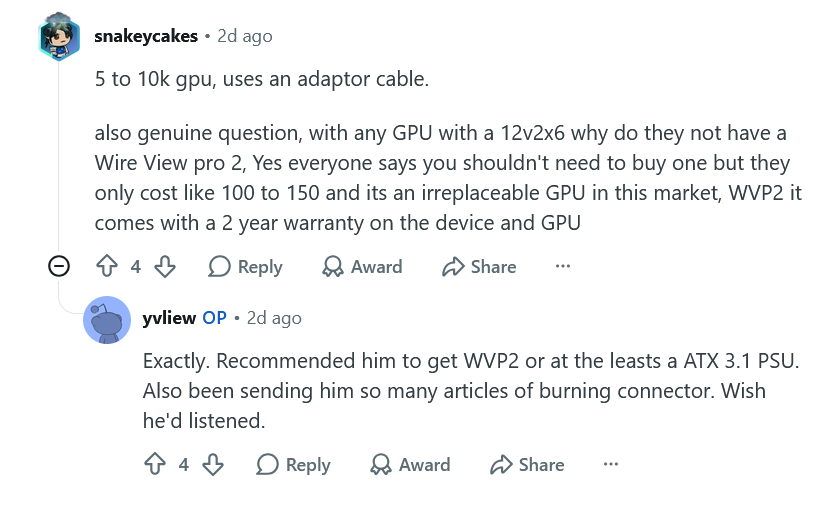
K|NGP|N coming back to the OC scene: "K-Pop Kung Fu Class" as a reason for switching studios was not on my bucket list of reasons to move to another location.... Looks like he's going with Asus..... New OC channel: https://www.youtube.com/channel/UClS4F_eKD3PCihwI9ZvrdwQ Welcome back! --------------------------------------------------------------------------------- Same boat.... I thought about selling but I switched to my Power Devil 9070xt then 5080 in my main rig for a few days and watching those frames seriously drop and sitting at 100% util more often than not in WoW 4k ultra 10 sent me scurrying back to my 5090. Yeah, I could pocket $3-4k+ profit right now and then what? Sit around and bitch whine and moan about being capped out and not getting the performance I want for the next 12-18 months just to see the prices of the 6090 requiring a kidney assuming it launches by Q1 2028? I'd rather enjoy the here and now with state of the art performance for the next 15 months if not more.... Have you given your 5090 the mvolt+ treatment yet? -------------------------------------------------------------------------- That is awesome news @Reciever! Know your worth and demand no less. Sometimes you have to be proactive and other times those around you will see and acknowledge your quality work and reward you thusly. Now, just go ahead and finance that 5090..... 🤣 ----------------------------------------------------------------------- Glad to see you taking the small, but meaningful, steps to right the ship and being able to drive again has to feel good. Losing self autonomy is never a good thing on any scale and driving is a big one. Just keep trying like you said to stick around and keep us up to date on the tech sector doom and gloom. 🙂 --- I am not shocked at that EVGA report. Nvidia and Jensen needed AIBs and gamers years ago but at every chance afforded to them well before the AI BS, they made sure to put the screws to AIBs and cook the books with crypto and continue to push prices as far as able while casting their illusions of MSRP and deliver less for more each and every cycle. EVGA went out on a high note with their GPUs and Motherboards and downsized to peripherals. I don't blame them one bit. --- The cable, according to TG data collected so far with the WVP2, is the primary issue regardless of MSI burning up or other makers like the PNY reported a day or two before this one. It was an Asrock PSU. In the comments: He literally recommended over and over to his friend to get a WVP2 or at least a better 3.1 compliant PSU. With the WVP2 I am pretty sure he would have immediately seen a high imbalance on a pin or two but without a WVP2, or a 3.1 PSU that reports pin monitoring or an Astral. Without any of these reporting protections, you are basically piddling blindly in the wind every time you use your 5090. Before my WVP2 and MSI sending me an Ai 1600T PSU, I purposely used the included tentacle just in case for warranty claims. Switched to the MSI PSU and its included 12vhpwr cable keeping MSI completely responsible for the warranty chain and then added a WVP2 and their warranty on top of it for extra added support. De8auer said they haven't had a single report of a WVP2 burning up yet from WVP2 to GPU connection. At this point, anyone running a 5090 without a WVP2, a pin monitoring compatible PSU or at the least using the tentacle to keep any burning issues warranty claims valid are playing with fire. -------------------------------------------------------------------------------------- Ditto, I'm holding onto my 5090 for at least another year if not more. Zero reason to sell. I'll re-evaluate the landscape next October/Nov when the 6000 series is potentially on the horizon. Hopefully the AI bubble will have popped or at least deflated a little by then. That makes sense with the 5090FE. The value proposition of it getting it for retail was its main draw by far. Price not being an issue, Astral is a sick card and removing price as a factor, I'd take an Astral over my Vanguard all day everyday on industrial aesthetics alone albeit I did find my Vanguard had the best silicon in my testing between it, the Astral and the Ventus but I would have to rerun those tests in the here and now with mvolt+. Whew, I'm glad you kept the overall better sample with the best fclk. It did seem the best on paper. Have you done any 8000+ testing yet? I agree on pressure. I was having issues with the delidded 9850X3D and the TG Heatspreader with 8000+ testing suddenly failing. One flaw I've found with the TG HS is heat expansion and cooling eventually loosens up the screws a bit. This might not be a problem with a tight pairing and a block keeping the pressure where it needs to be, but right now I'm still sorting out the Z-height issues so the pairing isn't as tight as it could or should be atm so eventually over the course of hours or days, my memory settings will fail. I dug through some older AM5 compliant heatsinks I have on the shelf and found a set of shorter by ~2.5mm non-spec standoffs I plan on swapping in to compensate to see if that helps along with shoring up proper pairing pressure to get temps to be a bit better. At the moment, I am not super pleased with the TG HS, but we'll see after this final testing. -------------------------------------------------------------------------------------------- I still need to get back to the G16 for some Bios tuning and testing but my desktop has been my focus atm. Yeah, three of them showed up. Two sold for $3500-3700. One was delisted but it had scam written all over it at the time. Do a completed sales history search on 9955HX3D 5090. Purchasing from an official outlet definitely was the way to go and get that three year warranty. With the way the market is going and offerings, it will be the best overall for the next few years. We won't see a 6000 mobile refresh till 2nd or 3rd quarter or 2028 at this rate. I plan on playing both retail and forever. I've always played Paladins since launch but I also alt druids and hunters from time to time. During Vanilla, I was all about my Paladin, priest and hunter. Priest had Benediction in Vanilla and Hunter had Rhok'Delar. I was guild leader with a top raiding guild back in the day and once we had MC and BWL on farm, loots eventually trickled down since we ran DKP globally and once everyone was geared up enough I let alts tag along for runs to get some good loot too. We had a server first Hand of Ragnaros but could NOT get the second half of the binding to drop for Thunderfury! 🤣 I burned out halfway through BWL and went casual after that. WoW stopped being fun and became more a job and managing egos. I'm pretty sure I am going to main a druid this time around and alt a hunter again.
 2 points
 -
Wow my ancient write up is still helping someone today! Nice!2 points
-
You are in our thoughts and prayers, brother. Glad things are moving in the right direction again. I hope the rest of the family is well.2 points
-
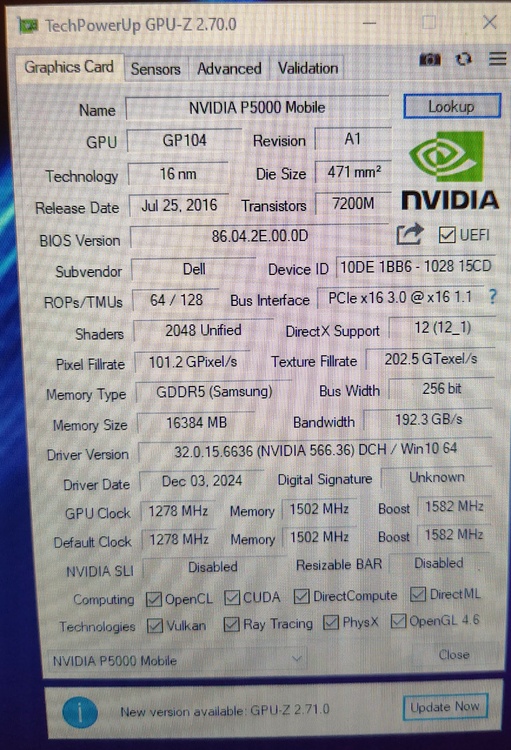
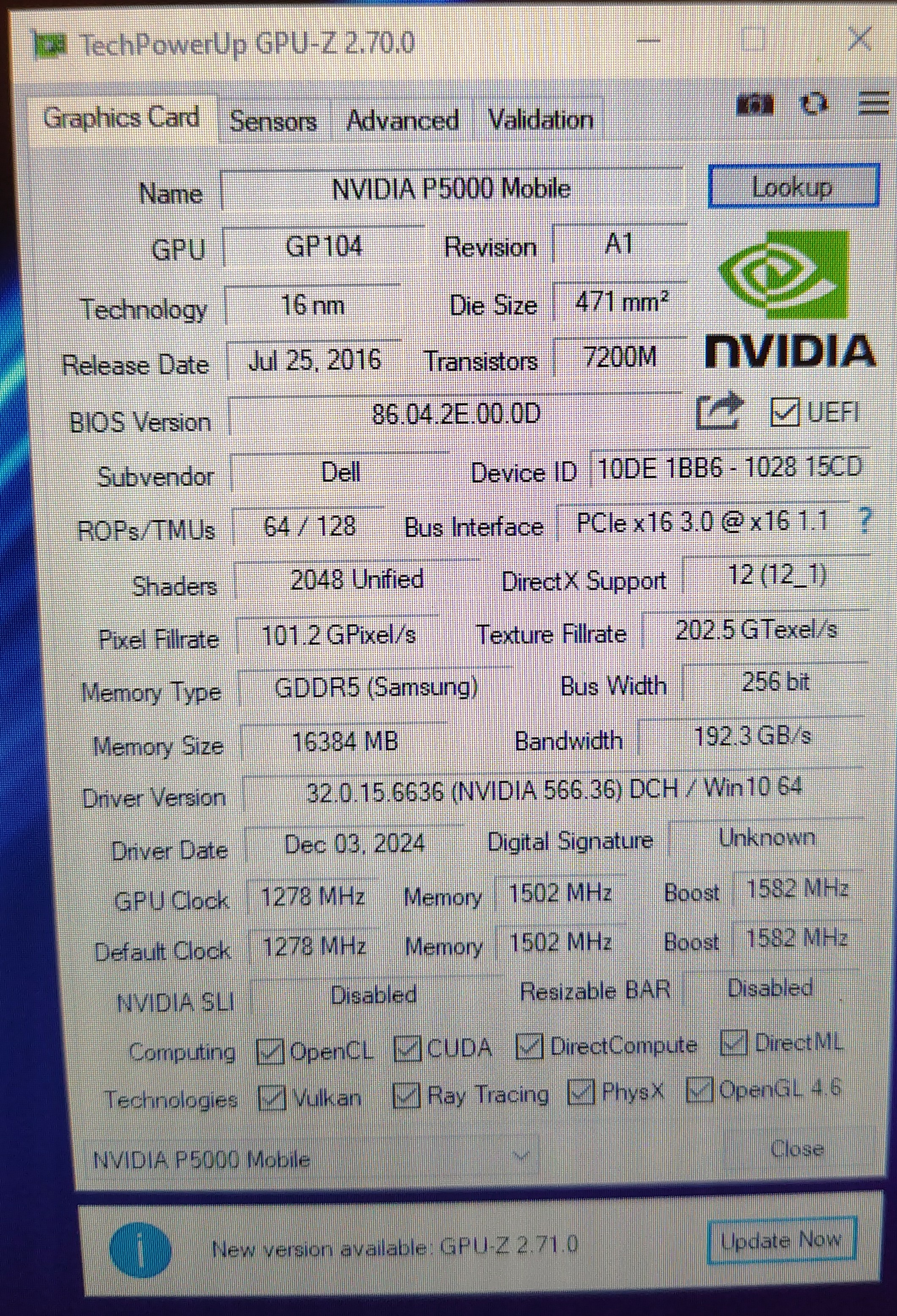
I have news, very good ones, the P5000 arrived, i filed the radiator a bit more after i dremeled it yesterday, i put it in, and half-assembled the upper half of laptop. I got into Linux Mint 18.3 and it saw the gpu, with ./nvflash --list then i flashed the vbios just like DynamiteZerg did in 2018 and after the reboot it went straight into Windows10. After some fighting with NVCleaninstall i present you another example of P5000 working in Dell Precision M6800 I want to thank everyone for the provided help, will post some updates later after i reassemble the laptop fully and test it in some benchmarks.
 2 points
 -
If it were up to me, NVIDIA would be legally bound and on the hook for all of the costs and footing the entire bill across the board for all GPU and PSU connector meltdowns, with no room for exceptions or fine print exclusions, because they are the idiots that ushered in the crappified connector and gave the OEMs an ultimatum requiring them to use an engineering abortion. If that were true, I suspect it would no longer be used and everyone would be back to using legacy 8-pin PCIe power connectors.2 points
-
They do have a point, though..... It is one reason I purposely used the MSI included 4 headed dongle of death originally with my Vanguard and my Suprim 4090 because if anything were to go wrong, it is on MSI. Worst case, the connector melts. Best case, just one of the tentacles (or more) melts down which is an easy replacement. Either way, the entire chain is on MSI. Now I use an actual MSI PSU AND a WV2Pro with two layers of warranty claim protection if my 5090 goes POOF! In this case, what caused it? The connector? The Asrock Cable/PSU? Both? Looking at the pictures, it appears to be an Asrock issue as it is burned on BOTH ends. Not that it doesn't suck, but I'm going to agree with PNY on this one and the owner now needs to go after Asrock and loop them in on the claim and see where things settle.2 points
-
This is nice... Double trouble and stupidity on top. What a combo. All PNY GPUs that require a 16-pin (12VHPWR / 12V-2x6) input include a PNY-approved power cable or adapter in the box. This cable is the only configuration covered under warranty. If a third-party power cable, adapter, or PSU cable is used and damage occurs - including melting, burning, overheating, or deformation of the connector - PNY cannot accept the product under warranty. Damage caused by non-PNY cables falls under the responsibility of the manufacturer of that cable or power supply.2 points
-
They do not, that was the case on 8570 and 8770 G5 and G6 (probably G4 too) have eDP on DP_D position of MXM slot, G1, G2 and G3 have eDP on DP_C so either a custom vbios is required to get picture on screen or a backlight cable mod. All zbooks have only eDP display connections. 17 g1 and 17 g2 have an eDP to LVDS converter on the display cable because they used LVDS displays, the GPU will read the display as eDP however.1 point
-
Catcall - The World is Ours Again & Satellites Because - Just found by accident a few years ago.....but like these songs the best1 point
-
I do see higher TDP draw on the GPU in performance mode. It goes up to 170W at QHD and max graphics. I am surprised there have been more show up on ebay. Not that I would have been happy with the ebay route as extending the warranty was far easier by having a B&H Photo "official reseller" receipt that MSI was willing to work with. I have not looked close enough at WoW Forever but it really depends on if we can get in a good community and its content is actually more fun than retail. I was actually more excited about WotLK remix coming next year. My IRL friend did purchase the pre-pack though so I will probably at least try Forever once the initial out the gate rush subsides.1 point
-
Thanks for asking bro🙂 More like status quo. But something good has it been the last week... I got my driving license back after 4 months . But only for two years due the risk for new strokes. Then I need to pay yet another $150 USD for a new prolonged period of two years. This if I once again can manage all the tests to keep the driving license. Some part of the brain is gone, thats the reality of getting stroke. You can compensate with other parts of the brain when some parts fall out. But within some limits. It's what it is. I try as best I can everyday. Not bad but it could be much better. But who know how it goes. The risk for new stroke is still high within the next 5 years😑 RTX 5080 with two old 8-pin connectors instead of 12V-2×6: Ronaldo's experiment or how much connector drama could NVIDIA have avoided? Former EVGA manager says NVIDIA pricing rules forced some GeForce cards to be sold at a loss Yup, the well known yellow-tip disaster strikes again...1 point
-
blackened death metal Haiduk - Archdevil1 point
-
Johnny Cash - Hurt Because - Best cover ever. Trent Reznor even said the song no longer belonged to him.1 point
-
Yup! Update: did another test today (8192mb) for the entire memory, about 2+ hours of running, and the result is PASS, with no anomaly nowhere, so it means the memory are good i would say. Like i said, i also changed the Vbios, and did run two unigine heaven today, for some long minutes (until the throttle), and no artefact. I will continue to test, but i will say there is maybe an Hope that the card still good.🥹1 point
-
100% I do think Nvidia came up with this new standard because they could see: A> The writing on the wall in regards to power consumption and the idea of running 4+ 8 pin connectors wasn't feasible space wise which leads into... B> The rise of AI and multiple cards all using a single power cable for arrays of AI equipped Nvidia GPUs... The issue is the connector is problematic but again how many connectors do we see blowing up in AI farms running thousands of these cards? Too many variables on the end user front and I'm not saying the connector isn't chock full of fail (it most certainly is), but it is a big Venn Diagram of problematic connector to the left and user error to the right.... Best bet, again, is to run the tentacle or at least get a PSU that is the same brand as your card so if something blows up, the company can't point fingers elsewhere. It pains me to side with PNY on this one, but since PNY doesn't make PSUs, running the tentacle would have kept the warranty responsibility on them. Unfortunately in today's market it really is a good price and that is why they sold out ASAP. 😞 And yes, for personal AI work, I would take a 5060 Ti 16GB over a 9070 XT atm.... As for cables, while that sucks, the warranty chain is entirely on MSI and yet again a reason to make sure to use the included adapter with your card or at least use a PSU that is from the same 5090 AIB so any melting connector issues are entirely on them. If you are using a 5090 with a third party power cable for vanity sake then things can get muddled when something melts down. Many times it isn't even the 12vhpwr connector itself but cable that blows and takes your connector with it. Again, I ran the tentacle religiously on my 4090 and 5090 till the WV2Pro AND getting an MSI 1600w PSU. How ya feeling these days @Papusan? Health on the mend and getting better? ---------------------------------------------------------------- Somehow Gigabyte shanked it with their 16" 9955HX3D 2026 laptops (they opted to replace Intel with this refresh from their 2025 variants). Insanely loud fans, subpar performance..... But as the game performance charts show, when X3D shines, it insanely shines. Part of this is due to some games loving that cache. The other part is the absolutely atrocious memory settings and adjustability on 15th gen Intel laptops.... Some OC controls in the BIOS but no CO offset like MSI and Asus.... Timestamped for 9955HX3D vs 275HX1 point
-
Does this mean this below is a steal? There is buyers out there, no doubt. But for $6000 and above? Not ordinary buyers for sure. 5090 is someone's only chance to get close to a "real" AI/workstation cards below $10K🙄 10,000 Walmart shoppers added a $4,299 RTX 5090 to their cart before it sold out The GPU Madness Has Come to This: 9070 XT vs. 5060 Ti 16GB GPU Pricing Has Turned a Ridiculous Comparison Into a Real Buying Decision As I understand it, and please note that I am far from an expert on this AI stuff, there is significantly greater demand for the RTX 5060 Ti 16GB than the Radeon RX 9070 XT among users running AI workloads locally. And the US introduced chip ban is a joke... Nvidia knows it very well. They have no intention to guide their AIC partners what they should or not. DeepSeek is devouring RTX 5090s for AI in China: stock is disappearing and prices are skyrocketing across the market Buying an NVIDIA RTX 5090 is becoming a virtually impossible mission, and the problem is no longer just gamers looking for the fastest gaming graphics card on the market. DeepSeek has turned NVIDIA's consumer GPUs into... Herein lies the problem. US restrictions have limited China's access to NVIDIA's most powerful accelerators, while DeepSeek R1 is heavily optimized for NVIDIA hardware and software . When you can't buy enough accelerators specifically designed for AI, the next option is fairly obvious: look to gaming GPUs. AMD denies direct sales of restricted chips to China after Dylan Patel calls for an investigation into the company for "treason" AMD denies direct supply and points to diversions by third parties Yup, you really need the two layer warranty claim protection on MSI cards... Because their yellow fire cracker is doomed to fail. And how easy is it for people ta ask for new 4 headed dongle from MSI if you see problems (when you see or measure uneven pin load) before they turn into the usual brown and black? Or do you need to use the yellow pig until it melts before they will send you working replacements? Hmmmm, fun times dealing with modern/cutting edge tech🤮 I think you should be safe at least with Asus. Nine brands responded on whether it’s better to use a native 12V-2×6 cable or the bundled GPU adapter Recommend the bundled adapter (the cable that ships with the graphics card) ASUS: “The included GPU adaptor is recommended for the best usage experience…” MSI: “MSI officially recommend using the adaptor provided with the graphics card.” GIGABYTE: “We strongly recommend using the original cable... RTX 5090 12V-2×6 connector reaches 91.7°C with DLSS 5, 16-pin input peaks at 647W1 point
-
Okay, first we need any ordinary contact cleaner spray based on isopropyl alcohol. There are tons of options on the market, but it has to be a pressurized can not a manual sprayer. Second you’ll need two or better three nearly dead AA or AAA 1.5V battery cells like from a TV remote control plus two pieces of any kind of wire or even a paper clip will do. If it's (in the best case) just a shorted ceramic capacitor it can be removed mechanically for example with a small screwsdriver and no soldering is needed. There are lots of them and the card can operate without one as well. No worries. Any ordinary inexpensive basic multimeter is obviously a big advantage, as other forum users have mentioned here.1 point
-
Seing as your charger shut's off immediately, it is safe to assume that the main power rail (+19v) of your MXM gpu is shorted. The charger supplies the MXM slot directly, making it cut out with GPU installed = the MXM card is main power rail shorted. This is either due to a capacitor that shorted itself or a high side mosfet short, the high side mosdfet are driving a secondary power rail (+VCC_CORE, +VCC_VRAM, +VCC_PEX, +VCC_1.8v) Best case is a capactitor as it can't damage anything else, mosfet is more problematic as the secondary power rails I mentionned are all at <2v and they suddenly received +19v for a few milliseconds, this is enough to internally destroy the core or the vram chips. I would highly recommend you get a multimeter, even at your local hardware store it will be less than <10$ and very useful for future projects/life. With the multimeter you can trace down the short and then you will need a controlled power source, such as a lab bench PSU to inject a small voltage of 1v @ 2-3 Amps so that the shorted components warms up. Then the component must be replaced (this is more complicated) You can also go to a repair shop and tell them you think it is main power rail short because of charger cutting out immediately, if they do actual motherboard level repairs (not a given) they should be able to confirm it and tell you if the card is fixable.1 point
-
5090 resell prices are reaching peak insanity: Current bidding on a 5090 Vanguard on eBay hit $7k @tps3443 last few 5090 FEs sold went for ~$6k!! Average selling price is $6k+ and climbing.... In a few Facebook PC hardware groups discussions, those selling their 5090s are literally putting them up for ~$6k and selling immediately paid in cash or zelle. We all know where they are going, but still...... To say the temptation to sell my 5090 Vanguard isn't strong would be a lie 🤣 At this rate, I would basically be swapping my 5090 for a Mac Studio Ultra.... But the question is, can I be happy with the massive drop in performance vs my $988 5080 or $720 9070xt? If you sell your 5090, you're basically resigning yourself to the 5080 or 9070xt moving forward for the next ~2 years and depending on how the 6000 series pans out, it could be longer.... ------------------------------------------------------------- WoW Forever is a hot mess on Macs atm so devs have a lot of work ahead of them considering retail runs decent on the M4 Max. I picked up the Forever Edition since I have oodles of in game gold sitting there and just converted a chunk of it to real $$$. I've done this for the last I think 4 Xpacs? Mac Mini M4 (10 GPU cores): Macbook Pro M5 Max (40 GPU cores): ------------------------------------------------------------ Yeah, I am still accumulating parts / waiting for a few back ordered parts for my AM5/5080 SFF buildout, but right now the G16 is really checking all the boxes. I could see downsizing to just the Clevo PE60 at this point. I saw a few more 9950HX3D/5090 raiders pop up on eBay but at the moment I've lost my zest for them with the Asus atm. Are you going to play WoW Forever? I am, but the wife isn't feeling it as retail is her comfort zone. Even with the QoL improvements, it is still vanilla / classic so it might be a little too hardcore for her so we will see. ------------------------------------------------------------ Always a chance you take when you purchased open box / used items, but even laptops being stripped of their memory and SSDs: https://wccftech.com/msi-vector-a18-hx-amazon-listing-32gb-ram-ssd-missing/0 points









This leaderboard is set to Edmonton/GMT-06:00