tps3443
-
Posts
2,244 -
Joined
-
Last visited
-
Days Won
109
Content Type
Profiles
Forums
Events
Everything posted by tps3443
-
*Official Benchmark Thread* - Post it here or it didn't happen :D
tps3443 replied to Mr. Fox's topic in Desktop Hardware
We’ll probably see something similar happen with RTX5000 series. I just hope it’s not as drastic though. It was pretty sad seeing an RTX4070 straight outpace these heavy OC 3090/3090Ti’s in ray tracing games with their frame gen. -
*Official Benchmark Thread* - Post it here or it didn't happen :D
tps3443 replied to Mr. Fox's topic in Desktop Hardware
Yeah the 4080 Super is very nice. Primarily with just how efficient it is. 90% of the time my 4080 Super with the 450W bios is literally 80% of a stock RTX4090 (Most of the time) It’s pretty fast! My old 3090KP was also quick for a 3090, it was substantially faster than overclocked 3090Ti’s. I believe the biggest advantage is the 4080S feels faster in real world when using RT/FG/DLSS3. Not to mention Cyberpunk 2077. Mainly because of Frame Gen. I can play Cyberpunk with 4K, DLSS Quality, Ultra RT, Path tracing off, and average exactly 100FPS. My 3090 would be high 50‘s here. So it makes the 4080S feel and seem like a monster in comparison all thanks to Frame Gen, better RT performance, and all at a fraction of the power cost lol. And it’s just so much smoother. When I was playing CB2077 on my 3090KP I had a profile that was pulling about 580-620W range on power. And it was barely maintaining that 54-60. I actually did buy a 4090. So we’ll see if it’s able to offer me more than 20% uptick. Possibly 25%. 😬 I’m hopeful though. The 4090 seems like sometimes it can just demolish in these rare scenarios, but other times it only offers a smaller boost over the 4080 Super. I know the 4090 is strong. But when I see my benchmarks compared to a stock 4090, I’m a little hesitant. But then I think about how much I enjoyed just 18%, whereas if it is something in the realm of 20-28% that would be a very welcome improvement. Anyways, I always thought going from a 3090Ti to a 4080 Super is pretty much like a half way mark to the full on 4090 performance boost. Some people may not think that’s good enough though, and that certainly makes sense. -
*Official Benchmark Thread* - Post it here or it didn't happen :D
tps3443 replied to Mr. Fox's topic in Desktop Hardware
@Mr. Fox I’m wondering if you could help me with this. I wanted to ask a question. I cannot find this answer anywhere about burification on the Apex. If I had a X8 lane PCIe add in card and wanted to run (2) x4 NVME's on this add in card using my 2nd PCIe x16 slot on my Z790 Apex, would that work? I know it would drop my top GPU PCIe to X8, but I'm wondering if the 2nd PCIe would see both of the x4 NVME SSD's in my 2nd x16 PCIe slot. I can’t seem to find this information. I see people reporting that it may only see (1) of them. -
*Official Benchmark Thread* - Post it here or it didn't happen :D
tps3443 replied to Mr. Fox's topic in Desktop Hardware
Man I really like this! I love the skull on it looks really cool. This would honestly be a great way to get in to direct die very affordably. Someone could chop in to it and splice in to this loop with more pumps and bigger or more rads. 😎 -
*Official Benchmark Thread* - Post it here or it didn't happen :D
tps3443 replied to Mr. Fox's topic in Desktop Hardware
Yeah I’ve been doing a lot of research on these drives. I’ve decided I am going to get an Intel Optane. I’m on the hunt for an Intel P5800X to use as a OS drive only. I’m trying to find a good deal. If I can’t find one here soon, I will probably just settle and grab a Optane 905P which are only $300 on sale. I really want the gen4 Optane though. I want to see what that ultra low latency feels like as an OS drive. I was also looking at these Intel Optane P5801X these are like a M.2/gum stick version of the U.2 P5800X. I have seen those for much cheaper but I’d need a E1.S to Gen4 PCIx4 adapter card. Which I may go that route as well. All of this is purely for fun of trying something different, but also because I keep hearing people say how amazing these Optanes are as an OS drive because of that crazy low latency and very high iops . -
*Official Benchmark Thread* - Post it here or it didn't happen :D
tps3443 replied to Mr. Fox's topic in Desktop Hardware
@Rage Set I know you are big in to storage and was wondering if you know anything about these drives, or maybe had any experience with them? The Intel 5520 U.2 SSD. These seem like an amazing deal for what you are getting. And I’m trying to figure out any downsides I’m not aware of. (1) 7.1GB Read speeds (Very fast like Gen4 M.2 (2) U.2 can be used in a U.2 to PCIe X4 adapter or even raid two of them together. 🤩 (3) 7.68TB of storage space. (4) Can be had for as cheap as $600 USD (Maybe lower if you look harder) (5) Most 8TB M.2’s are much more expensive, and slower unless you can find a Gen4 8TB M.2 which is usually much more expensive. (6) They also have an insane write per life span, I believe the 7.68TB model has a 14,000+ TB write per life. I believe my 2TB M.2 has a 160TB write per life lol. -
*Official Benchmark Thread* - Post it here or it didn't happen :D
tps3443 replied to Mr. Fox's topic in Desktop Hardware
This IMC has been blessed by someone. DDR5 8600 C36 sending 1.570 VDD and 1.450 VDDQ. Easily the best memory controller I have ever had tried on any LGA 1700 CPU. I have heard this as well. I see many people using them as OS drives. Even the smaller ones just because they can extract/transfer files super insanely fast compared to a traditional M.2. It removes all of the problems that regular drives suffer from. Plus, they kind of look cool as a bonus lol. Below is an Intel 5800X but they are crazy expensive. -
*Official Benchmark Thread* - Post it here or it didn't happen :D
tps3443 replied to Mr. Fox's topic in Desktop Hardware
I’d be okay running my GPU at Gen5 x8 lanes. I think it would be equivalent to Gen4 x16. But I’m not running Gen4 x8 lanes. -
*Official Benchmark Thread* - Post it here or it didn't happen :D
tps3443 replied to Mr. Fox's topic in Desktop Hardware
I always thought our best Gen3 and Gen4 drives today are not all that great. They sell us on some write-speeds that are not realistic. Maybe realistic for transferring a large single file type like a video. But using these drives for real world stuff, like extracting files, extracting apps made up of hundreds of different tiny file types, transferring large game files from one Gen4 to another Gen4 is very slow and tedious. One good example of this would be downloading and extracting R24. It is very slow even on a 2TB Gen 4 drive. This becomes even worse when transferring large games that are 10-20GB or maybe even 200GB made up from thousands of tiny files. I think we need better/faster than this. I can download the file in 10 seconds but wait 10 minutes to extract it lol. And it's a fairly smaller file 1.3GB in size. Now I am kind of curious how a Gen5 M.2 would handle the R24 extraction process. 🙂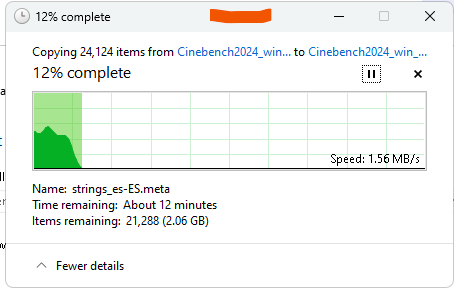
-
*Official Benchmark Thread* - Post it here or it didn't happen :D
tps3443 replied to Mr. Fox's topic in Desktop Hardware
So is waterchilling an M.2 maybe becoming a useful thing now? 🤣 I’ll probably keep this Apex and 14900KS for a while. So I will swap to Gen5 M.2’s when I have a Gen5 PCIe supported graphics card. Our motherboards have Gen5 PCI-e support. But using a Gen5 M.2 will only let our GPU’s run at X8 lanes. I think X8 Gen 5 would be satisfactory. -
*Official Benchmark Thread* - Post it here or it didn't happen :D
tps3443 replied to Mr. Fox's topic in Desktop Hardware
My first attempts at stabilizing 8600C38 "Tighter Timings" with only 1.470V VDD/ 1.450V VDDQ 🥰. I'm going to guess and say 1.450V VDD will pass as well. (Have not tried yet) But this IMC is freakishly strong. I am finally in a place where my ram IC silicon quality will be at play for sure. Ram Kit: G.Skill 2x24GB 8200@1.350V M-Die DDR5@ 8600 Timings@ CL38-49-49-49-84 131,071K tREFI VDD: 1.470V VDDQ 1.450V Bandwidth and latency are really good considering the CPU is 100% stock, and the ring is still only at 4.5R 😄 This is usually a good sign. In my experience strained IMC's will usually show not so good performance. -
*Official Benchmark Thread* - Post it here or it didn't happen :D
tps3443 replied to Mr. Fox's topic in Desktop Hardware
Man, I really want to try new Intel 15th Gen 285K Ultra when that drops. But I highly doubt I will be coming off of my current setup anytime soon. Apex A04/14900KS/DDR5 8600. It’s too dang good right now. The speed/stability/reliability aspect is pure golden. -
*Official Benchmark Thread* - Post it here or it didn't happen :D
tps3443 replied to Mr. Fox's topic in Desktop Hardware
OLED will ruin other panels visual appeal like IPS/TN for sure. I might be down sizing when I move, and it’ll probably be something like a 32” 240hz oled. I have complete faith in the technology though. -
*Official Benchmark Thread* - Post it here or it didn't happen :D
tps3443 replied to Mr. Fox's topic in Desktop Hardware
Nearly 1,700 hours of screen on time with this 2021 OLED 48” monitor now. I’m amazed by Oled still. I’d confidently recommend any OLED monitor/TV nowadays especially. I am using the MSI A1000 (Little dinky thing it is). I bought it from the MSI store for a pretty good price. The new car smell on these is so strong it almost smells like burned electronics lol. VERY strong smell. It had my whole house smelling like that. I’m amazed that I’m using this 1,000 watt baby PSU though. It has been extremely reliable, everyone was laughing at its size on here if I’m not mistaken. It powers my entire PC and cooling setup. (5) D5 pumps, (0) fans, 14900KS, Apex, and 4080 Super Suprim X. I’ve had absolutely no problems with it, even with extreme 6.1P/4.9E benching I did on my prior chip with direct die. This little thing is a beast! It’s an MSI so no complaints. Bonus pic of my two kittens by accident. They are brother and sister. 🤣 On another note, I have to add this in. That big expensive EVGA 1300P+ unit was a screaming coil whining mess. This dinky MSI 1,000 is completely silent and surprisingly it’s a better product. No matter how large of a load or what game I am playing I have zero electrical noise when moving my mouse, or when gaming anymore. Just stability, and no noise. I put the 1300P+ in my son’s build since his RTX3060 12G doesn’t make it scream. 😎 -
*Official Benchmark Thread* - Post it here or it didn't happen :D
tps3443 replied to Mr. Fox's topic in Desktop Hardware
I think with the price of GPU's. It is worth repairing them! Even if it's a $200-$400 dollar repair. You are going to spend way more buying another 7900XTX anyways. Anyways, check this out everyone. This DDR5 8600 with 1.400V is definitely stable. 8600@1.400v is so impossibly hard to run. Never owned a chip that can actually do this. -
*Official Benchmark Thread* - Post it here or it didn't happen :D
tps3443 replied to Mr. Fox's topic in Desktop Hardware
I’ll be grabbing a used 4090, or probably a RTX5080 I guess they’ll still be like $1500 lol.😂 -
*Official Benchmark Thread* - Post it here or it didn't happen :D
tps3443 replied to Mr. Fox's topic in Desktop Hardware
These 14900KS chips are true Lava Monsters when paired with traditional cooling. But they can be tamed down nicely without actually taming it down. This stock 14900KS idles at 10 watts, and loads up at 290 watts. Even with DDR5 8600 and 6.2Ghz boost, using auto voltage and LLC4. It is very efficient for an Intel chip, even compared to AMD I think it’s still pretty crazy efficient for its performance it puts out. 😎 Chiller rarely cycles when working during the day. It’s quite nice! -
*Official Benchmark Thread* - Post it here or it didn't happen :D
tps3443 replied to Mr. Fox's topic in Desktop Hardware
Over here enjoying this 14900KS. Great dang chip have about 40 hours on it. I’m going to share some screens momentarily here, but so far I have it setup with 5.9Ghz (8P) 6.2Ghz (2P) all auto voltage, LLC4, ACLL 0.20/DCLL 1.00 the E-Cores are at 4.5Ghz stock, and even with a 320 watt power limit set in the bios, it doesn’t go past 290 watts in Cinebench R23 or 239 amps 🤯 and that’s with DDR5 8600 and 1.400v vdd/vddq set in bios. The VID’s are set perfect, so it essentially idles and boost to 6.2Ghz with 1.350’s VID’s sitting in desktop, and under heavy load it drops to 1.190’s matching the load vcore. 😃 CPU temp says 60C max, but cpu package temp is actually 68C. It feels like my R-batch but with better IMC, and maybe a little more temp resistant up top in the 6Ghz range since it’s not delidded and all. -
*Official Benchmark Thread* - Post it here or it didn't happen :D
tps3443 replied to Mr. Fox's topic in Desktop Hardware
I tried a few. Thermalright, Bequiet, thermal grizzly. They can all last months and months, and after like 3-4 months the performance just fades a little bit but still okay. But when it eventually fails you lose that solid stability, and that day will always be a surprise visit out of the blue lol. The failure can be closing to desktop when gaming, or other random stability issues. Then you have to pull the chip and prep everything again with some Flitz and possibly sand paper if it’s really bad. This was one of the main reasons for selling my R-Batch. Now, I think Liquid Metal and ambient water is totally fine. But with 15C water it just fails really fast. Never seen a 13900K do that well before! Thats faster than a stock 14900KS 😂 -
*Official Benchmark Thread* - Post it here or it didn't happen :D
tps3443 replied to Mr. Fox's topic in Desktop Hardware
This chiller helps a lot but not nearly as much as direct die does. With a rad only, my cpu would only be 10c warmer. So I could still run 5.9/4.8 easily and be 78-79C package on normal ambient water without a delid or direct die. I tested this on my R-Batch, and this SP108 has a really low 5.9 Vmin for a soldered chip, lower than my R-batch when it was soldered. You might even be able to hulk it to 6Ghz if you don’t mind 89-90C temps and higher voltage lol. -
*Official Benchmark Thread* - Post it here or it didn't happen :D
tps3443 replied to Mr. Fox's topic in Desktop Hardware
Yeah the maintenance is higher on Supercool or any direct die with daily chiller+LM. But its temps are just insanely good no doubt. 5.9Ghz would be 50C cpu package temps with my supercool in R23 using direct die. I considered thermal paste on direct die, but now I felt I’m going backwards now. Stock solder is supposed to be better than thermal paste 😁. The only thing direct die and Liquid Metal will give me is a 15C cooler CPU. And +100Mhz. I can run either of these KS chips, and my R-Batch at 6.0P/4.8E with no delid, and still stay in the 70’s on CPU package. I think that’s pretty good. -
*Official Benchmark Thread* - Post it here or it didn't happen :D
tps3443 replied to Mr. Fox's topic in Desktop Hardware
Yep I always ran 8400/8533 with tight timings it performs really good. But the main reason why was because my prior chip(s) could not run 8600 with tight timings. This chip will be worked up to a 8600 tight profile. As for moving away from direct die. I just don’t need it. Liquid Metal on 15C water daily doesn’t last very long. So it requires maintenance every 1-3 months. I can run either of these 14900KS chips at 5.9Ghz(8P) 6.2Ghz (2P) with a load voltage of (1.190 higher SP chip) OR (1.208V lower SP chip) The package temps are substantially warmer than direct die. But the CPU is still only 67-68-69C like this in Cinebench. The solder and my mount is good for a very very long time. Chiller and Liquid Metal daily usage breaks down and etches badly and doesn’t hold up worth a dang. I have always had this problem, and I’m just tired of dealing with it. -
*Official Benchmark Thread* - Post it here or it didn't happen :D
tps3443 replied to Mr. Fox's topic in Desktop Hardware
I had to share this! I have been trying to run such settings for some bit now. DDR5 8600 with only 1.400 vdd/vddq set in bios!! (NOT 1.450vdd, NOT 1.435VDD but only 1.400V! 🥲 (All done on my G.Skill 8200 sticks) Its crazy how a really good IMC directly determines how good your ram is and how low the ram voltage can be set. This is such a nice little chip. I love it. Glad to be back on solder. 😎 -
*Official Benchmark Thread* - Post it here or it didn't happen :D
tps3443 replied to Mr. Fox's topic in Desktop Hardware
Pretty nice run @Mr. Fox I get exactly 8,020 with my 4080 Super on Vulkan API. -
*Official Benchmark Thread* - Post it here or it didn't happen :D
tps3443 replied to Mr. Fox's topic in Desktop Hardware
I appreciate the kind words! I’m not testing anymore chips. I’m absolutely good with this one. Finding one better could happen, but also having a similar IMC like this one does probably won’t happen, and also no SA bug. Calling it quits on anymore KS chips lol. Im going to look in to the free game. Thanks!