
K4sum1
-
Posts
170 -
Joined
-
Last visited
Content Type
Profiles
Forums
Events
Everything posted by K4sum1
-
 I upgraded to the M2200, I didn't test the stock GPU much.
 -
It seems to be more reliable with Optimus off, however brightness is broken. White pages flashbang me.
-
Often times when I power my M4800 on, it flashes the backlight once, and I get no display. It seems to boot up as normal if I let it, just without display. If I keep restarting the laptop, eventually the backlight won't flash and the display works like normal. Does anyone know what would cause this?
-
selling FS/FT - Lenovo Flex 3 1580 | 6500u | 940m | READ
K4sum1 replied to K4sum1's topic in Notebooks and Desktops
Changed price to $175 (~150 for laptop ~25 for shipping). Nothing has changed, but I do want to sell it so that's why the price is lower. -
selling FS/FT - MSI GS60-2QE Ghost Pro | 4720HQ | 970m | READ
K4sum1 replied to K4sum1's topic in Notebooks and Desktops
I've lowered the price to 150 (~125 for laptop, ~25 for shipping). The taped in CMOS battery died, so I edited the post to add that, and I also taped (actually sticky tacked, but whatever) the connector into the blank SATA drive spot because it's probably just going to die again if I taped another battery in. If I can't get rid of this for 150 I might just shelve it to repair it. I'm not going to recycle a relatively powerful laptop, or sell it much below that. -
Need information from lost Dell support page
K4sum1 replied to K4sum1's topic in Pro Max & Precision Mobile Workstation
I did some more testing, sometimes the display wouldn't turn on with boot. After disabling the iGPU, there's no issues. -
Need information from lost Dell support page
K4sum1 replied to K4sum1's topic in Pro Max & Precision Mobile Workstation
I want to say it's fine with it disabled, however I'm currently running with the iGPU for working brightness on the internal display. -
Interesting issue, my guess is something driver related, but without the hardware there's no way to be sure.
-
With my M4800, my internal display often turns off, and I can't turn it back on without rebooting. I have no idea why it does this. There appears to have been a Dell support article about the issue, but it doesn't seem to be available or archived anywhere? Does anyone have the page archived or know of an archive that has it? https://www.dell.com/support/kbdoc/en-uk/000125718/precision-m4800-with-nvidia-graphics-loses-power-to-lcd-display
-
I'd like to make a list of modern laptops that work on 7/8, but I don't have $1000+ to drop on a modern laptop to test, let alone multiple of them. The criteria that you need to meet is: 8/9th gen with UHD integrated graphics (not Iris Xe) AMD Ryzen up to 12nm Or 8th Gen and later with Nvidia cards up to the Ampere generation with the ability to disable the iGPU/Optimus. AMD Ryzen (any gen) with Nvidia cards up to the Ampere generation with the ability to disable the iGPU/Optimus. CSM support would help for 7, but it's not required. 8 testing doesn't require CSM. Works flawlessly under 7: Nothing yet Works flawlessly under 8: Dell Precision 7530 (Tested by a friend Moline) Requires mods to work under 7: Nothing yet Requires mods to work under 8: Nothing yet Works with issues under 7: Dell Precision 7530 (Requires UEFI mod (No CSM), requires ACPI mod, and trackpad doesn't work) Works with issues under 8: Nothing yet
-
That bay is a generic common model with the Thinkpad drive stuffs screwed into it. It has a switch that you need to flip for it to work in Thinkpads. This bay has no such switch. Also it doesn't emulate a hot-swap bay. It requires the laptop to support it. My previous 8770W didn't.
-
Why NVMe when it's slower than SATA through the 2.0 x1 bus?
-
Anyone try anything like this yet?
-
selling FS/FT - MSI GS60-2QE Ghost Pro | 4720HQ | 970m | READ
K4sum1 replied to K4sum1's topic in Notebooks and Desktops
Is the price too high or is there just no interest here? -
Also not sure if the M6700 is the same, but my M4800's palm rest was made out of that sticky rubber like plastic, and it took a while to get all of it off.
-
M.2 is cool and all, but SATA is still great for bulk storage.
-
Modern laptop moment
-
Not sure if Aliexpress search sucks or they sold out, but I can't seem to find anything relevant.
-
I did figure out it only is the internal display that disconnects, but Windows moves all the windows to the main display when I open it back up. I guess it makes sense, but I don't remember it being an issue with my other laptops. idk T1000 is cheap and T2000 can be found nowadays, and we're out of the mining ages. Maybe someone stocked up on a bunch of them.
-
Does all connected screens shut off when you close the lid for anyone else? I mean like disconnect from the system entirely. This happens for me, meaning all the windows I have on the second display get moved to the first when I open it back up, and I can't use just a second screen with the main one closed if I wanted to.
-
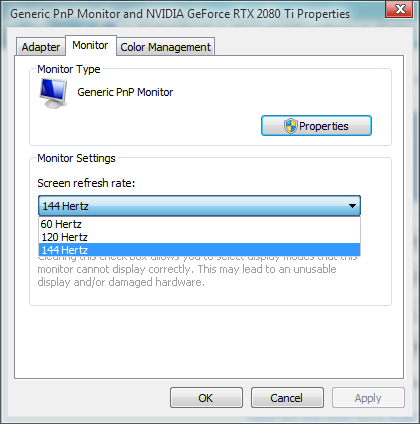
Oh yeah I forgot to mention but you should just be able to adjust the refresh rate without needing a custom resolution. Not sure where it is in 10 but here's what it looks like on my desktop.
-
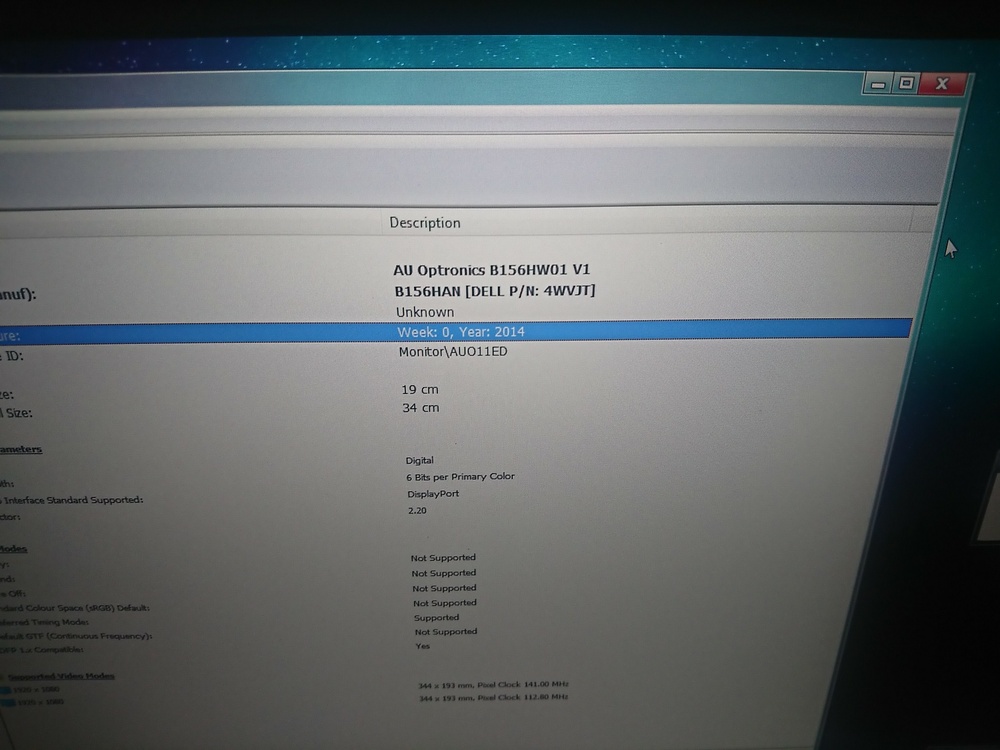
Battery life isn't that big of a concern for me, I'll just use my T430 if I need it. I wanted to check if my panel was 30 or 40 pin, so I went back into HWINFO and looked up the panel it gave me (B156HW01 V1), and found a LVDS panel from 2009. This was confusing until I saw it also listed a B156HAN with a Dell part number of 4VWJT. This appears to be a B156HAN01.1 and 30 pin eDP. I kinda want to take apart my laptop to know for sure but I don't want to cause unnecessary stress on the plastics. Also if a display is 30 pin eDP, will it just work or will I need to check other factors as well? (Aside from size and screw hole placement) I haven't checked screw holes yet, but would like a NV156FHM-NY1 (BOE085C) or NV156FHM-N4B (BOE0726) work? Also a picture of the HWINFO page because why not
-
So I went and looked at the GPU fan and it says Delta. I guess it's a different design as from the CPU fan as it doesn't have the cone or whatever.
-
I guess I'll add a Delta CPU fan to my list. Anything about the GPU fan?
-
That only has the CFM, I didn't find any noise numbers when I was skimming it. Could've missed something though. I have an AVC CPU fan, and I want to say I remember the GPU fan being Delta but it doesn't have the Delta shape, and I don't want to check right now. I think I just want quieter fans more than anything.