
Clamibot
-
Posts
481 -
Joined
-
Last visited
-
Days Won
4
Content Type
Profiles
Forums
Events
Everything posted by Clamibot
-

*Official Benchmark Thread* - Post it here or it didn't happen :D
Clamibot replied to Mr. Fox's topic in Desktop Hardware
For me, the only part that really makes sense to splurge on is the CPU. As a high framerate gamer, the CPU's performance (both single core and multi-core) is the most major factor that will make or break the experience for me, which is why I got my 10900K in the first place. The overclocking headroom allowed by the very good quality silicon has allowed me to brute force my way to 144 fps in all but the most unoptimized of games. Modern mid range GPUs are powerful enough to satisfy my needs now with a bit of settings tuning in games since I play at 1080p and plan to stay there. I got my Clevo X170 6 months ago to satisfy my high framerate (144 fps) requirement in ALL games and I don't need gaming ruined for me again by moving to higher resolutions. Heh heh, I should've stayed away from high framerate gaming. That cost me.🤣 Oh well. I just need to make sure my requirements don't increase again. -
*Official Benchmark Thread* - Post it here or it didn't happen :D
Clamibot replied to Mr. Fox's topic in Desktop Hardware
For me, there is a major difference between 60 fps and 144 fps. The difference in smoothness is insane. 60 fps is laggy and pisses me off, so I always gun for 144 fps. However, yeah I do agree people are being freaking idiots. I wouldn't pay an extra $1000 for a GPU. I wouldn't even spend $1000 on a GPU period. More like $200-$500. These idiots are the main cause of rising prices. They keep overpaying for GPUs, which in turn causes AMD and Nvidia to charge more. It must be really nice having infinite disposable income, I wish I had that.🤣 As for settings in games, like you said, ultra is usually a waste since it gives minimal improvement to graphics at a significant performance cost. Personally, I go with a mix of ultra, high, medium, and low depending on the setting. Textures are the only setting I ever set to ultra. Everything else is a mix of high, medium, and low. It's surprising how little of a difference there is between low settings and ultra settings in modern games. It used to be that there was a major difference. Not anymore. Pretty soon, it won't be necessary to go any higher than low settings since low will look like ultra from today. -
Oh yeah I first heard about the eBlaztr portable gaming PC about a year ago while looking for the perfect case for my custom laptop build. It's pretty sweet, but I really needed a case that could support an extremely beefy cooling system, which the eBlaztr is not capable of housing. If they modified the case layout so it was similar to Sliger's new upcoming Trego case, it would be perfect.
-
*Official Benchmark Thread* - Post it here or it didn't happen :D
Clamibot replied to Mr. Fox's topic in Desktop Hardware
Wait, you can do that with Z490 boards? How would I set the TjMax temperature to over 100°C? I want to see how far I can push my 10900K in my Clevo X170SM-G with that extra thermal headroom. Yeah yeah I know, not a good idea for prolonged use, but I don't plan to subject my CPU to temperatures over 100°C for an extended period of time. Even if I did, the CPU would still outlive it's useful lifespan for me since electronics are really robust. -
I find the X170SM-G runs pretty quiet until put under a heavy sustained load. For me, the only tasks the fans ramp up for are benchmarks and games. They run pretty quiet at all other times.
-
Janktop IV Sneak Peek (open source MINI ITX Laptop)
Clamibot replied to StripeySnake's topic in Custom Builds
This device you are talking about is called a lapdock. Unfortunately nobody makes a 17 inch version with a high refresh rate display. I wish one existed since that would be very useful for backpackable SFF builds. -
This backpack is essentially like having a suitcase strapped to your back: https://www.amazon.com/Vancropak-Weekender-Expandable-Backpacks-Resistant/dp/B07QLKFP8D/ref=pd_day0fbt_sccl_2/146-7479626-0879512?pd_rd_w=Lo1Wc&pf_rd_p=bcb8482a-3db5-4b0b-9f15-b86e24acdb00&pf_rd_r=VBZERDQWJV8AA9F9Z2TQ&pd_rd_r=4fba678b-6cd7-46f0-837c-cdbfb4481d52&pd_rd_wg=iPqiD&pd_rd_i=B07QLKFP8D&th=1 It should fit pretty much all console style SFF cases with room to spare for everything else. It'll easily fit in an overhead compartment, and I believe it is the maximum size that will fit under the seat too (probably with very little foot room left). Regarding the strength of SFF cases, they're generally about as solid as the cases of true DTRs. You don't have to worry about that. The point of worry here is the GPU, since the GPU will be held in place by the screws on the exterior of the case, and the GPU riser in the console style cases. There is no support directly under the GPU, so you'd want to be careful to avoid the GPU snapping off the riser board. I imagine this would take an extreme amount of mishandling though, as the screws that hold the GPU in along with the riser board are sturdy enough to keep this from happening with shock and vibrations you would encounter during travel.
-
This is diverging from the topic a little, but regarding the portable desktop build I'm planning out, Sliger is releasing a new sff case around mid-May that can fit an ATX motherboard, full length GPU, and a 360mm AIO: https://imgur.com/gallery/pT7GUFc The dimensions on the link are wrong, except for the thickness. The actual dimensions are 18.775 in x 17.43 in x 4.20 in (477mm x 443mm x 107mm). I think this case will be perfect for building the ultimate portable powerhouse. Now to find a bag it can fit in.🤣
-
Another thing for future DTRs, I really hope we can disable the efficiency cores on the new Intel CPUs in the BIOS. I only care about the performance cores, and disabling the E-Cores gives you additional overclocking headroom on the P-Cores.
-
Like I said in the Official Desktop Benchmark Thread, this seems promising for future DTRs. Unfortunately it's a 15 inch laptop, the chipset is not Z690, so no overclocking, and the GPU is BGA, but at least the effort in this class of laptops is continuing. This means we should probably see a successor to the X170SM-G and X170KM-G, hopefully in the same chassis. I am hoping one of these days we'll get a 17 inch laptop with just a desktop CPU and no discrete graphics, but with a Zxxx chipset for overclocking and an oculink port or something similar for eGPUs. When gaming, you're already plugged in anyway, and the laptop could get extremely good battery life when unplugged.
-
*Official Benchmark Thread* - Post it here or it didn't happen :D
Clamibot replied to Mr. Fox's topic in Desktop Hardware
This seems promising for future DTRs. Unfortunately it's a 15 inch laptop, the chipset is not Z690, so no overclocking, and the GPU is BGA, but at least the effort in this class of laptops is continuing. This means we should probably see a successor to the X170SM-G and X170KM-G, hopefully in the same chassis. -
*Official Benchmark Thread* - Post it here or it didn't happen :D
Clamibot replied to Mr. Fox's topic in Desktop Hardware
That bit about the 5.8 GHz turbo sounds awesome! I've found it's typically possible to overclock a CPU's all core speed to it's single core boost speed and hold that clock if you have good cooling capabilities. I don't know about you guys, but I've never been able to get my CPUs to run at different speeds based on the number of active cores. The max core clock is always what my all core speed is, regardless of how many active cores there are, so I just set the all core speed to the single core boost speed, and all is well. If the 13900K has the typical amount of additional overclocking headroom above the 5.8 GHz boost, then we could see 6 GHz all core. That would be super duper awesome for gaming. Disable the E-Cores, and you get additional overclocking headroom. This CPU should be able to brute force its way to 144 fps in any game! As we all know, this is all speculation for now, but that doesn't stop me from getting excited. I was planning on upgrading my desktop to compliment my X170SM-G, but haven't really found anything enticing yet. I promised myself I would not get another CPU unless it was capable of 6 GHz and up. The 13900K seems it may do just that. -
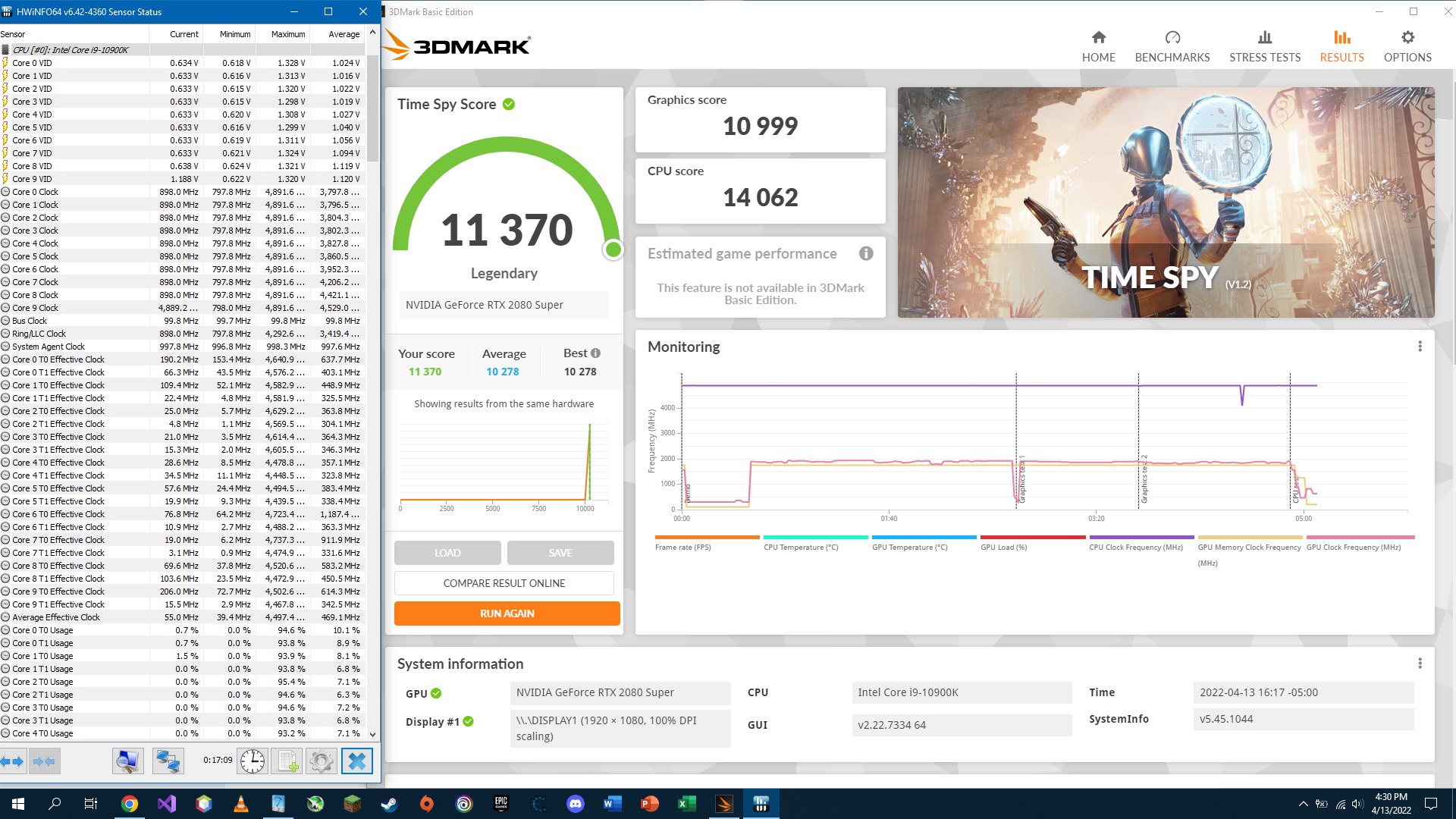
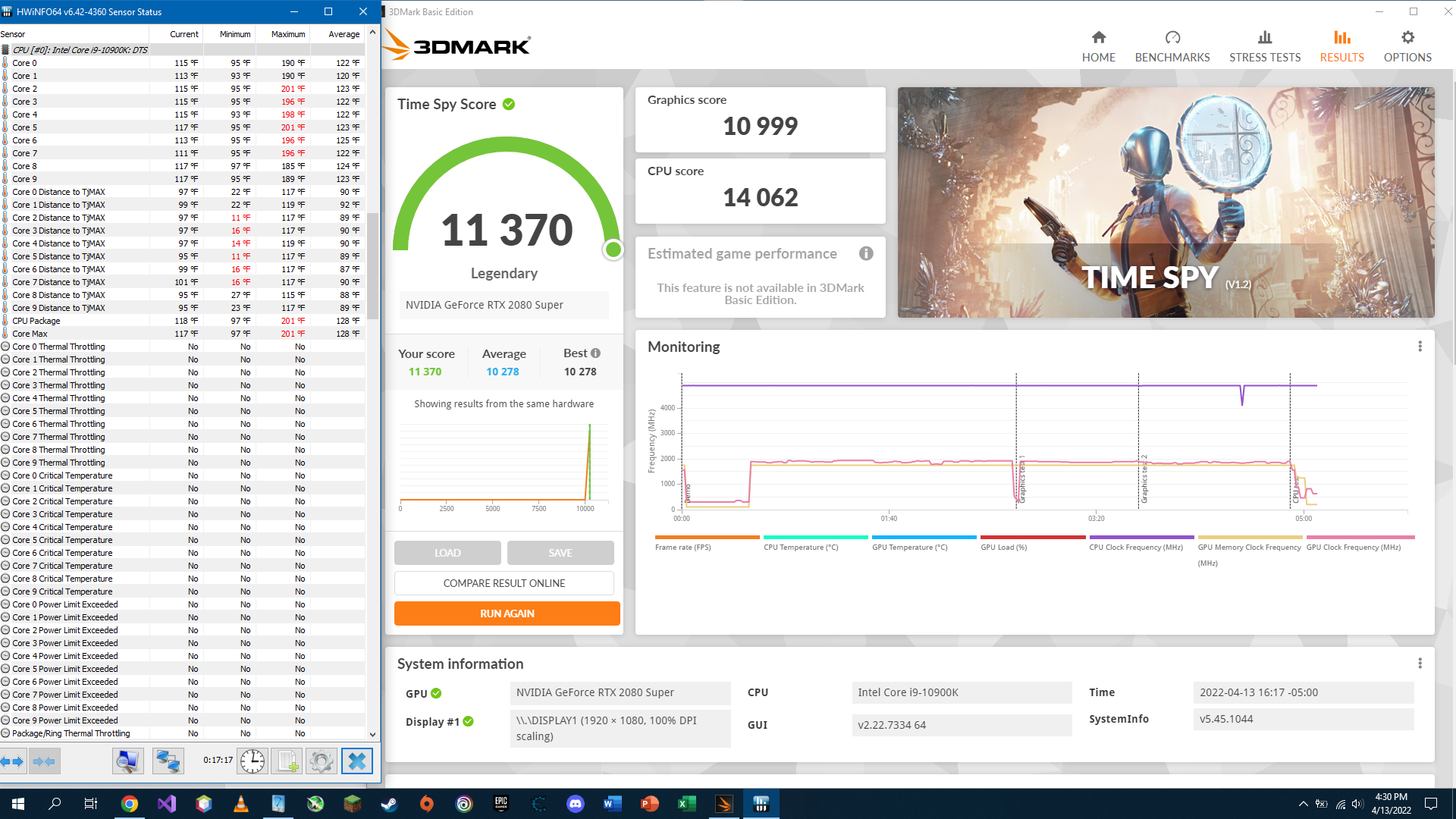
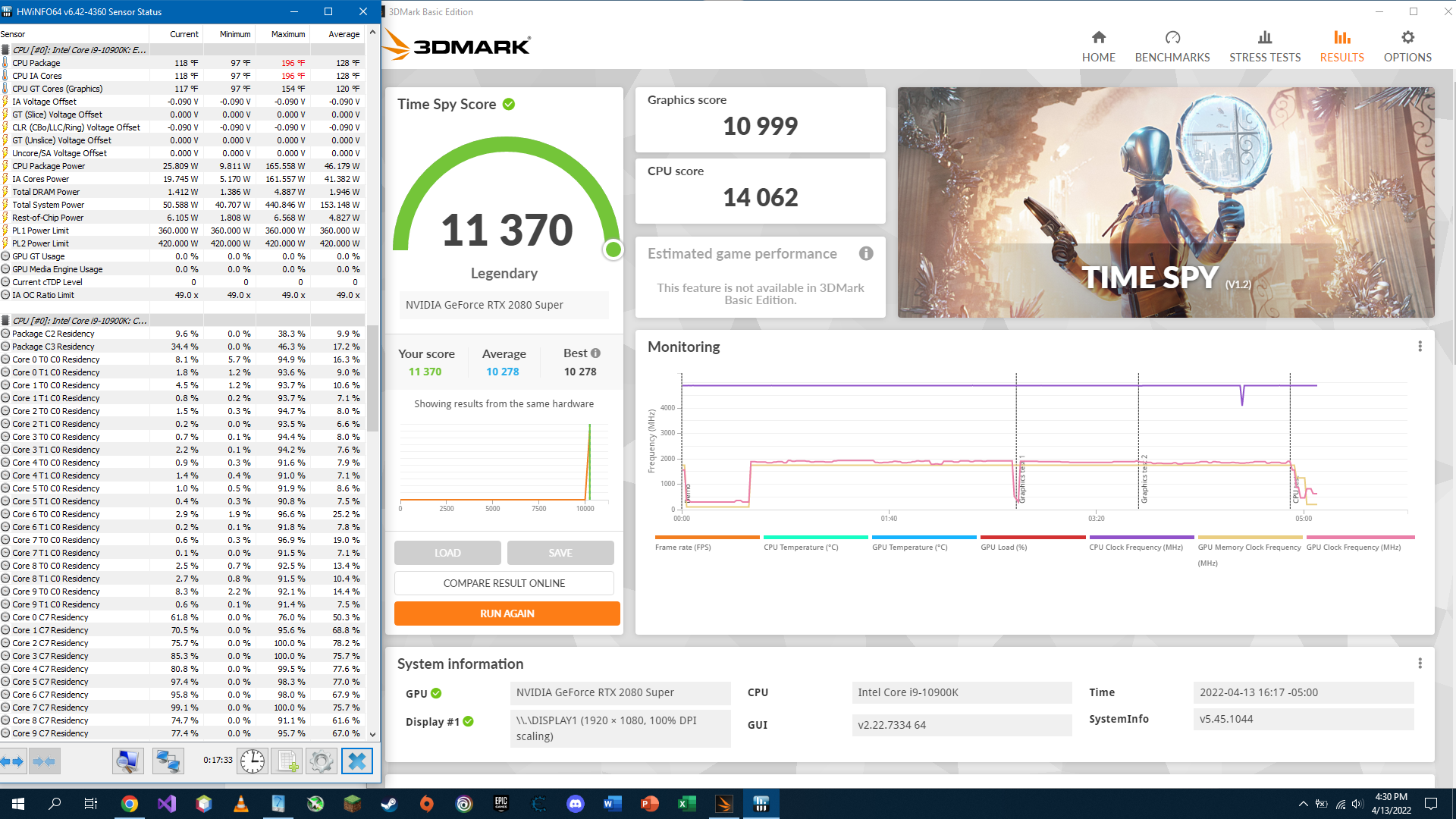
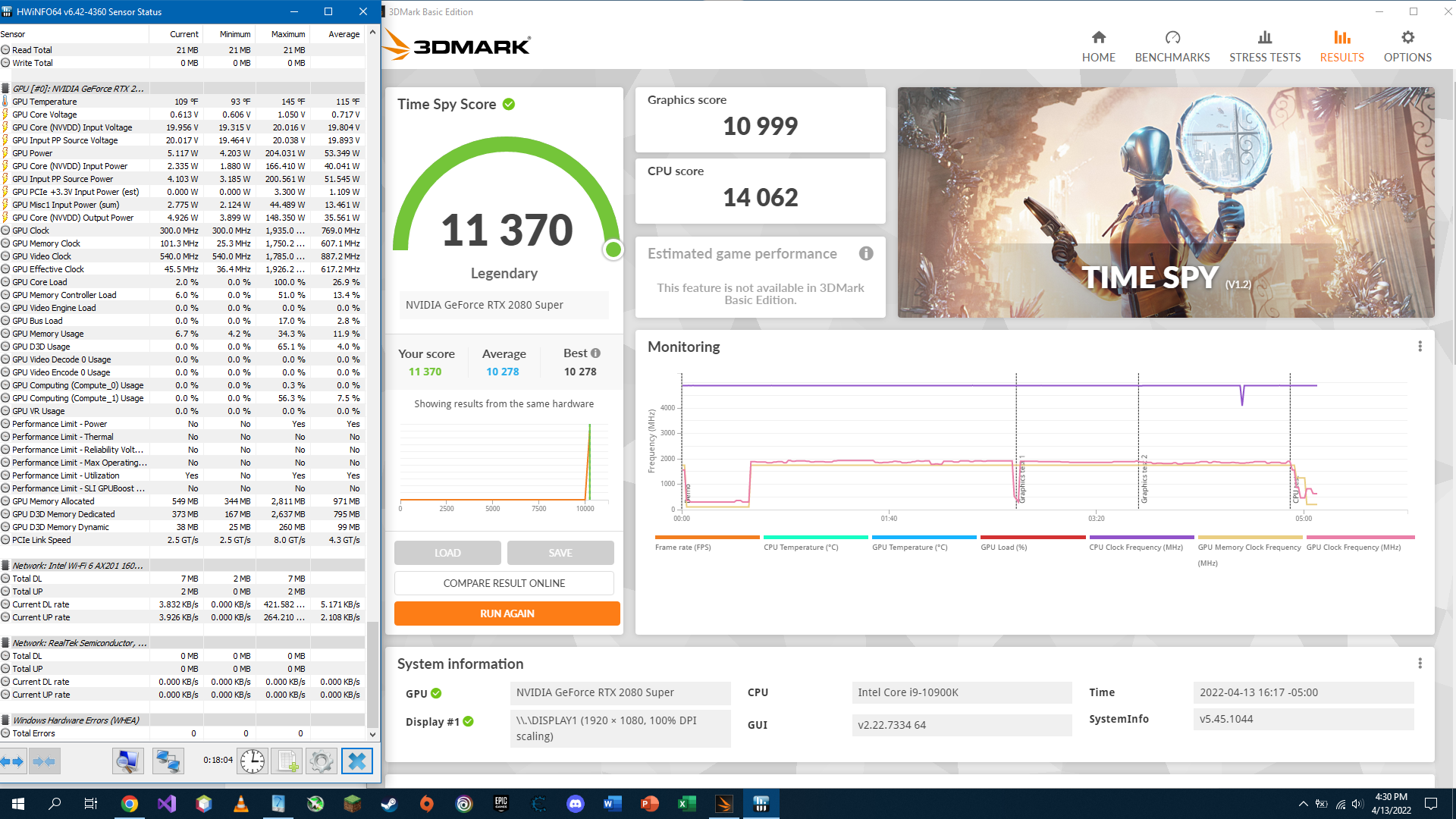
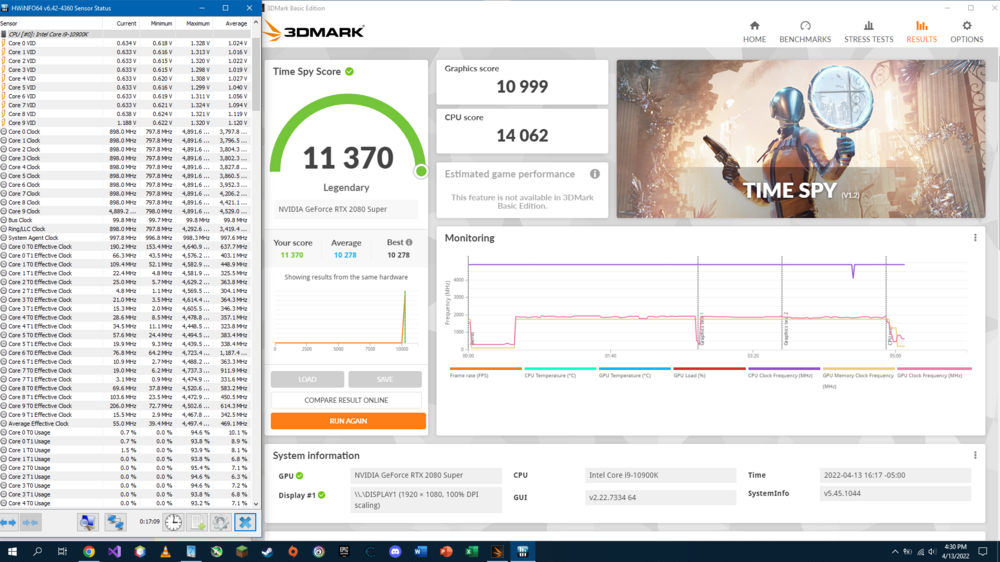
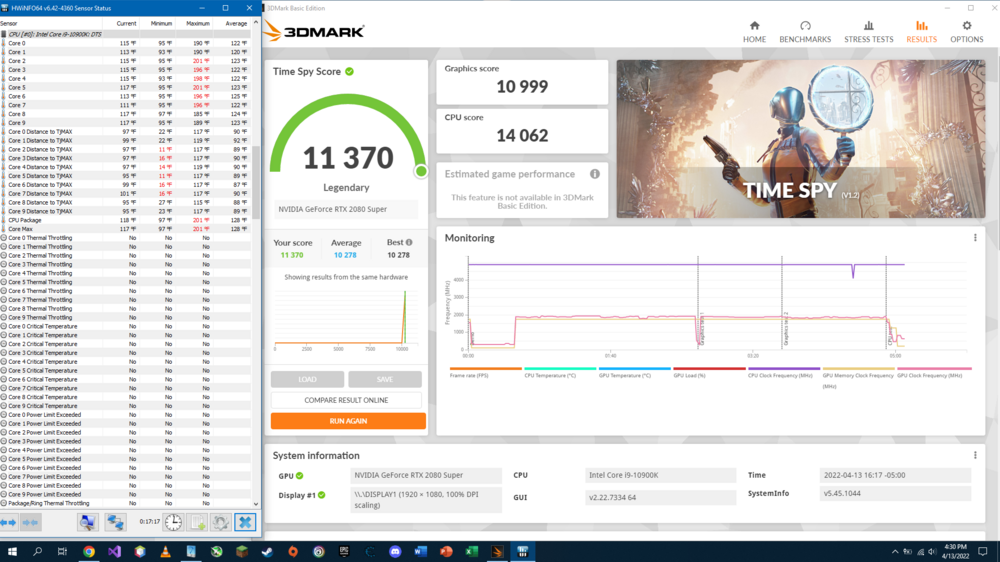
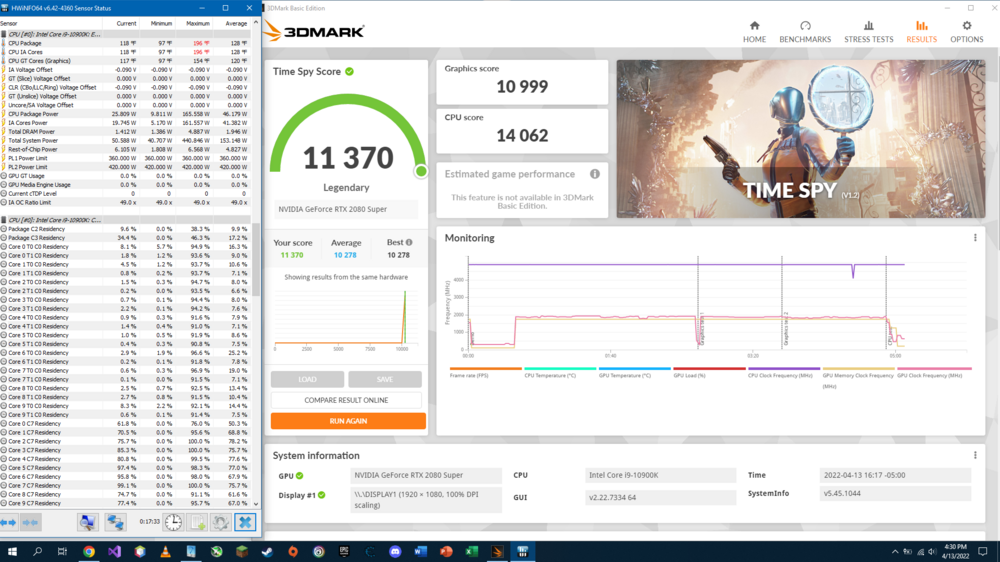
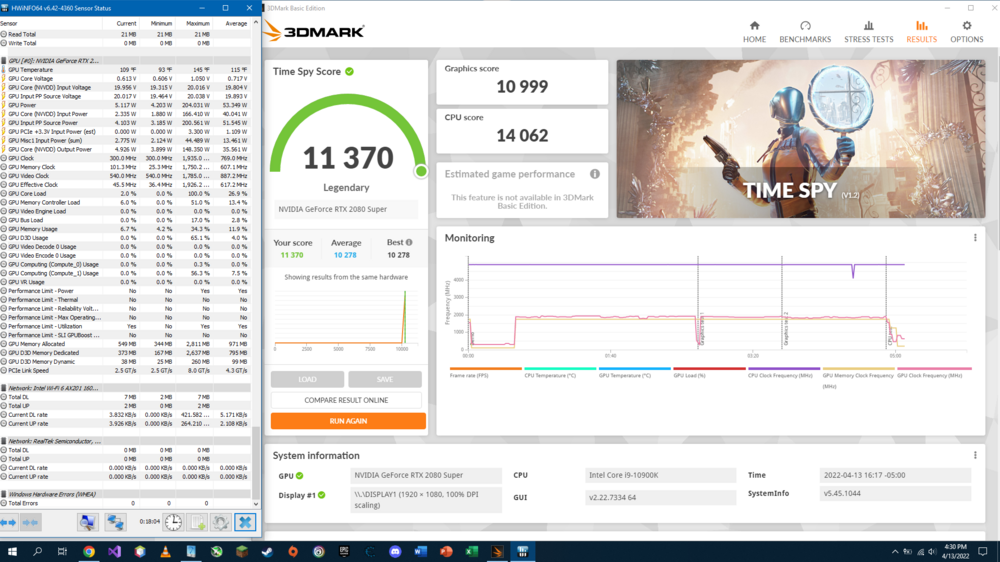
This past week has been extremely busy for me, but looks like I finally got to relax a little. I took this chance to do a Time Spy run as you requested @electrosoft. My runs were done at all stock settings (so 4.9 GHz all core on the CPU) with max fans and a 90mv undervolt on the CPU. Here are my results with some HwInfo64 screens: Results with CPU voltages and clocks: Results with CPU core temperatures: Results with CPU statistics: Results with GPU statistics: Lemme know if you need anything else! I hope this helps give a point of reference!
-
*Official Benchmark Thread* - Post it here or it didn't happen :D
Clamibot replied to Mr. Fox's topic in Desktop Hardware
Borderlands 3 is adequately multithreaded when run in DX 12 mode. That removes the single core performance bottleneck present when running the game in DX 11 mode and massively boosts performance. The significant jump in framerate in Far Cry 5 is a bit confusing to me as that game is single core performance bound. It's probably a game that responds well to cache size increases. -
Dang that is one beefy heatsink. Imagine hooking up a water chiller to our laptops with this.
-
Sure thing buddy! I'm sorry I didn't reply earlier. I never got a notification that I was mentioned in this thread.
-
*Official Benchmark Thread* - Post it here or it didn't happen :D
Clamibot replied to Mr. Fox's topic in Desktop Hardware
Yep it's pretty awesome to be able to have one device purposed for a specific set of tasks. Usually we end up having multiple laptops because we keep our old ones for something else after replacing them with something newer. It's always nice to have one device that does everything though. At some point you start getting clutter because of the sheer number of devices you amass over the years. I do prefer keeping my old machines though, because it means my newer stuff will last longer since it will get used less than it otherwise would. Intelligent usage balancing across your devices does wonders for their lifespans. I'm always paranoid that something is going to break on me the next day.😆🤣😂 -
*Official Benchmark Thread* - Post it here or it didn't happen :D
Clamibot replied to Mr. Fox's topic in Desktop Hardware
I use all my computers, all for different purposes as well. Generally, I have one main laptop I use all the time, both for work and gaming. This is always the most powerful laptop I have. In addition to this laptop, I have a desktop with similar specs so I have a backup machine with similar processing power just in case I need a backup. It's also good to have when friends come over since it serves as a convenience for them. Either they don't have to bring anything since the hardware is provided to them by me, or they get to use something good if they don't own a gaming computer. In addition to these two machines, I still have my 3 older laptops. One I'm using for my job doing software/game development using Unity. Another is my Alienware 17, which was my main laptop before I got my Clevo X170, and I used it for school in my last semester of college. It now serves as a backup to my Clevo X170 if I need a portable backup gaming machine. The third is my first gaming laptop, which I used for school since I got my Alienware 17. I now have it loaned out to one of my friends who is still in school and needed more processing power for engineering and design software. I was no longer using that machine in my last semester of college. -
Gaming Laptop 1800cad or less no restrictions
Clamibot replied to ryan's topic in What Laptop Should I Buy?
The 3060 is the best bang for buck GPU on the laptop side of things this GPU generation. The laptop 3080 performs about as good as the desktop 3060 TI does, so I'd suggest keeping your HP Omen and waiting for the next generation of laptops if you want a performance upgrade for a reasonable price. If you absolutely need the performance now, there isn't any 3080 laptop that is reasonably priced. You'll have to shell out at least an extra $1000 to get one, and it'll be about a 35% increase in performance over a 3060. If you're ok with a portable SFF desktop, you can try going that route, which is what I would recommend with the current state of things with the laptop market. The 3060 TI seems to be the best bang for buck GPU on the desktop side this gen. -
*Official Benchmark Thread* - Post it here or it didn't happen :D
Clamibot replied to Mr. Fox's topic in Desktop Hardware
New SFF cases by Sliger coming out on April 18th: This is gonna be epic! A console style case that can fit an ATX motherboard, and another case that can fit an E-ATX motherboard and has 360mm radiator support? Yes please! I think I have finally come across the perfect case! Both of them are getting carrying handles as well. I'm glad I held off getting the Fractal Node 202 I was originally planning to use in my next build. I was hoping a case like the ones I linked to would become a reality one day, and they have! The only way to improve this further is to allow 420mm radiator support. Sliger's console style cases are very portable, so I have no doubt they'd execute excellently on such a case. -
*Official Benchmark Thread* - Post it here or it didn't happen :D
Clamibot replied to Mr. Fox's topic in Desktop Hardware
@electrosoft There's also the Sliger SV590, which is an SFF itx case capable of housing a 360mm AIO. Some people managed to cram a 420mm radiator in it with custom water cooling. Unfortunately there doesn't seem to be a slim console style case that can mount a 360mm or 420mm radiator in a flat orientation like with the GPU. -
*Official Benchmark Thread* - Post it here or it didn't happen :D
Clamibot replied to Mr. Fox's topic in Desktop Hardware
Thank you very much for that heads up. Good thing there is in fact an SFF case that can fit an ATX motherboard, and that's the P-ATX V2. Only downside is that it's a boutique case, so limited production runs. But there's always legos, hehe😁. -
*Official Benchmark Thread* - Post it here or it didn't happen :D
Clamibot replied to Mr. Fox's topic in Desktop Hardware
I was hoping something like Slabtop would come to the market as that is essentially a laptop style chassis for desktop parts. Unfortunately, that product never came to the market. My plan for my ultraportable SFF gaming PC is to get a mini-ITX motherboard, a future core i9, an Arctic Liquid Freezer II 420 AIO, 32 GB of actually good DDR5 RAM (whenever that happens), and a mid-range GPU. I will be powering it using 2 HDPLEX 400w picopsus, and get 2 Bixpower CP300s to battery power it when I need to use the system away from a power outlet. I will be using a portable 17 inch usb-c powered 144Hz screen as well. The one component I can't seem to find is a case I want for this build. I'm seriously considering building one out of legos because I can't find what I want. -
*Official Benchmark Thread* - Post it here or it didn't happen :D
Clamibot replied to Mr. Fox's topic in Desktop Hardware
I have a question. How much power can a mini-ITX motherboard push into the CPU? I know the 8-pin CPU EPS connector is rated for 250 watts, but I'm wondering if the CPU can be supplied more than that on a mini-ITX motherboard. My plan is to build a portable PC for my next build because I doubt there will be any laptop in upcoming hardware generations that would be worth buying. They all suck now. I really hope proper DTRs make a comeback in the future, but I want a contingency plan ready if that doesn't happen. If I cannot push more than 250 watts to the CPU on a mini-ITX motherboard, I think I'll go with a micro-ATX motherboard, but I wanted to consult you guys first. My current plan is to get a mini-ITX motherboard, a future core i9, an Arctic Liquid Freezer II 420 AIO, 32 GB of actually good DDR5 RAM (whenever that happens), and a mid-range GPU. Like every system I've ever had, I want to overclock the crap out of it, hence the 420mm AIO I picked for a mini-ITX based build and my question on the capabilities of mini-ITX motherboards. -
Good thing we got the SM model buddy. I had a feeling this would happen, so I didn't bother waiting for the KM. I do wish we had 11th Gen support on the SM though. A binned 11900K in our zTecpc models would be a beast!